
Categories: AI Avatar Generator, AI Background Remover, AI Cartoon Generator, AI Expand Image, AI Hairstyle, AI Headshot Generator, AI Image Generator, AI Image Upscaler, AI Painting Generator, AI Passport Photo, AI Photo Editor, AI Photo Enhancer, AI Photo Restoration, AI Portrait Generator, AI Sketch Generator, AI Sticker Generator, Object Remover AI
PicPicAI Review: The AI Photo Editor You Actually Need?

For years, the words “photo editing” brought a little bit of dread. It meant firing up Photoshop, waiting for it to load, and then trying to remember which of the 1,473 tools and menus did that one simple thing you needed. It’s powerful, sure. But it’s also like using a sledgehammer to crack a nut for most everyday tasks. We’ve all been there.
So, when another “all-in-one AI photo editor” slides across my desk, my inner skeptic raises a well-practiced eyebrow. I’ve seen dozens. Most are either too simple to be useful or too clunky to be enjoyable. But then I spent an afternoon with PicPicAI, and, well… I might be a convert.
It promises to let you “Enhance, Erase, Imagine.” A catchy tagline, but does it deliver? I poked around, burned through some credits, and I’m here to give you the real scoop—the good, the slightly confusing, and whether it deserves a spot in your marketing or content creation toolkit.
So, What is PicPicAI, Really?
Think of PicPicAI not as a single tool, but as a whole toolbox. It’s a web-based platform packed with a bunch of different AI-powered functions designed to handle specific photo editing jobs. You’re not getting a blank canvas and a million brushes like in Adobe’s world. Instead, you get a clean menu of options: Need to remove a background? Click here. Want to make a blurry photo sharp? Click there. Want to give your grandpa a mohawk? Yeah, it can probably do that too.
It’s built for speed and simplicity. The whole idea is to get you from a mediocre photo to a professional-looking result without needing a four-year degree in graphic design. For bloggers, social media managers, and small business owners, this is a pretty compelling promise.
First Impressions: A Tour of the Toolbox
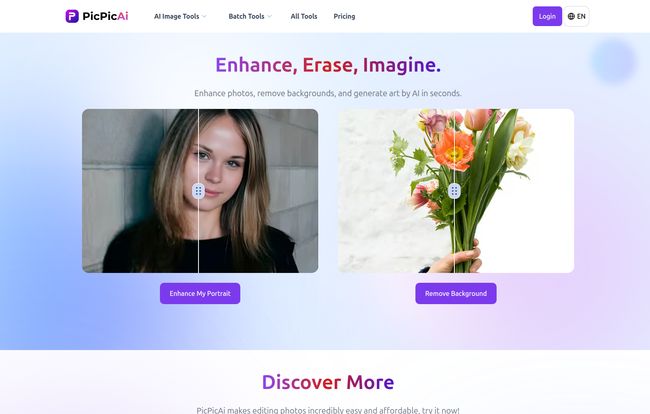
Logging in, the interface is clean. Almost deceptively simple. There’s no clutter, no overwhelming dashboard. Just a clear list of what you can do. I decided to take a few of the main features for a spin.
The Workhorses: Enhancer and Background Remover
These are the bread and butter of any modern photo editor, and frankly, if a tool can’t do these well, I close the tab. I uploaded a slightly soft, poorly-lit photo of a product. The AI Photo Enhancer did its thing in seconds. The result was genuinely impressive. Sharper, better lighting, and more vibrant colors without looking fake or over-processed. It’s a one-click fix that actually works.
The AI Background Remover is just as slick. We’ve seen this tech before in tools like Canva and Remove.bg, and PicPicAI holds its own. It handled tricky edges around hair pretty well, which is always my personal test. It’s a massive timesaver for creating clean product shots for an ecommerce site or headshots for a team page.
Visit PicPicAI
Getting Creative: Portraits, Sketches, and Fun Stuff
This is where PicPicAI starts to feel less like a utility and more like a playground. You’ve got tools like Portrait to Sketch, AI Hairstyles, and even a Cartoonify Portrait tool. Are these essential for my day-to-day SEO work? Not really. But are they a blast to play with? Absolutely.
I can see these being gold for anyone creating more whimsical or personalized content. Imagine turning a team photo into sketches for your ‘About Us’ page. It’s a quick way to create unique brand assets that don’t look like they came from a stock photo site. Because, well, they didn’t.
The Future is Now: AI Image Extender and Generator
Okay, this is the stuff that gets me excited. The AI Image Extender is basically ‘outpainting.’ Got a photo that’s too tightly cropped? The AI will intelligently generate a wider background, expanding the scene. It feels like magic. I tested it on a landscape shot and it created a believable, seamless extension. It’s not perfect every time, but when it works, it saves you from having to ditch an otherwise great photo.
Then there’s the FLUX-1 AI Image Generator. This is their text-to-image tool, a competitor to things like Midjourney or DALL-E. The quality is solid, and its inclusion in the same platform as the editor is just smart. You can generate an image and then immediately pop it into the enhancer or background remover without skipping a beat. That’s a workflow I can get behind.
The Big Question: The Credit System and Pricing
Alright, let’s talk about the money. PicPicAI doesn’t use a monthly subscription model. Instead, it runs on a credit system. You buy a pack of credits, and then you spend them to use the various tools. This is where things get a little… interesting.
The cost per action varies. For example, generating an image with their base model might be free, but using the more powerful FLUX-1 generator costs 1-3 credits. Removing a background might set you back 2-4 credits, while a simple upscale is 3 credits. Here’s a quick look at the breakdown I saw:
SDXL Create Stunning AI Art: Free
AI Headshot Generator: 1 credit per image
FLUX-1 AI Image Generator: 1-3 credits per image
Background Remover: 2-4 credits per image
Restore Old Photos: 3 credits per image
Relight: 4 credits per image
Now, for the odd part. I went looking for the page to actually buy these credits… and couldn’t find a working link on their site. The pricing page seemed to be inaccessible at the time of this review. A bit of a strange oversight, and it makes it hard to calculate the actual dollar cost of, say, editing 50 photos. I have to assume this is a temporary glitch, but it’s a frustrating roadblock for a new user.
My take on the model? It’s a double-edged sword. For the casual user who just needs to clean up a few photos a month, a pay-as-you-go system is fantastic. You’re not locked into a $20/month subscription you barely use. For a power user, however, those credits could start to add up fast, and you might find yourself constantly needing to top up your account.
Who Is This For, Anyway?
After playing around, I have a pretty clear picture of the ideal PicPicAI user. It’s not for the professional photographer who lives and breathes Lightroom. It’s for the rest of us.
It’s for the social media manager who needs to quickly create an eye-catching post. It’s for the small business owner who needs clean product photos without hiring a pro. It’s for the blogger (hello!) who needs to resize, enhance, or create a unique featured image on a deadline. It’s for anyone who values speed and results over having granular control over every single pixel. It’s a workhorse, not a show pony.
The Good, The Bad, and The AI
So, let’s boil it down. What I loved was the sheer efficiency. The range of tools in one spot is a huge win. The quality of the core features like the enhancer and remover is top-notch, easily competing with standalone tools. I got professional-quality results in seconds, and there was basically zero learning curve. I just uploaded a photo and started clicking. That’s how software should work.
On the flip side, the credit system, while great for some, will be a turn-off for others. The lack of clarity on credit pack pricing is a definite minus—I want to know what I’m spending! And, as with any AI suite, some tools are stronger than others. You’ll find your favorites and probably ignore the rest.
Final Verdict: Should You Use PicPicAI?
Despite the slightly mysterious pricing, I’m walking away impressed. PicPicAI has successfully bridged the gap between overly simple apps and overly complex pro software. It’s a powerful, accessible, and dare I say, fun platform.
If you find yourself constantly battling with photo editing software and just wish there was an “easy button,” this is probably the closest you’re going to get. It streamlines the most common editing tasks and throws in some genuinely cool creative AI tools for good measure. For the right person, this isn’t just another tool; it’s a massive productivity boost. I’ll certainly be keeping it in my back pocket.
Frequently Asked Questions
- What exactly are PicPicAI credits?
- Credits are the currency you use within PicPicAI. Instead of a monthly fee, you buy a bundle of credits and then spend them to perform different actions, like removing a background or generating an AI headshot. Different tools consume a different number of credits.
- How much does PicPicAI cost?
- This is the tricky part. While the platform uses credits, the actual cost of the credit packages was not available on their website during our review. The cost-effectiveness depends entirely on that missing price information.
- Can PicPicAI completely replace Photoshop?
- For most everyday users, yes, absolutely. For tasks like enhancing photos, removing objects or backgrounds, and quick creations, it’s faster and easier. However, for professional graphic designers or photographers who need complex layering, vector tools, and pixel-perfect manual control, Photoshop still reigns supreme.
- Is PicPicAI good for beginners?
- It’s perfect for beginners. The user interface is incredibly straightforward with almost no learning curve. If you can upload a photo to social media, you can use PicPicAI.
- What’s the best or most useful feature on PicPicAI?
- In my personal opinion, the combination of the AI Photo Enhancer and the AI Background Remover is the most powerful part of the platform. They are the two tasks people need most often, and PicPicAI executes them flawlessly and quickly.


