
Categories: AI Agent, AI Chatbot, AI Developer Tools, AI Github, AI Image Generator, AI Models, AI Text-to-Speech, AI Tools Directory, AI Video Generator, AI Voice Cloning, Large Language Models (LLMs), Open Source AI Models
Pinokio Review: Your One-Click Pass to Local AI Fun?

The AI explosion has been wild, but for anyone who’s tried to run the cool stuff locally, it’s often a massive pain. You find an amazing new model on GitHub, your eyes light up, and then you see the installation instructions. git clone, create a virtual environment, pray to the tech gods that pip install -r requirements.txt doesn’t implode, and then wrestle with missing CUDA drivers. I’ve lost more weekends to dependency hell than I’d like to admit.
It’s a frustratingly high barrier to entry. You just want to play with a new voice cloner or image generator, not become a part-time Python environment sysadmin. So when I stumbled upon a tool called Pinokio, claiming to let you install and run these apps with a single click, my inner cynic immediately kicked in. “Yeah, right,” I thought. “Another solution that promises simplicity but delivers a new flavor of headache.”
But you know what? I think I was wrong. This thing is actually… pretty cool.
So, What Exactly Is This Pinokio Thing?
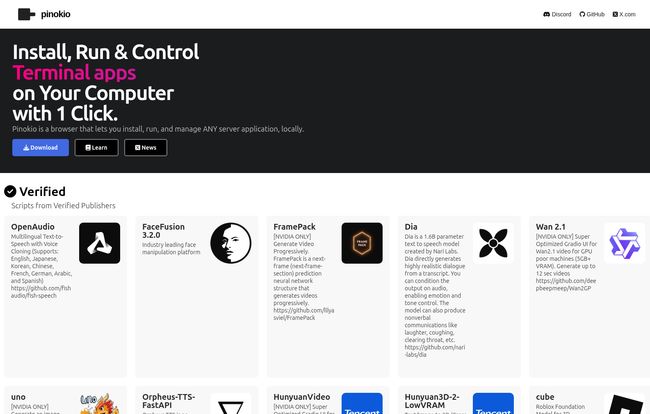
Imagine an App Store, but instead of installing apps on your phone, it installs complex server applications directly on your computer—all handled automatically. That’s the simplest way to describe Pinokio. It’s a specialized browser that doesn’t surf websites. Instead, it browses a library of scripts. When you find an app you want, like Stable Diffusion or a new Text-to-Speech model, you just click “Install.”
Pinokio then gets to work, running a script that handles all the tedious stuff in the background: creating folders, installing dependencies, configuring settings. It’s like having a little robot assistant who actually knows what they’re doing. The best part? It all runs locally on your machine. No cloud fees, no data privacy concerns. Just you and your hardware.
Visit Pinokio
The platform puts a big emphasis on security, too, with “verified scripts from verified publishers.” This provides a layer of trust, which is critical when you’re essentially letting a program run installation commands on your computer. It’s a smart move that helps it feel less like the Wild West of random GitHub repos.
A Look at the AI Buffet: What’s on the Menu?
Honestly, the sheer variety of applications available is what first caught my eye. This isn’t just a one-trick pony for Stable Diffusion. I spent a good half-hour just scrolling through the grid of available apps, and it’s a who’s who of the open-source AI scene.
You’ve got heavy hitters in every category:
- Text-to-Image: Of course there’s AUTOMATIC1111’s Stable Diffusion WebUI, but also alternatives like ComfyUI, Fooocus, and InvokeAI.
- Text-to-Speech & Voice Cloning: Tools like AudioCraft, Bark, and the incredibly popular RVC (Retrieval-based Voice Conversion) are there, ready to go.
- Large Language Models: Want to run your own local ChatGPT alternative? There are one-click installers for interfaces like oobabooga’s Text Generation WebUI and KoboldCpp.
- Audio & Video Tools: I saw scripts for everything from FaceSwap and Roop for video face-swapping to AudioLDM 2 for generating audio from text prompts.
It’s an impressive collection that turns your PC into a proper AI creation studio. The fact that I could try three different image generators in the time it would normally take me to debug one is a game-changer.
My Experience: The Good, The Bad, and The GPU-Hungry
So, I took it for a spin. I decided to install oobabooga’s text-gen web UI, something that has given me a bit of trouble in the past. The process was… anticlimactic. I clicked install, a terminal-like window popped up within Pinokio showing the progress, and a few minutes later, it was done. I clicked “Start,” and a local web server fired up. It just worked. No fuss.
The Good Stuff
The ease of use is obviously the main draw. It abstracts away the command line chaos. But more than that, having a central dashboard to launch, stop, and manage all these different tools is fantastic. No more trying to remember which `conda` environment belongs to which project or hunting down the right `run.bat` file. The potential for programmatic control is also there for power users who want to automate workflows, though I haven’t messed with that much myself.
Some Honest Caveats
Now, Pinokio isn’t a magic wand. It can’t create a powerful GPU out of thin air. You still need the right hardware. If an application requires an NVIDIA GPU with 12GB of VRAM, Pinokio can’t change that. It simplifies the software setup, not the hardware requirements. So don’t expect to be running advanced models on your old laptop. Performance will always depend on your machine’s specs.
Also, it’s still reliant on community-developed scripts. While this is a strength, it means a script might occasionally be outdated or have a bug. Things can break. In a moment of real-world charm, I tried to find a dedicated pricing page and was met with a 404 error from GitHub Pages. It happens to the best of us, and it just adds to the authentic, community-driven feel of the project.
Also Read: Precog AI: The Smart AI Router That Vanished
And What’s the Price for This Convenience?
This is the best part. From everything I can see, Pinokio is free. There’s no pricing page (that works, anyway), no subscription model, no premium tier. It appears to be a genuine open-source project built for the community. In an era where everything is becoming a service with a monthly fee, this is incredibly refreshing.
Here’s a quick breakdown of my thoughts:
| The Upsides | The Downsides |
|---|---|
| Truly simple one-click installation for dozens of popular AI tools. | Hardware is still the bottleneck. You need a powerful PC (often NVIDIA). |
| Central dashboard to manage all your local AI applications. | Performance is entirely dependent on your local machine’s specs. |
| Verified scripts provide a decent layer of security and trust. | You’re reliant on community scripts, which could have bugs or become outdated. |
| Free and open source! | Still requires some technical understanding of what the apps do. |
Frequently Asked Questions about Pinokio
Is Pinokio safe to use?
It’s reasonably safe. The platform promotes the use of verified scripts from trusted sources, which minimizes the risk of running malicious code. However, as with any tool that installs software, you should always be mindful of what you’re installing. Stick to the popular, verified apps if you’re concerned.
Does Pinokio work on Mac and Windows?
Yes, Pinokio is designed to be cross-platform and has installers available for Windows, macOS (both Intel and Apple Silicon), and Linux. This makes it accessible to a huge range of users.
So I don’t need a powerful computer anymore?
You absolutely still do. Pinokio makes the software installation easy, but it doesn’t change the hardware requirements of the AI applications themselves. For most serious image generation or LLM work, a modern NVIDIA GPU is practically a must-have.
Is Pinokio really free?
As of late 2023, yes. It’s an open-source project available on GitHub. There are no fees or subscriptions required to use the browser or its main scripts.
How is this different from using Docker?
That’s a great question for the more technical folks. Docker is a broad containerization platform for creating isolated environments for any application. Pinokio is a much more specialized, user-friendly tool specifically designed for the task of discovering, installing, and managing a curated list of apps with a simple GUI. Think of Pinokio as a purpose-built car, and Docker as a box of powerful engine parts.
The Final Word on Pinokio
Pinokio is one of those tools that does exactly what it says on the tin, and it does it well. It successfully lowers the intimidating technical barrier that keeps so many people from experimenting with the amazing open-source AI tools out there. It’s not a magic bullet—your hardware is still the king—but it tames the chaotic beast of software setup.
For AI hobbyists, developers who need to test things quickly, or anyone who is just plain curious, I think Pinokio is a fantastic piece of kit. It brings a bit of much-needed simplicity to a wonderfully complex field, and I’m genuinely excited to see how the project and its library of apps grow. It’s earned a permanent spot in my digital toolbox.
Reference and Sources
- Pinokio Official Website: https://pinokio.computer/
- Pinokio on GitHub: https://github.com/pinokiocomputer/pinokio
- Stable Diffusion WebUI (AUTOMATIC1111) Repository: https://github.com/AUTOMATIC1111/stable-diffusion-webui


