
Categories: AI Assistant, AI Design Assistant, AI Developer Tools
Piny Review: A Visual Editor for Tailwind in VS Code?

It’s 2 PM on a Tuesday, you’ve had way too much coffee, and you’re locked in a death match with a particularly stubborn div. You tab over to your browser, tweak a CSS property in the inspector, and it looks perfect. Chef’s kiss. Then you tab back to VS Code, find the right file, find the right line, and manually type out the change. You save, the page reloads, and… it’s wrong. You forgot a semicolon. Or a class. Or your cat walked across the keyboard.
This little dance—the constant context switching between visual output and abstract code—is one of the tiny papercuts that can make front-end development so frustrating.
Tailwind CSS came along and made things a lot better. I’m a huge fan. Utility classes are a revelation for keeping things consistent and avoiding a swamp of custom CSS files. But it also introduced its own challenge: “class soup.” Staring at a long string of classes like flex items-center justify-between p-4 bg-gray-100 dark:bg-gray-800 rounded-lg can make your eyes glaze over. It’s powerful, but it’s not always intuitive.
So, what if you could have the best of both worlds? The power of writing real code, with the immediate visual feedback of a design tool? That’s the promise of a new tool I’ve been playing with called Piny. And I gotta say, it’s pretty interesting.
So, What is This Piny Thing Anyway?
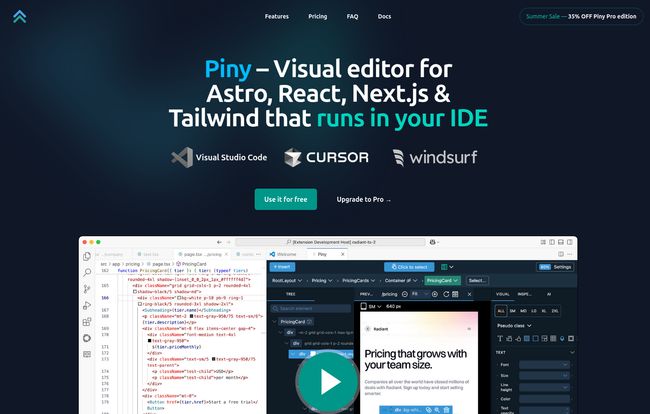
Piny is a visual editor that runs directly inside your IDE. Right now, that means Visual Studio Code, Cursor, and Windsurf. It’s built specifically for the modern web stack: Astro, React, and Next.js, with a heavy focus on making Tailwind CSS a more visual experience.
Now, when you hear “visual editor,” your developer senses might start tingling with dread. We’ve been burned by tools that promise simplicity but deliver a mess of bloated, unmaintainable, or proprietary code. But here’s the kicker, and the reason I even gave Piny a second look: it edits your actual code.
There are no abstractions, no cloud services, and no vendor lock-in. It’s not a website builder that spits out code you can’t touch. It’s more like a visual interface—a superpower—for the code you’re already writing. It sees your JSX, understands your Tailwind classes, and just gives you a better way to manipulate them.
The Piny Features That Actually Matter
Alright, let’s get into the good stuff. I’ve messed around with it on a couple of small Next.js projects, and a few features really stood out.
The Visual Tailwind Controls and Inspector
This is the main event. You pop open a preview of your component right next to your code. You can click on any element, and a little panel appears, just like your browser’s dev tools. But instead of just showing you the styles, it shows you the actual Tailwind classes on that element. You can add, remove, or tweak classes—adjusting padding, changing colors, setting flex properties—with sliders and color pickers. Every change you make is instantly written to your source file. It’s honestly the workflow I’ve always wanted. It closes that loop between seeing and doing.
AI-Powered Drag and Drop
This one sounds like marketing fluff, but it’s surprisingly useful. You can literally drag an element from one place to another in the visual preview, and Piny’s AI attempts to rewrite the flexbox or grid classes to make it happen. Is it perfect every time? No, especially with deeply nested components. But for quickly scaffolding a layout or re-ordering items in a container? It’s a massive time-saver. It’s like having a junior dev who’s really good at Flexbox Froggy sitting next to you.
Visit Piny
Visual Navigation for Your Sanity
Ever been dropped into a massive, unfamiliar codebase? It can feel like being lost in a forest. Piny’s component navigation helps a lot here. It lets you visually click through your component tree, seeing how everything is nested and structured. It’s much faster than grepping for file names or trying to mentally map out the project. For complex UIs, this feature alone is a huge win for just understanding what the heck is going on.
Zero Lock-In and No Extra Baggage
This is the most important part for me, and probably for you too. Piny doesn’t infect your project with a bunch of weird dependencies or custom libraries. It works by adding a tiny script to your project’s layout, and only in development mode. It never touches your production build. If you decide to uninstall Piny tomorrow, your project is completely fine. It’s still just a standard Next.js or Astro app. This respect for the underlying code is what separates a professional tool from a toy.
Let’s Talk Money: The Piny Pricing
Okay, so how much does this magic cost? The pricing is actually pretty straightforward and, in my opinion, very fair for what you’re getting.
| Plan | Price | Key Features |
|---|---|---|
| Piny Free | $0 / year | Visual Tailwind Controls, Class Inspector, Component Navigation, AI Drag & Drop, Community support. |
| Piny Pro (Early Access) | US$49.00 / year | All Free features + Visual Select, Edit Multiple Elements, Navigate the whole project, Custom Tailwind theme import, Priority support. (Price locked for life) |
| Piny Pro (Regular) | US$120.00 / year | The full-feature set at the standard price after the early access period ends. |
The free version is genuinely useful and a great way to see if the workflow clicks for you. But that Early Access deal for the Pro plan is hard to ignore. For less than five bucks a month, you get the full suite of tools, and they promise to lock in that price for the lifetime of your subscription. Given that the regular price will be $120, that’s a pretty compelling reason to jump in early if you’re interested.
The Not-So-Perfect Bits (A Reality Check)
No tool is perfect, especially one that’s labeled “Early Access.” Piny is still young, and there are a few rough edges. The “Visual Select” feature, which is supposed to pinpoint the right code when you click in the preview, can sometimes get confused by complex component structures. It’s not a deal-breaker, but it happens.
It’s also very React-centric right now. While Astro support is there, the core feels built for the React ecosystem. The team says Svelte and Vue support are on the roadmap, which is great, but if you’re a die-hard Svelte fan, you’ll have to wait. But hey, they’re transparent about it, which I respect.
Frequently Asked Questions About Piny
I had a few questions myself, and here are some quick answers I found.
- What happens to my project if Piny is discontinued?
- Absolutely nothing. Your project remains a standard React/Next.js/Astro project with clean code. Since Piny doesn’t add any special libraries to your production build, you’re 100% safe.
- Is there a money-back guarantee?
- Yep. They offer a 30-day money-back guarantee on the Pro plans, so you can try it out without risk.
- Do I need to install a bunch of special libraries?
- Nope. That’s one of its best features. It’s just a VS Code extension and a tiny, dev-only script.
- What frameworks does it support right now?
- It currently supports React, Next.js, and Astro. The team has mentioned that support for Svelte and Vue is planned for the future.
- Can I use my custom Tailwind theme?
- Yes, importing and using your custom `tailwind.config.js` file is a feature of the Piny Pro plan. This is pretty essential for any serious project.
My Final Verdict on Piny
So, is Piny a gimmick or a game-changer? In my experience, it leans much closer to game-changer. It’s not going to write your application logic, and it won’t magically make you a better designer. What it does do is remove a significant layer of friction from teh front-end development process.
It’s a fantastic tool for accelerating UI development, especially for developers who are more comfortable in code than in Figma. It makes working with Tailwind CSS faster, more intuitive, and honestly, a bit more fun. That direct link between a visual change and the line of code it produces is something I think many of us have been waiting for.
Given the incredibly generous free tier and the very attractive Early Access pricing, I’d say Piny is a no-brainer to try out for anyone working in the React and Tailwind ecosystem. It might just be the visual co-pilot you didn’t know you needed.


