
Categories: AI Icon Generator, AI Illustration Generator, AI Logo Generator, AI SVG Generator, AI Vector Graphics, Text to Image
PlusVector Review: My Take on AI SVG Generation

How many hours of your life have you lost scrolling through stock image sites? You’re hunting for that one perfect icon. You know the one. It’s not too corporate, not too cutesy, and it actually matches your brand colors. You find something close, but it’s a low-res JPG. Or it’s part of some ridiculously expensive subscription. I’ve been there. More times than I care to admit.
We’ve all seen the explosion of AI image generators like Midjourney and DALL-E. They’re incredible, mind-blowing even. But for those of us in the trenches of web design, marketing, and content creation, they have a glaring flaw. They spit out raster images (like PNGs and JPGs). Beautiful, yes. But try to scale one up for a billboard or even just a high-res landing page hero, and you’re staring at a pixelated mess.
That’s the problem that had me genuinely excited to stumble upon PlusVector. The promise? An AI that understands the language of prompts but speaks in SVG. An AI for us, the people who obsess over file sizes and infinite scalability. But does it live up to the hype? I had to find out.
So, What Exactly is PlusVector?
Think of it this way: PlusVector is an AI illustration engine that acts as a translator. You give it a simple text prompt—like “a minimalist line art logo of a coffee cup with steam rising”—and instead of a flat image, it generates a vector graphic (an SVG). This isn’t just a picture; it’s a set of mathematical instructions that can be scaled to any size without losing a drop of quality. It’s designed to create custom illustrations, logos, icons, and more, supposedly without needing a single design skill. A bold claim, and one I was ready to put to the test.
Why I’m an Absolute Nerd for SVGs
Before we go further, let’s have a quick heart-to-heart about why vectors are so important. If you already know this, feel free to skip ahead, but for many, this is the whole point. A raster image (JPG/PNG) is like a mosaic, made up of a fixed grid of colored pixels. When you stretch it, you just make the pixels bigger and more obvious. It gets blurry and sad.
A vector image (SVG), on the other hand, is like a recipe. It’s a set of instructions: “draw a blue circle here, a straight line from this point to that point…” Because it’s just instructions, you can tell the computer to make it the size of a postage stamp or a building, and it will redraw it perfectly every single time. Crisp. Clean. No pixels.
For an SEO guy like me, this is huge. SVGs mean:
- Smaller File Sizes: They’re just code, so they’re often way lighter than a high-res PNG. This is music to my ears for Core Web Vitals and page load speed.
- Resolution Independence: Looks fantastic on a 4K monitor, a tiny mobile screen, and everything in between.
- Full Editability: You can easily go in and change the color of a specific element without having to mess around with a Photoshop wand tool. It’s a dream.
Putting PlusVector Through Its Paces
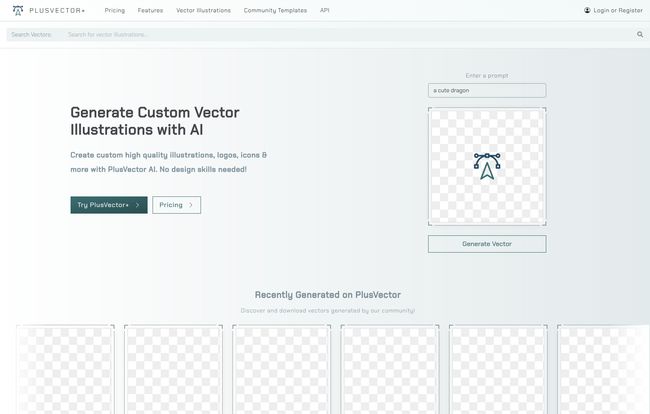
The interface is clean and straightforward. You’re greeted with a prompt bar, much like any other AI tool. You type in what you want, and it gets to work. I started with something simple: “a friendly robot waving”. The results were pretty impressive—clean lines, solid colors, and definitely in a vector style.
Visit PlusVector
What really caught my attention, though, were the community templates. This is a brilliant touch for people who aren’t prompt-wizards. You can find pre-built styles and prompts that give you a massive head start. I found a template for “isometric illustrations,” tweaked the prompt to be about ‘data analytics’, and got a seriously professional-looking graphic for a blog post in under a minute. That’s time I would have otherwise spent trawling stock sites or trying to hack something together in Canva.
The Good, The Bad, and The Scalable
No tool is perfect, right? After playing around with PlusVector for a while, here’s my honest breakdown.
What I’m Genuinely Excited About
The quality of the SVG output is top-notch. These aren’t just JPGs wrapped in an SVG tag; they are true, scalable vector graphics. For creating icons for a new web app, unique illustrations for a presentation, or even a simple logo for a side project, this is fantastic. The ability to generate something and then immediately have access to its component parts for editing is a massive workflow improvement.
Some Potential Drawbacks
The main limitation is the credit-based system. On the Standard plan, you get 20 generations a month. While that’s probably enough for a blogger or a small project, if you’re in a phase of heavy creative exploration, you might burn through them quickly. Secondly, the privacy features are locked behind the more expensive Pro plan. If you’re designing a confidential logo or proprietary illustrations for a client, you’ll need to shell out for the Pro plan to keep those assets private. It makes sense from a business perspective, but its something to be aware of.
Let’s Talk Money: The PlusVector Pricing Plans
The pricing structure is pretty clear, which I appreciate. No hidden fees or confusing tiers. It basically boils down to this:
| Plan | Price | Key Features | Best For |
|---|---|---|---|
| Standard | $20 /month | 20 credits/month (rollover up to 100), community access, limited support. | Freelancers, bloggers, small business owners dipping their toes in. |
| Pro | $50 /month | 100 credits/month (rollover up to 500), everything in Standard, plus private illustrations & templates, premium support. | Professional designers, agencies, businesses with privacy needs. |
| Enterprise | Custom | Large-scale credit needs, custom use cases, API access. | Large companies, SaaS platforms wanting to integrate the tech. |
The fact that credits roll over is a really nice, consumer-friendly touch. We’ve all had those months where you don’t use a service, and it feels like you’ve just thrown money away. This helps soften that blow.
So, Who is PlusVector Actually For?
After my testing, I dont think this is a tool to replace high-end human illustrators for complex, bespoke projects. But that’s not its goal. I see it as an incredibly powerful tool for a few key groups:
- Marketers & Content Creators: Need a custom graphic for your next blog post or social media campaign? This is infinitely faster than briefing a designer or settling for a generic stock image.
- Web & App Developers: Quickly generate perfectly scalable icons and UI elements that won’t bloat your site’s load time.
- Small Business Owners: A fantastic resource for creating branding materials, social graphics, and website visuals without a massive budget.
It fills a very specific, and very common, gap in the market. It bridges the creative power of AI with the practical needs of digital professionals.
Frequently Asked Questions
- What exactly is an SVG and why should I care?
- An SVG (Scalable Vector Graphic) is an image format built on code, not pixels. You should care because it means the image can be resized to any dimension without getting blurry, and the file sizes are typically much smaller than PNGs or JPGs, which is great for website speed.
- Can I use the images I create for commercial projects?
- Based on the tool’s purpose for professional designers and businesses, the generated assets are intended for commercial use. As always, it’s good practice to double-check the platform’s terms of service for specific licensing details.
- How do the generation credits work?
- One credit is used each time you generate an illustration from a prompt. Your monthly credits are added to your account, and any unused credits roll over to the next month, up to a cap depending on your plan (100 for Standard, 500 for Pro).
- Is this better than using a stock vector site?
- It’s different. Stock sites give you pre-made assets that thousands of others might be using. PlusVector allows you to create something completely custom and unique to your prompt in seconds. For originality, PlusVector wins. For finding a very specific, complex illustration that already exists, a stock site might still be useful.
- Can a total beginner really use this tool?
- Yes, I believe so. The prompt bar is simple, and the community templates provide a great starting point if you’re not sure what to write. It’s much more approachable than professional design software like Adobe Illustrator.
My Final Verdict: Is PlusVector a Buy?
I’m genuinely impressed. PlusVector isn’t just another AI image toy; it’s a practical utility that solves a persistent problem for anyone who works on the web. It democratizes the creation of clean, professional, and performant vector graphics. While the credit system requires you to be mindful of your usage, the value it provides—in time saved and creative possibilities—is undeniable.
If you’ve ever found yourself frustrated with the limitations of raster images or the endless search for the right icon, I’d say give PlusVector a serious look. It might just be the tool you didn’t know you needed.
Reference and Sources
- PlusVector Official Website: https://plusvector.com/
- PlusVector Pricing Page: https://plusvector.com/pricing
- Google’s Core Web Vitals Documentation: https://web.dev/vitals/


