
Categories: AI Design Generator, AI Social Media, AI Social Media Post Generator
PostNitro Review: An AI Carousel Maker That’s Actually Good?

It’s 4:47 PM on a Tuesday, and you suddenly remember you haven’t posted on LinkedIn this week. You know a carousel post would kill it—the algorithm loves ’em, engagement goes up—but the thought of actually making one feels like a herculean task. Firing up Canva, finding the right template, fighting with alignment, writing ten slides of pithy-yet-profound copy… Ugh. By the time you’re done, it’s dark outside and you’ve missed dinner.
The content creation hamster wheel is relentless. So when another “game-changing” AI tool slides into my DMs or pops up in my feed, my skepticism is usually cranked to eleven. I’ve seen dozens of tools promise the world and deliver a slightly-less-ugly-than-PowerPoint slideshow. So when I heard about PostNitro, an AI-powered carousel generator, I thought, “Okay, show me what you’ve got.”
And I have to admit, I was pleasantly surprised.
What Exactly is PostNitro? (And Why Should You Care?)
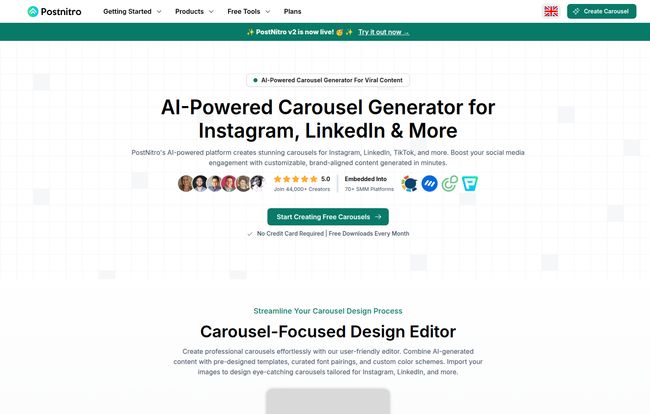
At its core, PostNitro is a specialized tool designed to do one thing and do it well: create social media carousels, fast. It’s aimed squarely at people like us—the overworked marketers, the agency folks juggling multiple clients, small business owners wearing all the hats, and creators trying to stay consistent without burning out. It uses AI to handle the heavy lifting of both design and copywriting for platforms like Instagram, LinkedIn, and even TikTok and Twitter (or X, whatever we’re calling it this week).
Think of it less as a blank canvas and more as a brilliant creative assistant. You provide the spark—a topic, a link to an article, even a random tweet—and it builds the entire carousel for you. The promise is simple: go from idea to a ready-to-publish, multi-slide masterpiece in minutes, not hours.
Visit PostNitro
My First Impressions: The Good, The Bad, and The AI
Getting started is ridiculously simple, which I appreciate. There’s no 12-step setup or mandatory product tour. The homepage just asks you to spark an idea. You can plug in a URL to a blog post, paste in some text, or just give it a topic like “Benefits of SEO for Small Businesses.”
I decided to test it with one of my own older blog posts about generating traffic. I pasted in the URL, held my breath, and clicked “Create.”
What it spat out a few moments later was… genuinely impressive. Not perfect, mind you, but a coherent, well-designed, and surprisingly well-written first draft of a 7-slide carousel. The AI had pulled out the key points, summarized them into bite-sized chunks for each slide, and laid it all out in a clean template. It felt like I’d handed my research to a junior designer and they came back with a fantastic starting point. A real “gets you 80% of the way there” moment.
This whole process is a neat three-step flow: Idea -> Customize -> Publish. It’s a content creation assembly line, but in a good way. Like having a sous chef for your social media kitchen who does all the boring prep work, so you can just do the fun, creative cooking at the end.
Digging into the Features that Matter
A slick first impression is great, but a tool is only as good as its features. So, I started clicking around to see how deep the rabbit hole goes.
The AI Content Generator: From a URL to a Carousel?
This is the star of the show. The ability to transform existing content is a massive time-saver. Think about it: you can repurpose a single blog post into a LinkedIn carousel, a Twitter thread, and an Instagram educational post with minimal effort. The AI copy wasn’t Shakespeare, but it was better than a lot of the robotic-sounding stuff I’ve seen from other tools. It needed a little polish to inject my own voice, but that’s the easy part. The hard part—structuring the information—was already done.
Customization: Are You Stuck with Cookie-Cutter Designs?
Here’s where a lot of AI tools fall flat. They give you a nice-looking output, but you can’t change a thing. Thankfully, that’s not the case here. PostNitro’s editor is pretty flexible. You can easily change fonts, and colors, and move elements around. The most important feature, in my opinion, is the Custom Colors & Fonts section. You can set up your brand kit so every carousel you generate automatically comes out looking like your brand, not a generic PostNitro template. For maintaining brand consistency across channels, this is non-negotiable.
Now, some might argue that this reliance on AI and templates limits true creative control. And they’re not wrong. If you’re a graphic designer who builds every single element from scratch in Adobe Illustrator, this tool isn’t for you. But for the 95% of us who just need to create professional-looking content without spending half a day on it, the customization is more than enough. It strikes a great balance between automation and control.
Beyond the Basics: Collaboration and Automation
Two things really stood out to me for more advanced users: Team Collaboration and Zapier Integration.
The Team Collaboration and Project Workspaces features are a godsend for agencies or marketing teams. You can have multiple people working on different projects, keeping everything organized and on-brand. No more emailing v3_final_final_REAL.png files back and forth.
But the Zapier integration… now that gets my inner marketing nerd excited. The potential workflows are awesome. You could set up a Zap to automatically create a carousel draft in PostNitro every time a new article is published on your WordPress blog. Or connect it to a Google Sheet of content ideas. It turns content creation from a manual task into a semi-automated system. That’s powerful.
Let’s Talk Money: The PostNitro Pricing Model
Okay, the big question. What’s this going to cost? The homepage proudly states “Free forever” and lists the price as “$0.00 / month”. As a seasoned pro, I know there’s usually a catch. The site also mentions a “Premium Model,” but when I looked for the pricing page it was a 404 error (oops, looks like they’re still building things out!).
But the freemium model itself is incredibly generous. You can get started and create carousels without dropping a dime or even entering a credit card. Based on industry standards, here’s my educated guess on how the plans probably break down:
| Feature | Freemium Plan (Confirmed) | Premium Plan (Speculated) |
|---|---|---|
| AI Carousel Generation | ✔️ | ✔️ |
| Customizable Templates | ✔️ | ✔️ |
| Exports | Likely limited per month, possibly with watermark | Unlimited exports, no watermark |
| Brand Kits | Limited (Maybe 1) | Multiple brand kits |
| Team Collaboration | ❌ | ✔️ |
For a solo creator or a small business just starting out, the free plan is more than enough to get your feet wet and see a real benefit.
So, Who is PostNitro Really For?
After playing around with it for a while, I have a pretty clear idea of who gets the most out of this tool.
- The Overworked Social Media Manager: This tool will literally give you hours back in your week. What more can I say?
- The Small Business Owner: You dont have the budget for a full-time designer, but you know you need to look professional on social. This is your solution.
- The Agency Grinding Out Content: The combination of speed, brand kits, and team features makes this a scalable option for churning out high-quality content for multiple clients.
- The Creator Building a Personal Brand: Consistency is everything. PostNitro makes it dead simple to maintain a regular posting schedule with visually consistent content.
My Final Verdict: Is PostNitro Worth Your Time?
Yes. Unreservedly, yes. It’s one of the most practical and immediately useful AI tools I’ve tested in a while. It’s not a magic wand that will solve all your marketing problems, but it’s a fantastic power tool that fixes one of the most annoying, time-consuming parts of the job.
It takes the worst parts of carousel creation—the blank page paralysis, the tedious design tweaks, the initial copywriting slog—and automates them. It leaves you with the fun part: adding your own flavor and hitting “publish.” For the grand price of free to get started, it’s a no-brainer to try. It just might save you from another 4:47 PM content panic.
Frequently Asked Questions about PostNitro
- Is PostNitro really free?
- Yes, it operates on a freemium model. There’s a “Free Forever” plan that is quite robust, and a Premium model for users who need more advanced features like enhanced team collaboration and likely unlimited exports.
- What platforms can I create carousels for?
- It’s optimized for creating content for Instagram, LinkedIn, TikTok, and Twitter/X. You can export in various formats (like PNG and PDF) that are suitable for these platforms.
- Can I use my own brand colors and fonts?
- Absolutely. The platform allows you to create a custom brand kit with your specific color palettes and fonts to ensure all your creations are on-brand.
- Does the AI write good copy?
- In my experience, the AI-generated copy is a very strong starting point. It does a great job of summarizing content and structuring it for a carousel format. You’ll likely want to do a quick pass to inject your own personality and tone, but it saves a ton of time.
- How does the Zapier integration work?
- You can connect PostNitro to other apps through Zapier to automate your workflow. For example, you could set up an automation (a “Zap”) to trigger the creation of a carousel draft in PostNitro whenever a new post goes live on your company blog.
- Is it better than just using Canva?
- It’s different. Canva is a general-purpose design tool—a blank canvas. PostNitro is a specialized AI-powered tool specifically for carousels. If you want to start from an idea and have a full carousel (design and copy) generated for you in seconds, PostNitro is much faster. You can then refine it, whereas with Canva, you’re starting from scratch or a template.
Reference and Sources
- PostNitro Official Website
- Zapier Automation Platform
- Later’s Guide to Instagram Carousel Posts (for more on why carousels work)


