
Categories: AI Ad Generator, AI Animation Generator, AI Cartoon Generator, AI Presentation Generator, AI Social Media Post Generator, AI Video Generator, No-Code&Low-Code
Powtoon Review: AI Video Creation Made Easy? (2024)

For years, the words “video marketing” were enough to make most marketing managers break out in a cold sweat. It meant either begging for a huge budget to hire a production agency or trying to master some beastly software like After Effects, which, let’s face it, has a learning curve steeper than Mount Everest. I remember spending a whole weekend back in 2016 just trying to make a 30-second animated explainer video. The result was… well, let’s just say it had character.
But the world of content creation moves fast. Really fast. Today, we’re spoiled for choice with tools that promise professional-looking videos with drag-and-drop simplicity. One of the names that keeps popping up in my circles is Powtoon. It bills itself as a “visual communication platform,” which is a fancy way of saying it helps you make cool animated videos and presentations without needing a film degree. But does it actually deliver? I’ve spent some time kicking the tires, and I’m here to give you the real-deal, no-fluff breakdown.
Visit Powtoon
So, What’s the Big Deal with Powtoon?
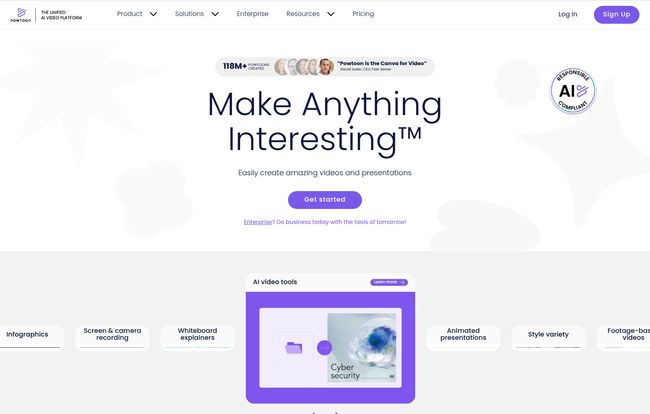
At its core, Powtoon is a cloud-based platform designed to democratize video creation. Think of it as a sort of Canva, but specifically for animated videos. Instead of static graphics, you’re working with characters, animated props, and dynamic scenes to tell a story. It’s built for people who need to create engaging content but don’t have the time or technical skills for traditional video production.
Who’s this for, you ask? Well, pretty much anyone who needs to get a message across visually. I see it being a huge win for:
- Marketing Teams: Whipping up social media videos, product explainers, and animated ads.
- HR & Internal Comms: Creating engaging training materials and company announcements that people will actually watch.
- Educators: Making lessons more dynamic and memorable for students.
- Small Business Owners & Freelancers: Crafting a professional-looking pitch or promo video on a shoestring budget.
Basically, if you’ve ever found yourself staring at a wall of text thinking, “this would be so much better as a video,” Powtoon is knocking on your door.
The AI Elephant in the Room: Powtoon Imagine
You can’t talk about any creative tool in 2024 without talking about AI, and Powtoon is leaning in hard with its “Imagine” suite of AI features. This isn’t just a gimmick; it’s a serious attempt to slash creation time. It’s the part that got me most curious.
The platform integrates several AI-powered tools that are genuinely useful. You can feed it a simple prompt, a URL, or even a full document, and its AI Video Creator will generate a draft video, complete with scenes, text, and animations. It’s a fantastic starting point. It’s not going to spit out a final, perfect masterpiece, but it gets you 70% of the way there in about two minutes. That’s a huge workflow accelerator.
There’s also an AI Script Writer, text-to-speech with AI voices, and even AI-powered avatars that can speak your script. I’ve played around with a lot of AI avatar tools, and while they can still be a bit uncanny valley, Powtoon’s integration is pretty smooth for internal or quick-turnaround projects. It’s all about speed and efficiency, taking the tedious parts out of the process.
Diving into the Toolbox: My Favorite Powtoon Features
AI is flashy, but the long-term value of a tool is in its core features. After messing around for a while, a few things really stood out.
A Template Library That Doesn’t Suck
I’m usually skeptical of templates. They can feel cookie-cutter. But Powtoon’s library is extensive and well-categorized for different goals (marketing, training, HR, etc.). For someone on a deadline, grabbing a template, swapping out the text, and changing the brand colors is an absolute lifesaver. You’re not starting from a terrifying blank canvas.
From Boring PowerPoint to Dynamic Video
This is a killer feature. We all have that one 80-slide PowerPoint presentation gathering dust on a server somewhere. Powtoon allows you to import it and instantly convert it into a video. You can then go in and add animations, voiceover, and music. It’s one of the easiest ways to breathe new life into old content—a huge win for content repurposing.
Custom Characters and Brand Control
On the higher-tier plans, you get full character customization. You can create animated versions of your team, or a brand mascot, and even have them lip-sync to your audio. This moves you away from the generic feel of stock characters and helps build a stronger brand identity. It’s a small touch that makes a big diference.
The All-Important Question: What’s the Damage? (Powtoon Pricing)
Alright, let’s talk turkey. Powtoon uses a freemium model. There’s a free plan, which is a great way to test the waters, but it comes with some serious limitations. Your videos will have Powtoon branding, be limited to 3 minutes, and export quality is capped. It’s a trial, not a long-term solution.
To get the good stuff, you’ll need to subscribe. Here’s a quick look at their individual plans (billed yearly, which is cheaper):
| Plan | Price (Billed Yearly) | Who It’s For | Key Features |
|---|---|---|---|
| Lite | $15 /month | Students & Freelancers | Removes Powtoon branding (on 5 exports/mo), 10 min video length, MP4 downloads. |
| Professional | $40 /month | Marketers & Professionals | Everything in Lite, plus unlimited premium exports, full access to all templates and content, 20 min video length. |
| Business | $85 /month | Agencies & Large Teams | Everything in Pro, plus full character customization, brand control, AI script/video tools, 30 min length, reseller rights. |
In my opinion, the Professional plan is the sweet spot for most serious users. The unlimited premium exports and full access to the content library are what truly unlock the platform’s power. The Lite plan is a good budget option if you only create a few videos a month, while the Business plan is geared toward agencies or companies that need tight brand controls and reseller rights.
Keeping It Real: Where Powtoon Falls Short
No tool is perfect, and it wouldn’t be an honest review without pointing out the downsides. First, as I mentioned, the Free plan is pretty restrictive. The Powtoon branding and short video limit make it unsuitable for any professional use case. It really is just a test drive.
Secondly, while the templates are a huge pro, they can also be a con. If you’re a seasoned designer with a very specific vision, you might feel a bit boxed in. Powtoon is built for ease and speed, not for granular, frame-by-frame customization like you’d find in professional animation software. Some might argue that this reliance on templates stifles true creativity; however, in my experience, most marketers would gladly trade a bit of creative freedom for the ability to get a project done in two hours instead of two weeks.
And finally, the coolest features—like the full-blown AI tools and character customization—are locked behind the most expensive plan. That’s just business, but it’s something to be aware of when you’re budgeting.
Your Powtoon Questions, Answered
Is Powtoon really free to use?
Yes, there is a free plan. However, it’s limited. Videos will include a Powtoon watermark, are capped at 3 minutes, and have limited export options. It’s best for trying the platform out before committing to a paid plan.
Can I create videos with AI using Powtoon?
Absolutely. The ‘Powtoon Imagine’ suite uses AI to help you generate scripts, create entire videos from a prompt, and produce text-to-speech audio. These more advanced AI features are primarily available on the Business plan.
Do I need any video editing experience to use Powtoon?
Nope! That’s one of its biggest selling points. The platform is designed with a drag-and-drop interface and a huge library of templates, making it accessible for complete beginners.
Can I download my videos as an MP4 file?
Yes, but you need to be on a paid plan (Lite, Professional, or Business) to download your creations as an MP4 file.
Is Powtoon good for my website’s SEO?
Indirectly, yes. While the tool itself isn’t an SEO tool, creating engaging video content is fantastic for SEO. Videos can increase dwell time on your pages, improve user engagement, and earn backlinks—all positive signals to search engines like Google. Using Powtoon to create those videos is a means to that end.
What’s the main difference between the Professional and Business plans?
The Professional plan is focused on content creation, giving you unlimited exports and full access to the media library. The Business plan adds advanced collaboration, branding controls, full character customization, and the most powerful AI features, making it better suited for larger teams and agencies.
The Final Verdict: Should You Add Powtoon to Your Stack?
So, is Powtoon the right tool for you? If you’re a creative agency with a team of professional animators, probably not. You need more power and control. But for the other 99% of us? I’ve gotta say, it’s a seriously compelling option.
Powtoon successfully bridges the gap between overly simplistic (and often cheesy) video apps and complex, professional-grade software. It empowers marketers, educators, and business owners to create clean, engaging, and effective videos without the traditional barriers of cost and skill. The AI integration is more than just a buzzword; it’s a practical way to accelerate content production.
If you’ve been putting off creating video content because it feels too daunting, I’d strongly suggest giving Powtoon’s free plan a spin. It might just be the tool that finally gets your message in motion.
References and Sources
- Powtoon Official Pricing Page
- Wyzowl Video Marketing Statistics (for general context on video’s importance)


