
Categories: AI Assistant, AI Code Assistant, AI Code Generator, AI Developer Tools, Large Language Models (LLMs), Open Source AI Models
Prisma Assistant: Chat with Your Database Schema

Staring at a massive schema.prisma file, trying to remember the exact syntax for a deeply nested query with a dozen relations. You know what you want to ask your database, but translating that thought into perfect Prisma Client code can sometimes feel like a chore. It’s that tiny bit of friction that can break your flow state.
For years, we’ve had linters, autocompletes, and documentation. But the next wave is here, and it’s conversational. I’ve been keeping a close eye on AI-powered developer tools, and when I stumbled upon Prisma Assistant, I was genuinely intrigued. A tool that lets you literally chat with your schema? Sign me up.
So, I took it for a spin. And I have some thoughts.
So, What Exactly Is Prisma Assistant?
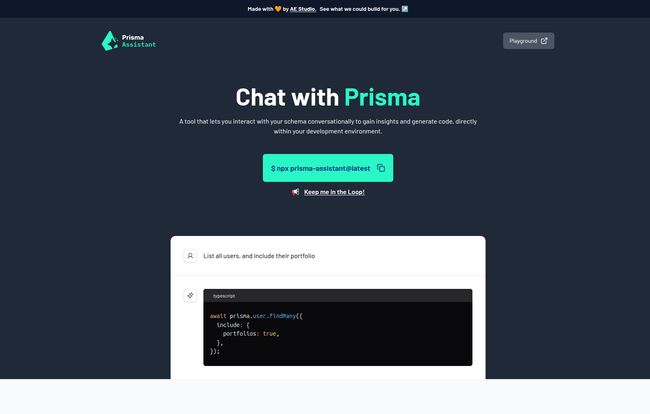
Imagine having a junior developer who has perfectly memorized your entire database schema and the Prisma docs. That’s kind of what Prisma Assistant feels like. It’s a command-line tool that spins up a simple web interface, allowing you to type plain English requests and get back ready-to-use Prisma Client code.
For instance, instead of meticulously crafting a query, you can just ask:
“List all users, and include their portfolio
And it spits back the code. It’s a simple idea, but the implications for productivity, especially for teams with complex schemas or for onboarding new devs, are pretty significant. It’s not just about generating code; it’s about lowering the barrier to interacting with your own data.
Visit Prisma Assistant
Getting Your Hands Dirty with Prisma Assistant
Okay, so you’re sold on the idea. How do you get it running? It’s fairly straightforward, but there are a couple of hoops to jump through, which is expected for a tool that’s currently in early alpha. And yes, you should go into this knowing it’s a work in progress. Expect some rough edges.
The Prerequisites You Can’t Skip
First thing’s first: you need an OpenAI API key. This is the brain behind the operation. The assistant sends your schema context and your natural language query to an OpenAI model, which then generates the code. You can grab a key from the OpenAI portal if you don’t have one already.
Firing It Up on Your Machine
Once you have your key, you need to expose it as an environment variable. The process is a little different depending on your operating system.
For my fellow Mac and Linux users, it’s a simple export command in your terminal:
export PRISMA_ASSISTANT_OPENAI_API_KEY=your_actual_openai_api_key
For the Windows crowd, it’s a similar vibe, just with the set command:
set PRISMA_ASSISTANT_OPENAI_API_KEY=your_actual_openai_api_key
A quick heads-up: doing this in your terminal only sets the variable for your current session. If you close the terminal, you’ll have to do it again. For a more permanent solution, you’ll want to add it to your shell profile (like .zshrc, .bashrc) or your system’s environment variables. Once that’s done, you just navigate to your project’s root directory (the one with your schema file) and run:
npx prisma-assistant@latest
And that’s it! It’ll give you a local URL to open in your browser, and you can start chatting.
The Big Wins of Using This Tool
After playing around with it, a few things really stood out to me. The most obvious benefit is the speed of code generation. It’s just faster to type a sentence than to craft a query object, especially for queries that you don’t write every day. It’s a fantastic way to scaffold out your data access layer.
But the bigger win, in my opinion, is how it provides insights into your schema. You can ask it questions like, “What fields are available on the Post model?” or “How do I connect a User to a Profile?” It acts as interactive documentation that’s always in sync with your latest schema changes.
And my favorite part? The security model. I’m always a bit hesitant to plug my code into cloud-based AI tools. With Prisma Assistant, everything runs locally on your machine. Your schema and your precious OpenAI API key never leave your computer. This is a huge, huge plus and shows the creators really understand their developer audience.
Keeping It Real: The Current Limitations
Now, it’s not all sunshine and rainbows. This is an alpha product, and it feels like it. Sometimes the generated code might not be exactly what you wanted or it might miss some nuance. You still need to be a good developer and review what teh AI gives you. Don’t just blindly copy-paste.
The setup, while not difficult, is still a barrier. Having to manage API keys and environment variables might turn off some beginners. But if you’re already working with Prisma, chances are you can handle it. This isn’t a knock against the tool, just the reality of its current stage.
Beyond OpenAI: Running with Ollama
This is something I was incredibly happy to see. You are not locked into the OpenAI ecosystem. Prisma Assistant supports running with Ollama, which lets you run powerful open-source language models like Llama 2 or Mistral right on your own hardware. For those concerned about privacy, cost, or just like to tinker, this is a game-changer.
The setup is similar—you just need to set a few different environment variables to point the assistant to your local Ollama instance. This flexibility is a massive vote of confidence in the open-source community and a smart move by the developers. It means you can have a completely self-hosted, offline-capable AI assistant for your database. How cool is that?
My Personal Take and Who This Is For
So, is Prisma Assistant ready to replace your job? No, of course not. But is it a valuable addition to your toolkit? Absolutely.
I see this being incredibly useful for:
- Teams with large, complex schemas: It can dramatically speed up development and reduce the mental overhead of working with the database.
- Onboarding new developers: It’s a fantastic learning tool to help new team members get up to speed with your data model.
- Rapid prototyping: When you’re in the zone and just need to get data on the screen, it’s brilliant.
This tool fits perfectly into the current trend of specialized, context-aware AI assistants. It’s not trying to be a general-purpose chatbot like ChatGPT; it has one job—understanding your Prisma schema—and it focuses on doing that one job well. I’m excited to see where it goes from here. Imagine if it could suggest schema optimizations or automatically generate migrations based on a conversation. The potential is massive.
Frequently Asked Questions about Prisma Assistant
- Is Prisma Assistant free?
- As of right now, yes. It’s in an early alpha stage, and there’s no pricing information available. This could change as it matures, but for now, you can use it freely (besides the cost of the OpenAI API calls, if you go that route).
- Is it safe to use my OpenAI API key?
- Yes. The tool is designed to run entirely on your local machine. Your API key is read from your environment variables and used to make direct calls to the OpenAI API. It is not sent to any third-party server other than OpenAI’s.
- Do I need to be a Prisma expert to use it?
- Not at all! In fact, it’s almost better if you’re not. It serves as a great learning tool that can help you understand both your schema and the Prisma Client syntax more intuitively.
- Can I use models other than OpenAI’s?
- You bet. The tool has first-class support for Ollama, which allows you to connect to a wide range of open-source language models running locally on your own machine.
- What happens if I give it a very complex query?
- It will do its best to generate the code. Given its alpha status, it might not nail extremely complex or ambiguous requests on the first try. The best approach is to start simple and build up, reviewing the generated code at each step.
A Promising New Assistant in the Works
Prisma Assistant is one of those tools that, once you use it, you wonder how you managed without it. It’s still young and has room to grow, but the core concept is solid and the execution is already impressive. It simplifies schema interaction, speeds up development, and does it all with a thoughtful approach to security and flexibility.
If you’re a Prisma user, I’d highly recommend giving it a shot. It’s a glimpse into a more intuitive, conversational future of software development. Go ahead, have a chat with your database—it might just have a lot to say.
Reference and Sources
- Prisma Assistant Official Website: https://prisma-assistant.vercel.app/
- OpenAI API Portal: https://platform.openai.com/
- Ollama: https://ollama.com/


