
Categories: AI Developer Tools, AI Productivity Tools, Large Language Models (LLMs)
OpenAI Token Counter: The Free Tool I Can’t Live Without

You spend a solid half-hour crafting the perfect prompt for GPT-4. It’s a masterpiece of context, instruction, and examples. You hit ‘enter’ with the confidence of a master artist revealing their magnum opus, only to be met with that soul-crushing error: ‘This model’s maximum context length is X tokens.’
Ugh. It’s the digital equivalent of stubbing your toe. Or even worse, you’re running a big job through the API for a client, feeling all productive, and then the bill comes. Yikes. Suddenly, you realize those thousands of words you were generating cost a lot more than you budgeted for.
For a long time, managing this was a bit of a guessing game for me. A sort of dark art. But lately, I’ve found a little tool that has completely taken the guesswork out of the equation. It’s an online prompt token counter for OpenAI models, and honestly, it’s the most boring, simple, and downright essential tool I’ve bookmarked this year.
First Off, What Even Are Tokens?
Before I gush about a simple counter, let’s get on the same page. If you’re new to the AI space, the word ‘token’ might sound a bit like something you’d win at a video arcade. In the world of Large Language Models (LLMs) like those from OpenAI, tokens are the basic building blocks of text.
Think of them like LEGO bricks for language. A model doesn’t see words; it sees tokens. And here’s the kicker: one word isn’t always one token. A common word like ‘the’ might be a single token. But a more complex word like ‘tokenization’ could be broken down into multiple pieces, like ‘token’, ‘iz’, and ‘ation’. Even spaces and punctuation count!
Why does this matter? Two big reasons: cost and capacity.
- Model Limits (Capacity): Every model has a ‘context window’—a maximum number of tokens it can handle at once (both your prompt and its response). For example, the older `gpt-3.5-turbo` had a 4,096 token limit. If your prompt is 3,000 tokens, it only has 1,096 tokens left for an answer. Go over the limit, and you get an error.
- API Pricing (Cost): When you use the OpenAI API, you pay per token. It’s often priced per 1,000 tokens (or 1k tokens), for both the input you send and the output you receive. Those tokens add up fast, especially if you’re not paying attention.
So, being able to count your tokens before you send a prompt isn’t just nerdy—it’s smart business.
My New Favorite Tool: The Online Prompt Token Counter
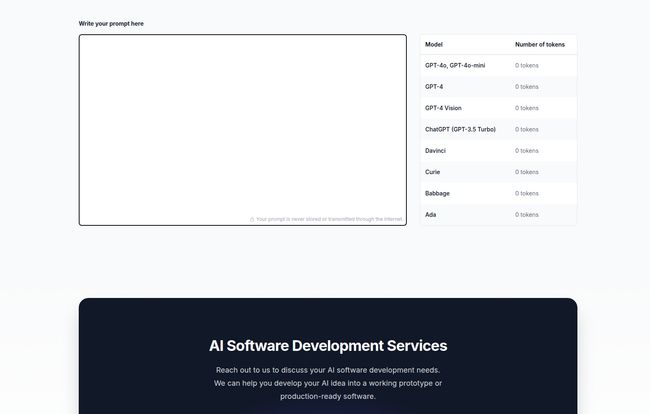
Okay, so here it is. It’s an incredibly straightforward web page. On one side, there’s a big, inviting box that just says, “Write your prompt here.” On the other, a clean list of OpenAI’s greatest hits: GPT-4, GPT-4o-mini, GPT-3.5 Turbo, and even some of the older models like Ada and Babbage.
Visit Prompt Token Counter for OpenAI Models
You just paste your text in, and… that’s it. The numbers next to each model name update in real time. No buttons to click, no captchas to solve, no annoying sign-up popups. It’s beautiful in its simplicity.
I can instantly see that my 500-word prompt is exactly 620 tokens for GPT-4 but maybe 618 for another model. This instant feedback is, frankly, a game-changer for my daily workflow.
Why This Little Tool Punches Above its Weight
I know what you’re thinking. ‘It’s a counter. Big deal.’ But the value is in what it prevents. It’s a seatbelt. It’s a smoke detector. It’s the boring-but-critical piece of kit that saves you from disaster.
It’s All About the Benjamins (and the Context Window)
As an SEO who experiments with AI for content outlines, meta description variants, and keyword clustering, I often work with large amounts of text. Before, I’d throw a whole article at the API for summarization and just pray it fit. Now, I paste it into the counter first. If its too long, I know I need to chunk it into two separate API calls. This single step has probably saved me a non-trivial amount of money by preventing failed calls and optimizing the input I send.
It’s about working smarter. You can fine-tune your prompts, cutting out a redundant phrase here or a wordy sentence there, and literally watch the token count drop. You start to get a feel for the ‘weight’ of your words.
The Magic Word: Privacy
Here’s the part that really sold me. At the bottom of the page, there’s a little note: ‘Your prompt is never stored or transmitted through the internet.’
Let that sink in. The counting happens right there in your browser. This is HUGE. I’m often working with client data or proprietary content strategies. The last thing I want to do is paste that sensitive info into some random online tool that might be logging everything. With this tool, I have peace of mind. It’s as secure as typing into a local text file. This focus on privacy is something I wish more web utilities would adopt.
So Simple, It’s Perfect
In a world of bloated software and endless feature creep, there’s a certain elegance to a tool that does one thing and does it perfectly. This token counter doesn’t try to be a full-fledged ‘prompt optimization suite’. It doesn’t offer suggestions or grammar checks. It’s a digital ruler. And sometimes, a ruler is all you need.
Okay, It Isn’t Perfect. But That’s Fine.
Look, no tool is without its flaws, and I’m not going to pretend this one is magic. For starters, it is just a counter. It won’t help you with the creative part of prompt engineering—it won’t tell you how to shorten your text, just that you need to. It’s a diagnostic tool, not a cure.
And, of course, being a webpage, you do need an internet connection to load it in the first place. A minor quibble, but a quibble nonetheless. Some might argue that developers can just use the `tiktoken` library from OpenAI directly in their code. And they’re right! But for marketers, writers, and everyday tinkerers like myself, having a quick, visual web tool is infinitely more convenient than running a Python script.
My Daily Workflow with the Token Counter
I find myself using it in two main scenarios.
First, when I’m preparing a long document for analysis. Let’s say I have a 10,000-word transcript I want to summarize. I know that’s way too big for a single prompt. I’ll open the transcript and the token counter side-by-side. I’ll copy and paste chunks into the counter until I hit just under the model’s limit (leaving room for the response!), then I feed that chunk to the API. It makes the whole process methodical instead of chaotic.
Second, when I’m fine-tuning a complex system prompt for a chatbot or a content generator. These prompts are dense with rules and instructions. I’ll tweak a sentence, change a word, remove a comma, and watch the token count. It becomes a game of efficiency, trying to pack as much clear instruction into as few tokens as possible.
A Small Tool for a Big Job
In the grand scheme of AI, a token counter seems like a tiny, insignificant thing. But in practice, it’s one of those quality-of-life improvements that makes a real difference. It saves time, it saves money, and it saves you from the headache of unexpected errors.
It’s a simple, private, and effective utility that respects the user. For anyone regularly working with OpenAI models, whether through the API or just experimenting in ChatGPT, I cant recommend it enough. Go bookmark it. You’ll thank me later.
Frequently Asked Questions
- Is this online token counter free to use?
- Yes, based on my experience and what’s shown on the site, the tool is completely free. There are no hidden costs or premium versions mentioned.
- How does it ensure my data is private and secure?
- The tool states that it performs all the token counting directly in your web browser. This means your prompt text is never sent over the internet to their servers, making it a very secure option for sensitive information.
- Which specific OpenAI models does this counter support?
- It supports a wide range of popular models, including GPT-4, GPT-4o-mini, GPT-4 Vision, ChatGPT (GPT-3.5 Turbo), and older models like Curie, Babbage, and Ada. It’s great for checking compatibility across different options.
- Can I use this to check token counts for models like Google Gemini or Anthropic’s Claude?
- No, this tool is specifically designed for OpenAI’s tokenization method. Other AI companies use different methods for tokenizing text, so the counts would not be accurate for their models.
- Why is the token count different from my word count?
- This is because of how tokenization works. A single token doesn’t always equal a single word. Simple words might be one token, but longer or less common words can be broken into several tokens. Punctuation and spaces also count, which is why the token count is often higher than the word count.
- Will this tool help me reduce my prompt’s token count?
- Not directly. It’s a measurement tool, not an editing tool. It will show you your current token count, but it’s up to you to revise your text to make it more concise and reduce the count.
Reference and Sources
- OpenAI’s official documentation on tokenization.
- OpenAI’s API pricing page.


