
Categories: AI Chatbot, AI Code Assistant, AI Grammar Checker, AI PDF, AI Productivity Tools, AI Rewriter, AI Summarizer, AI Translate, AI Writing Assistants
PromptBoom Review: An AI Swiss Army Knife for Creators?

My browser’s bookmark bar is a graveyard of ‘game-changing’ AI tools. Each one promised the world, got used maybe twice, and now just sits there, a digital ghost of subscriptions past. The AI gold rush is real, and frankly, so is the subscription fatigue that comes with it. My wallet can only stretch so far.
So when another “all-in-one” platform landed on my radar, my first reaction was, naturally, a skeptical eye-roll. We’ve seen this movie before, haven’t we? But this one, PromptBoom, had a couple of things that made me pause and actually take a closer look. And you know what? I’m glad I did.
So What Exactly is PromptBoom?
Imagine if you took a handful of your most-used AI tools—a chatbot, a writer, a summarizer, a translator—and bundled them all together under one roof and one single, very reasonable bill. That’s the core idea behind PromptBoom. It’s not trying to invent a completely new type of AI; it’s trying to solve a different problem: the overwhelming clutter and cost of the current AI ecosystem.
It’s like a Swiss Army knife. You might have a dedicated, top-of-the-line screwdriver in your workshop, but it’s the pocket knife that you end up using every single day because it’s just… there. Convenient. That’s the feeling I get from this platform.
A Look Inside the AI Toolbox
Alright, let’s pop the hood and see what we’re working with. PromptBoom has branded its tools with a ‘Power’ prefix, which is a bit on the nose, but I get it. They’re meant to be workhorses for content folks, developers, and students.
Visit PromptBoom
The Core Writing and Chat Suite
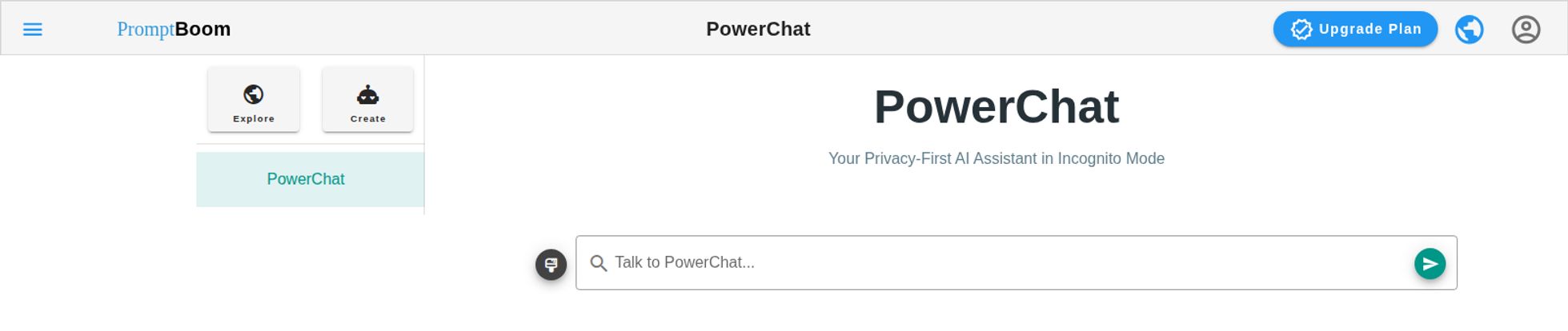
At the center of it all is PowerChat. The interface is clean, no-nonsense. It’s your standard AI assistant, a private brainstorming buddy you can throw ideas at without judgment. It feels like a ‘privacy-first’ approach which is a nice touch in today’s world of data-hungry tech.
Then you have the writer’s corner, which is where I spent most of my time. It includes PowerWriter for drafting content, PowerRewrite for when your first draft sounds like a robot wrote it (the irony), PowerSummarizer for tackling those massive reports you were supposed to read yesterday, and PowerGrammarFix because even the best of us mix up their/they’re/there sometimes. Seriously. No shame.
The Niche and Nerdy Tools
This is where it gets more interesting. Beyond the basics, there are some specialized tools that caught my eye. PowerTranslate is self-explanatory but incredibly useful. The PowerCodeExplainer is a gem for people like me who dabble in code but aren’t hardcore developers. You can drop in a snippet of code that looks like ancient hieroglyphics, and it will explain it in plain English. That alone has saved me hours of confused searching on Stack Overflow.
And then there’s the PowerTelegram integration. I’ll be honest, I didn’t think I’d care about this, but it’s surprisingly slick. Being able to access these tools directly in a Telegram chat on my phone has been a game-changer for on-the-go productivity. Firing off a quick query to rephrase an email before hitting send is just… easy.
The Big Question: What’s the Price Tag?
Okay, let’s talk money. Because at the end of the day, that’s what it all comes down to. A great tool at a terrible price is still a terrible deal. I appreciate that PromptBoom keeps things simple with a two-tier system. No confusing enterprise levels or hidden fees that I could spot.
| Plan | Price | Key Features |
|---|---|---|
| Free | $0 / month | Access to all AI tools, 5 free messages per day, Standard AI models. |
| Pro | $15 / month (discounted from $20) | No daily limits, Advanced AI models, faster response, priority support, and early access to new features. |
The free plan is exactly what it should be: a test drive. With only 5 messages a day, you’ll hit that limit before your first coffee is done. It’s enough to get a feel for the interface and see if you like the workflow, but it’s not for getting any real work done. The real value is in the Pro plan. Fifteen bucks a month is… pretty darn good. When you consider that a dedicated AI writer like Jasper can run you $40+ and a premium grammar tool is another $10-20, the math starts to look very attractive.
My Honest Take: The Good and The Not-So-Good
I’ve been in the SEO and content game for a long time, and I’ve learned that no tool is perfect. It’s all about finding the right fit for your specific needs.
The Advantages
The biggest win here is the value proposition. One subscription to rule them all (or at least, most of them) is a huge relief for my business expenses. The sheer variety of tools is also a major plus. Instead of having five tabs open, I can do most of my AI-assisted work in one place. Its also super accessible, with the web app and the Telegram bot covering all bases.
The Downsides
Now, it’s not all sunshine and rainbows. The old saying “a jack of all trades is a master of none” does come to mind. While the tools are good, a hyper-specialized tool might outperform one of PromptBoom’s individual features. The quality of the output is also completely dependent on the AI models they are using behind the scenes. The Pro plan promises ‘Advanced AI models,’ which is great, but you are putting your faith in PromptBoom to always be using the best tech. The limitations on the free plan are also quite strict, making it more of a demo than a useable free tool.
So, Who Is PromptBoom Really For?
After playing around with it for a while, I have a pretty clear idea of who would get the most out of this.
- Solopreneurs and Freelancers: If you’re a writer, marketer, or small business owner juggling a million tasks and subscriptions, this could be your new best friend.
- Students: The summarizer, grammar fixer, and translator are a fantastic toolkit for research and writing papers. The price is also student-friendly.
- Casual Coders & Tech Marketers: Anyone who needs to understand or explain code but isn’t a senior developer will love the PowerCodeExplainer.
- The ‘AI-Curious’ User: If you want to explore what AI can do without committing to five different expensive tools, this is the perfect starting point.
If you’re a large enterprise with a need for a highly specialized, fine-tuned AI model for one specific task, you might still want a dedicated solution. But for the rest of us? This is a seriously compelling package.
Frequently Asked Questions
Is PromptBoom really free to use?
Yes, there is a free plan. It gives you access to all the tools but limits you to 5 messages per day. It’s best for trying the platform out before committing to the paid plan.
What’s the difference between ‘Standard’ and ‘Advanced’ AI models?
Generally, ‘Advanced’ models (like GPT-4 and its successors) offer more nuanced, accurate, and creative outputs compared to ‘Standard’ models (like GPT-3.5). For professional-quality content creation, the advanced models on the Pro plan are likely what you’ll want.
Can I cancel my Pro subscription at any time?
While the specifics would be in their terms of service, most modern SaaS platforms like this operate on a monthly or annual subscription model that you can cancel. They also mention a 3-day money-back guarantee, which shows confidence in their product.
Is using an all-in-one platform better than separate AI tools?
It depends on your needs and budget. All-in-one platforms like PromptBoom offer incredible convenience and cost savings. Specialized tools might offer deeper features for one specific function. For most users, the convenience of an all-in-one tool outweighs the niche benefits of specialized software.
How does the Telegram bot work?
You connect your PromptBoom account to their Telegram bot. Once connected, you can send commands directly in a chat window on your phone or desktop to use the AI tools, like asking it to translate text, explain code, or write a short paragraph.
My Final Thoughts on PromptBoom
I came in skeptical, and I’m leaving pleasantly surprised. PromptBoom isn’t trying to be the most groundbreaking, revolutionary AI ever created. Instead, it’s taking a practical, user-focused approach to a real problem: tool overload. It’s a well-designed, affordable, and incredibly useful AI toolkit.
Is it perfect? No. But it’s a powerful ally for anyone looking to streamline their workflow, save some money, and get more done. It has certainly earned a permanent spot in my browser’s bookmark bar—and that’s the highest praise I can give.


