
Categories: AI Agent, AI Developer Tools, Large Language Models (LLMs), Prompt Engineering
PromptLayer Review: Taming Your GPT Prompts (Finally)

If you’re on a team building anything with Large Language Models, your prompt management system probably started as a Google Doc. Then it became a chaotic Slack channel. Now it’s a jumble of comments in your code, versioned with names like prompt_v3_final_final_for_real.txt. Sound familiar? I’ve seen it a dozen times.
This is the Wild West phase of building with AI, and while it’s exciting, it’s also incredibly messy. Trying to debug, improve, or even just track your prompts can feel like trying to nail Jell-O to a wall. It’s a huge engineering bottleneck.
Every so often, a tool comes along that feels less like a new feature and more like a massive sigh of relief. For teams wrestling with GPT and other LLMs, PromptLayer aims to be that relief. I’ve been kicking the tires on it, and I have some thoughts. This isn’t just a rundown of features; it’s a look at whether this thing can actually solve the hair-pulling problems we face every day.
What Exactly is PromptLayer? (And Why Should You Care?)
At its core, PromptLayer is a piece of middleware. A fancy term, I know. It basically means it sits quietly between your application’s code and OpenAI’s API. Every time your app talks to GPT, PromptLayer is listening, logging, and organizing. Think of it like Google Analytics, but for your LLM calls. Or maybe a better analogy is Git for your prompts. It brings version control, history, and collaboration to the one part of your AI stack that desperately needs it.
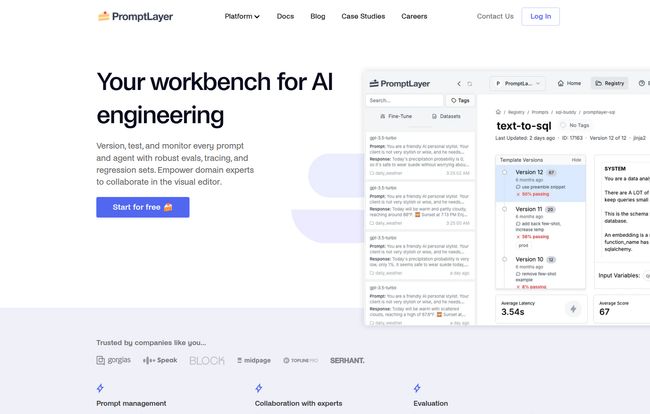
Why should you care? Because prompts aren’t just little bits of text anymore. They are the core logic of your AI features. They are assets. And for a while now, we’ve been treating these critical assets with all the care of a crumpled-up napkin. PromptLayer provides a proper workbench for AI engineering, moving prompt management from a chaotic afterthought to a structured, observable process.
Visit PromptLayer
The Core Features That Actually Matter
A platform can have a million features, but only a few usually make a real difference in your day-to-day. Here’s the stuff in PromptLayer that genuinely caught my eye.
A Single Source of Truth with the Prompt Registry
This is the big one for me. The Prompt Registry is a centralized place to store, manage, and version all your prompts. No more digging through code or asking a teammate for the “latest version” on Slack. Everything lives in one dashboard. You can see the history of a prompt, who changed what, and when. It’s version control, plain and simple.
Even better, it includes a no-code editor. This is huge. It means your product manager, a UX writer, or a marketing specialist can refine prompts without ever needing to touch the codebase or bother an engineer. It breaks down the silo between the technical and non-technical folks, which is a massive win for moving faster.
See Everything with LLM Observability
Flying blind is one of the scariest parts of deploying LLM-powered features. Is it working? Is it costing a fortune? Is one weird user input causing it to spit out gibberish? PromptLayer’s observability tools give you the dashboard you’ve been missing. You can search your entire request history, monitor usage and costs, track latency, and identify which prompts are performing well (and which are failing miserably). It’s about turning mysteries into data points. When a user complains that teh AI gave a weird answer, you can actually go back and see the exact API call, the model used, and the response it generated. That’s not just useful; it’s essential for debugging and building trust in your product.
Stop Guessing and Start Testing
Improving prompts has historically been a very unscientific process. You tweak a word here, rephrase a sentence there, and sort of… hope for the best. PromptLayer introduces proper testing protocols. You can run A/B tests between two different prompt versions to see which one performs better against real-world data. You can run historical backtests to see how a new prompt candidate would have performed on past requests.
My personal favorite is the regression testing. When you have a new prompt you think is better, you can automatically test it against a ‘golden set’ of examples to make sure it doesn’t break things that were already working perfectly. This prevents that awful “one step forward, two steps back” dance that often comes with prompt updates.
The Good, The Bad, and The Complicated
No tool is perfect, right? It’s always a game of trade-offs. Here’s my take on where PromptLayer shines and where you might hit a few bumps.
The good stuff is obvious. It brings order to chaos. It enables non-engineers. It lets you make data-driven decisions about your prompts. It fundamentally decouples prompt deployment from code releases, which means your team can iterate and improve prompts on the fly. That is a game-changer for agility.
On the other hand, it’s not a magic wand. You still have to integrate it into your codebase. While it’s just a couple of lines of code, it’s still a step that needs to be taken. For some legacy systems, that might be a hurdle. There’s also a potential learning curve. To get the most out of the evaluation and testing suites, your team will need to invest time in learning the platform. And finally, you’re introducing a dependency on a third-party platform. For some organizations, that conversation around data privacy and platform lock-in is a serious one, though PromptLayer does seem to take privacy and security seriously.
So, How Much Does This Magic Cost?
Here’s a fun little bit of real-time reporting for you. As of writing this, their pricing page seems to be… well, a 404 error. Whoops! Happens to the best of us.
However, the main page prominently features a “Get started for free” button, which is great news. Most tools in this space operate on a tiered model. I would expect to see a free tier for individual developers or small projects, a team plan with collaboration features, and a custom enterprise plan for large-scale needs. But that’s just my educated guess. For the real numbers, you’ll have to head over to their site and see what they’ve put up by the time you read this.
Who is PromptLayer Really For?
If you’re a solo developer just tinkering with the OpenAI API for a weekend project, PromptLayer is probably overkill. But that’s not who it’s for.
This platform is built for teams. It’s for startups and established companies that are building, shipping, and maintaining products where LLMs are a core component. It’s for any organization where you have engineers, product managers, and other stakeholders who all need to have a say in how the AI behaves. The fact that companies like Substack and Yac are using it, as shown on their site, tells you the kind of scale it’s designed to handle.
If your prompts are a critical business asset, you need a system to manage them. Period.
Frequently Asked Questions about PromptLayer
Is PromptLayer just for OpenAI models?
While it was built with OpenAI’s API as a primary focus, many such platforms are expanding to support other models like those from Anthropic (Claude), Cohere, or even open-source models. It’s best to check their latest documentation for a full list of supported providers.
Can non-technical users really use PromptLayer?
Absolutely. That’s one of its biggest strengths. The no-code prompt editor and the analytics dashboard are designed to be accessible to product managers, analysts, and writers, allowing them to contribute directly without needing to go through an engineer.
How hard is the integration process?
The basic integration is typically straightforward, often just requiring a couple of lines of code to wrap your existing API calls. However, to leverage advanced features like metadata logging and evaluation, you might need a bit more setup. It’s not plug-and-play, but it’s far from a complete system overhaul.
Does PromptLayer store my sensitive data?
This is a critical question for any third-party tool. PromptLayer acts as a proxy, so it does see your requests and responses. They mention a “high bar for privacy and security,” and companies in this space usually offer options for data redaction or on-premise deployments for enterprise clients. You should always review their specific privacy policy.
Is there a free plan to get started?
Yes! Their website explicitly says you can “Get started for free.” This likely provides a great way to test the core functionality and see if it’s a good fit for your team before committing to a paid plan.
My Final Verdict
The era of treating prompt engineering like a dark art is ending. As AI becomes more embedded in our products, we need professional tools and workflows. PromptLayer is a strong contender for being the standard for prompt management and observability.
It’s not just about keeping things tidy; it’s about enabling collaboration, moving faster, and building better, more reliable AI products. For my money, any team that’s serious about their AI stack should be looking at a tool like this. The Wild West days are over, and platforms like PromptLayer are building the roads and infrastructure for what comes next. It’s a smart move.


