
Categories: AI Developer Tools, AI Prompt Generator, AI Testing, Large Language Models (LLMs), No-Code&Low-Code, Prompt Engineering
PromptPoint Review: Taming Your LLMs for Good

For the last couple of years, prompt engineering has felt a bit like the Wild West. One minute you’ve struck gold with a prompt that sings, the next, it’s giving you nonsense about squirrels inventing a new form of pasta. Fun, but not exactly scalable.
I’ve lost count of the number of teams I’ve talked to whose ‘prompt management system’ is a chaotic mix of Google Docs, Slack threads, and a text file on a senior dev’s desktop ominously named prompts_final_v7_DO_NOT_DELETE.txt. It’s organized chaos at best. We’re building the future on top of these powerful models, but the way we interact with them can feel… well, primitive. It’s like trying to conduct an orchestra with a broken twig.
So when I saw PromptPoint’s tagline—“Make the non-deterministic predictable”—my ears perked up. That’s the whole ballgame, isn’t it? Taking the chaotic, creative, sometimes frustratingly random nature of Large Language Models (LLMs) and putting some guardrails on it. I had to see what it was all about.
So, What in the World is PromptPoint?
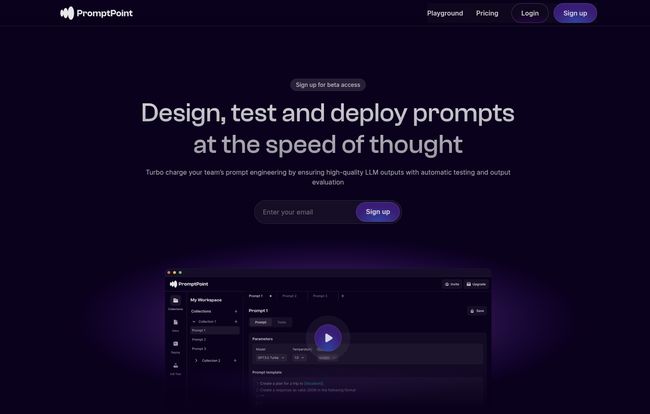
Think of PromptPoint as a command center for your AI prompts. It’s not another AI chatbot or a model itself. Instead, it’s the workbench where you craft, refine, test, and deploy the instructions you give to other AIs, like the various GPT models, Claude, and dozens of others. It’s a dedicated space to stop ‘winging it’ and start engineering your prompts with some actual process and sanity.
The whole idea is to move prompt creation out of messy text files and into a structured environment where you can see what works, what doesn’t, and why. You can build, collaborate, and, most importantly, trust that the prompt you deploy today will behave the same way tomorrow.
Visit PromptPoint
The Features That Made Me Sit Up and Pay Attention
A pretty UI is nice, but as an SEO and a tech nerd, I care about the machinery under the hood. Does it actually solve a real problem? Here’s what stood out to me.
Taming the Chaos with Organization & Versioning
You know that heart-sinking feeling when you had a ‘golden’ prompt that worked perfectly, you tweak it just a tiny bit, and suddenly it’s broken? And you can’t remember the exact wording of the original? PromptPoint tackles this head-on with versioning. It’s basically Git for your prompts. You can experiment freely, knowing you can always roll back to a previous version that worked. For any serious development workflow, this isn’t a luxury; it’s a necessity. It turns your prompts from fragile glass sculptures into well-documented, resilient assets.
Stop Guessing and Start Testing
This is the big one for me. The core of the platform is its automated testing suite. Instead of just running a prompt once and hoping for the best, you can set up test cases and evaluate the LLM’s output against your desired criteria. Is the tone right? Did it include the specific information you asked for? Is the JSON output valid? You can check for all of this automatically across multiple prompts and models.
This systematic approach is a game-changer. It moves you from a subjective “Yeah, that looks good” to an objective, data-backed understanding of your prompt’s performance. You can see latency, cost, and token usage, which is huge for managing your API bills. We all know how quickly those can spiral.
Making AI a Team Sport (Even for Non-Coders)
Here’s another pain point I’ve seen firsthand. The marketers or product managers have the vision for the AI feature, but they have to translate it for the engineers, who then translate it for the AI. It’s a game of telephone. PromptPoint is a no-code platform, meaning the person with the domain expertise—the copywriter, the support specialist—can get in there and build and test prompts themselves. It creates a shared workspace where everyone can collaborate. I’ve seen so many teams struggle with this, its almost a rite of passage in the AI space. Breaking down that barrier between the technical and non-technical folks is a massive win for efficiency and, frankly, for creating better products.
Let’s Talk Money: A Look at PromptPoint’s Pricing
Alright, the all-important question: what’s it going to cost me? I was actually pleasantly surprised here. The pricing structure seems pretty smart and accessible.
| Plan | Price (per month) | Key Features |
|---|---|---|
| Individual | Free | Access to 5 LLMs, prompt organization, testing suite, and usage analytics. Perfect for solo users and getting your feet wet. |
| Team | $20 / user | Everything in Individual, plus team collaboration (up to 20), 50+ LLMs, prompt versioning, and deployment endpoints. |
| Enterprise | Get in touch | Unlimited team members, advanced permissions, A/B testing, and on-premise hosting options for big players. |
The Free tier is genuinely useful. It’s not one of those crippled free plans that’s just a glorified ad. You can actually build and test stuff. For freelancers, students, or just anyone curious, it’s a no-brainer. The Team plan at $20/user feels very reasonable for startups and small-to-medium businesses that are serious about integrating AI into their products.
Who is PromptPoint Really For?
After playing around with it, I see a few key groups getting a ton of value here:
- Startups and Dev Teams: Any team building LLM-powered features needs a system like this yesterday. It will save them headaches and speed up their development cycle significantly.
- Product Managers and Marketers: The no-code interface empowers non-technical team members to contribute directly to the AI’s behavior, leading to better, more aligned outcomes.
- Solo Developers and Creators: The free plan is more than enough to manage prompts for your personal projects or small applications, giving you professional-grade tools without the cost.
My Honest Take: The Good and The Not-So-Good
No tool is perfect, right? Overall, I’m really impressed. PromptPoint is solving a real, tangible problem that almost everyone working with LLMs faces. The focus on testing and versioning is, in my opinion, the right direction for the industry. It’s about adding discipline to the art of prompt design.
The main potential hiccup? As your team grows, the $20/user/month on the Team plan can add up. For a team of 15, that’s $300 a month. You have to weigh that against the time and engineering resources you’d save, which for many will make it a worthwhile investment. The other consideration is platform reliance. By building your workflow around PromptPoint, you are adding another dependency to your stack. That’s not necessarily a bad thing—we do it all the time with tools like GitHub or Jira—but it’s something to be aware of.
Also Read: LangSaaS Review: Build Your AI SaaS Faster?
Frequently Asked Questions about PromptPoint
Do I need to be a developer to use PromptPoint?
Nope! That’s one of its main strengths. The platform has a no-code interface, so product managers, designers, writers, and other non-engineers can create and test prompts without writing any code.
Which Large Language Models does it support?
The Free plan gives you access to 5 different LLMs, while the Team plan opens that up to over 50 models from providers like OpenAI, Anthropic (Claude), Google, and more. This lets you test which model works best for your specific task.
What does ‘prompt versioning’ actually mean?
It’s like a save history for your prompts. Every time you make a significant change, you can save it as a new version. If your new prompt doesn’t perform as well, you can easily go back to an older, better-performing version with one click. It prevents you from losing good work.
Can I use the prompts I build in my own application?
Yes. The Team and Enterprise plans allow you to configure and deploy your tested prompts as an API endpoint. This means your own software can call that endpoint to get a reliable, tested response from the LLM without you having to manage the prompt logic directly in your app’s code.
Is the free plan really free? What’s the catch?
From what I’ve seen, it’s genuinely free for individuals. The limitations are on the number of LLMs you can access (5) and the lack of team collaboration and deployment features. It’s designed to let you learn the platform and handle personal projects effectively. The ‘catch’ is that they hope you’ll love it and upgrade when your needs grow.
A Step Towards a More Mature AI Ecosystem
Tools like PromptPoint feel like a sign of a maturing industry. We’re moving past the initial ‘wow’ phase of LLMs and into the ‘how do we actually build reliable things with this?’ phase. Putting structure, testing, and collaboration around prompt engineering is the next logical step. It’s not just about making one-off magic tricks; it’s about building a repeatable, predictable process.
If you’re tired of the prompt-and-pray method and want to bring some order to your AI development chaos, I’d say giving PromptPoint’s free plan a spin is a very, very good idea. It might just be the command center you didn’t know you needed.


