
Categories: AI Browsers, AI Research Tool, AI Search Engine, Prompt Engineering
Promptsion Review: Is This AI Tool Worth It?

If you’re in SEO, marketing, or any knowledge-based field, your browser is a warzone. A chaotic landscape of half-read articles, Google Docs, keyword research tools, and that one lonely, blinking ChatGPT tab waiting for its next command. I call it “Tab Hell.” We’ve all been there, doing the copy-paste-switch-tab dance until our fingers ache and our focus is shot.
It’s a massive time sink. You find a juicy stat in an article, highlight it, Cmd+C, switch to ChatGPT, Cmd+V, write a prompt like, “Explain this to me like I’m five,” wait, then switch back. Rinse and repeat. It’s clunky. It’s inefficient. And frankly, it’s annoying.
So, when I stumbled upon a Chrome extension called Promptsion, which claimed to be my “personal AI research assistant,” my cynical SEO brain perked up. Another AI tool promising the world? Sure. But this one seemed different. It wasn’t trying to replace my workflow; it was trying to live inside it. So I took it for a spin.
Visit Promptsion
What Exactly is Promptsion?
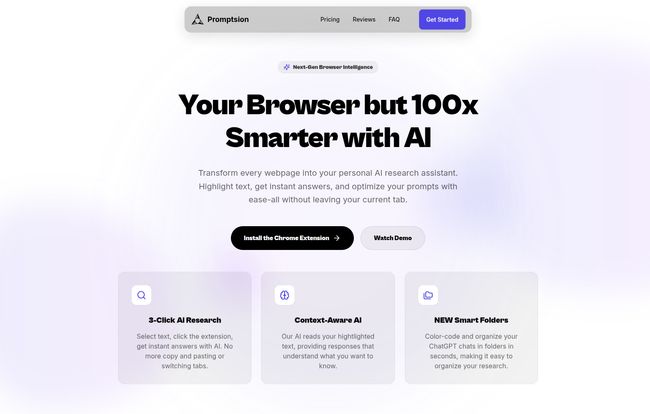
At its core, Promptsion is a Chrome extension that weaves AI directly into your browsing experience. It’s not a separate app you have to open. It’s a sidekick that’s always there, ready to jump in. The whole idea is to stop you from drowning in browser tabs by bringing the power of AI to the page you’re currently on. No more context switching. No more endless copy-pasting. Just highlight some text, click a button, and get what you need.
Think of it as having a tiny, context-aware researcher sitting on your shoulder, ready to summarize, explain or elaborate on anything you’re looking at. Sounds pretty good, right?
Breaking Free from the Research Grind
The daily grind for me often involves sifting through SERPs, competitor blogs, and industry reports. This means a lot of reading and a lot of questions. Promptsion targets this exact pain point with a few clever features that, I have to admit, work surprisingly well.
Instant AI Explanations on Any Page
This is the feature that first got my attention. You’re reading a dense technical document or a complex case study. You come across a paragraph you don’t quite get. Instead of opening a new tab to Google the term or ask ChatGPT for a summary, you just… don’t. You highlight the text, click the Promptsion icon, and a small pop-up gives you a concise, AI-generated explanation. It’s a simple 3-click process: highlight, click, understand. The AI is context-aware, meaning it knows the information is coming from that specific page, which leads to much more relevant answers. A real time-saver.
Becoming a Prompt Whisperer (Without Really Trying)
We all know that the quality of your AI output depends almost entirely on the quality of your input. “Garbage in, garbage out” has never been more true. But who has time to become a full-blown prompt engineer? Promptsion has a killer feature that takes your lazy, one-line prompts and turns them into detailed, structured commands.
For example, I typed a basic prompt: “write code for user authentication.” Promptsion’s AI Prompt Optimizer instantly transformed it into a detailed specification, including features like email/password auth, JWT token management, security requirements like input validation and CSRF protection, and even the preferred tech stack. It’s like having an expert co-writer for your prompts, ensuring you get better, more detailed results from ChatGPT every single time. According to their own stats, it leads to 87% better responses, and I kind of believe it.
Taming the ChatGPT Beast with Smart Folders
My ChatGPT history is a mess. It’s a chaotic, endlessly scrolling list of untitled conversations that are impossible to navigate. Promptsion introduces a feature that OpenAI should have built years ago: smart folders. You can create custom, color-coded folders to organize your chats by project, client, or topic. It’s a simple concept, but the impact on my workflow was immediate. I can now find that one specific conversation about a Q3 content strategy in seconds, instead of endlessly scrolling and guessing. It brings a sense of order to the chaos, which is something my brain desperately craves.
Let’s Talk Money: The Promptsion Pricing Structure
Alright, this is where a lot of tools lose me. But Promptsion’s pricing is pretty interesting, especially with its lifetime deals (LTDs), which are always a soft spot for me. Who doesn’t love paying once and being done with it?
| Plan | Price | Key Features |
|---|---|---|
| Free Plan | $0 | 10 daily prompt optimizations, 500 character limit, 5 prompt history. A good way to test the waters. |
| Basic Lifetime | $49.99 (one-time) | Unlimited prompt engineering, 50 daily AI searches, full history, 10k character limit, and the all-important folder organization for 3 ChatGPT accounts. |
| Pro Lifetime | $99.99 (one-time) | Everything in Basic, plus unlimited AI searches, no character limits, and priority processing. This is for the power users. |
For me, the Basic Lifetime plan hits the sweet spot. For a one-time payment that’s less than a nice dinner out, you get the core features that make Promptsion so useful, especially the folder organization. The free plan is fine for a quick look, but the limits are too restrictive for any serious work.
The Real Scoop: Pros and Cons
No tool is perfect. After using Promptsion for a while, here’s my honest breakdown.
What I Genuinely Like
The time-saving aspect is undeniable. The friction of research is just… gone. It feels much more fluid. The prompt enhancement is a genuine game-changer for getting better AI outputs, and the ChatGPT folder system is the organizational tool I didn’t know I needed so badly. It’s incredibly easy to get started—you install the extension and you’re pretty much good to go.
What Could Be Better
The biggest drawback for some will be that it’s a Chrome extension only. If you’re a die-hard Firefox or Safari user, you’re out of luck for now. Also, the most powerful features, like the unlimited folders and full prompt history, are locked behind the paid plans. While the free plan gives you a taste, its limitations on characters and daily use make it more of a demo than a truly usable free tool.
So, is Promptsion Worth It?
In my opinion? Yes, absolutely. Especially if you’re a researcher, writer, student, developer, or digital marketer who spends a significant amount of time wrangling information online and interacting with AI.
If the time you save in just one week is worth more than the $50 for a lifetime plan, then it’s a no-brainer. It’s a small investment for a significant boost in day-to-day productivity. It doesn’t try to reinvent the wheel; it just puts some high-performance tires on the car you’re already driving. And sometimes, that’s all you need.
Frequently Asked Questions
What is Promptsion in simple terms?
Promptsion is a Google Chrome extension that acts like an AI assistant for your browser. It lets you get instant explanations of text on any website, improves your prompts for ChatGPT, and helps you organize your ChatGPT conversations into folders.
How does Promptsion improve my ChatGPT experience?
It improves ChatGPT in two main ways. First, its Prompt Optimizer turns your simple questions into detailed, expert-level prompts, giving you better answers. Second, it adds a folder system to your ChatGPT interface, so you can organize all your conversations by project or topic, making them easy to find later.
Is there a completely free version of Promptsion?
Yes, there is a free plan. It’s quite limited, offering only 10 prompt optimizations per day and a 500-character limit. It’s best for trying out the basic functionality before deciding to upgrade.
Is Promptsion a monthly subscription or a one-time purchase?
This is one of its biggest selling points. Promptsion offers lifetime deals (LTDs), meaning you pay once for the Basic or Pro plan and own it forever. There are no recurring monthly fees.
Does Promptsion work on browsers other than Chrome?
Currently, Promptsion is only available as a Chrome extension. There’s no word yet on support for other browsers like Firefox, Safari, or Edge.
Who is the ideal user for Promptsion?
It’s ideal for anyone who does a lot of online research and uses AI tools like ChatGPT regularly. This includes students, researchers, writers, SEO professionals, developers, and marketers who want to speed up their workflow and get more organized.
Conclusion
Tools like Promptsion represent the next logical step in our relationship with AI. It’s not about a standalone chatbot anymore; it’s about integrating this intelligence seamlessly into the things we already do. Promptsion isn’t flashy, but it’s a workhorse. It smooths out the rough edges of a modern, AI-assisted workflow and just lets you get on with your work, only faster and a little bit smarter. For me, it has earned a permanent spot on my Chrome toolbar.


