
Categories: Other
PythonAnywhere Review: Is It The Best Cloud IDE?

If you’ve been in the development world for more than a week, you’ve known the pain. The wrestling match with virtual environments, the cryptic dependency conflicts, the sheer headache of trying to get a simple Flask app running on a server that seems to actively hate you.
I’ve lost count of the hours I’ve poured into just setting up the playground before I can even start playing. It’s a rite of passage, I guess, but one I’d happily skip. So when a tool comes along promising to burn that whole frustrating process to the ground, my ears perk up. That’s the promise of PythonAnywhere: a place to host, run, and code Python, all from the cozy comfort of your web browser.
But is it just a gimmick for beginners, or is there some real substance here for seasoned coders and SEOs like me who need to spin up scripts and tools on the fly? I’ve been kicking the tires on it for a while now, and it’s time to lay it all out.
So, What Is PythonAnywhere, Really?
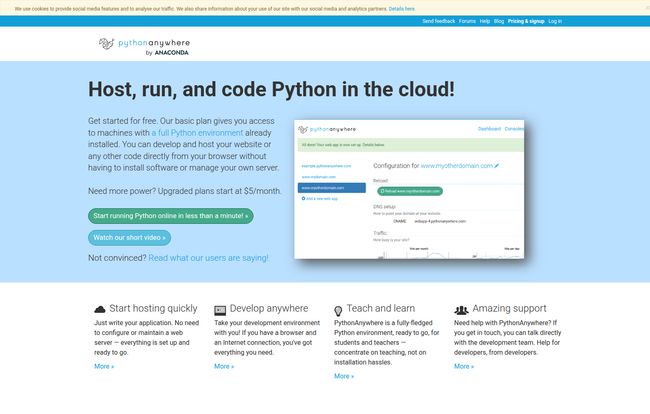
At its heart, PythonAnywhere is a cloud-based platform that gives you a complete Python environment without you having to install a single thing. Think of it like a ready-to-go Linux computer living on the internet, pre-loaded with all the Python goodies you’d want. You access it through their website. You can write your code there, run it there, and even host a live website there.
It completely removes the server management part of the equation. You don’t need to worry about applying security patches, configuring Nginx, or figuring out why your WSGI server is throwing a 502 error at 3 AM. It’s a platform as a service (PaaS) designed specifically for Python developers, and its main selling point is simplicity. And frankly, in a world of overly complex cloud dashboards, simplicity is a feature I’m willing to pay for.
Visit PythonAnywhere
The Standout Features That Actually Matter
A feature list is just a list. What matters is how those features solve real problems. Here’s what stood out to me during my time with the platform.
In-Browser Coding and a Live Bash Console
This is the magic trick. Being able to open a browser tab on any computer—a library PC, a Chromebook, my friend’s laptop—and have immediate access to a full-fledged Bash console and a decent code editor is, well, awesome. I once had to make an emergency fix to a client’s web scraping script while I was on a train, using my tablet. PythonAnywhere made that possible. The editor itself isn’t going to replace your beloved VS Code or PyCharm setup, let’s be clear. But for quick edits, development, and general tinkering, it’s more than capable. It has syntax highlighting, code formatting, and all the basics you need. It feels less like a toy and more like a genuinely useful utility belt.
Web Hosting That Doesn’t Make You Cry
If you’ve ever tried to deploy a Django or Flask app from scratch on a bare VPS, you know the pain. You have to configure Gunicorn or uWSGI, set up Nginx as a reverse proxy, handle SSL certificates… it’s a whole thing. PythonAnywhere abstracts most of that away. You create a new “Web App,” point it to your code, and it just… works. It handles the WSGI configuration behind the scenes. For a small to medium-sized project, a personal blog, or an internal tool, this is an absolute godsend. It’s also great for SEOs who need to host small, specific tools, like a log file analyzer or a keyword clustering app, without spinning up a whole new server.
Scheduled Tasks Without the Cron Job Confusion
Cron jobs are powerful but notoriously finicky. Getting the syntax right and making sure the environment is correct can be a pain. PythonAnywhere has a ‘Tasks’ section that is basically cron for humans. You pick a time, paste in the command to run your Python script (`python /home/yourusername/myscript.py`), and you’re done. This is incredible for automation. I use it to run daily scripts that check competitor SERPs, pull data from Google Analytics API, or send me a weekly report. It’s reliable, easy to set up, and one of my favorite features.
Who Is This Platform Built For?
PythonAnywhere isn’t trying to be an AWS killer. It has a very specific and, in my opinion, very well-served audience.
The Student and the Educator
This is a no-brainer. The platform’s documentation even highlights its use in education. The ability to give every student the exact same, pre-configured environment is a game-changer for teachers. No more “it’s not working on my Windows/Mac/Linux machine” excuses. Everyone is on a level playing field, which means you can focus on teaching Python, not debugging installations.
The Hobbyist and the Tinkerer
Got a cool idea for a weekend project? A Twitter bot, a personal finance tracker, a little API for a mobile app you’re building? PythonAnywhere is perfect for this. It lets you get from idea to a running, publicly accessible application in record time. The friction is so low that it encourages experimentation, which is what side projects are all about.
The Prototyping Professional
For me, this is the sweet spot. When I have an idea for a new SEO tool or a data dashboard for a client, I don’t want to provision a full server and set up a CI/CD pipeline right away. I want to build a quick and dirty prototype to see if the idea has legs. I can build and deploy a functional proof-of-concept on PythonAnywhere in an afternoon, share the URL with a client, and get feedback immediately. If it takes off, I can always migrate it to a more robust infrastructure later. It’s the ultimate rapid-prototyping tool.
Let’s Talk About the Price Tag
This is often the dealbreaker, but PythonAnywhere gets it right. They have a very generous free plan. It’s limited, of course. You get lower CPU allowances (what they call ‘CPU seconds’), your web apps run on a shared `yourusername.pythonanywhere.com` domain, and scheduled tasks can only run once a day. But for learning or running a very small, non-critical script? It’s fantastic.
Then there’s the first paid tier, the “Hacker” plan, at $5/month. For the price of a fancy latte, you get way more CPU power, the ability to host your own domain (e.g., `www.yourcoolproject.com`), and more flexibility with scheduled tasks. This plan can easily support a website with up to 10,000 hits a day, which is more than enough for most personal projects, blogs, and internal business tools. For me, the $5 plan is one of the best bargains in the developer tool space. It provides immense value.
| Plan | Price | Key Benefit |
|---|---|---|
| Beginner (Free) | $0 / month | Perfect for learning and tiny scripts. Limited CPU. |
| Hacker | $5 / month | Host custom domains, much more power, supports a decent traffic website. |
The Not-So-Perfect Parts
No tool is perfect, and it would be dishonest to pretend otherwise. While I genuinely like PythonAnywhere, there are a few things to keep in mind. The free tier can feel sluggish, especially if your script is doing any heavy lifting. That’s by design, to encourage you to upgrade. Also, while it’s perfect for 90% of web apps, if you need something outside the standard WSGI setup or require a specific database version they dont support, you might run into a wall. It’s a managed environment, which means you trade some control for convenience. You can’t just `sudo apt-get install` whatever you want.
So, What’s the Verdict?
After all is said and done, PythonAnywhere has earned a permanent spot in my toolkit. It doesn’t replace my local development setup, nor does it replace AWS for my large, high-traffic client sites. But it fills a crucial gap in between. It’s my go-to platform for quick prototypes, automated SEO scripts, and small personal projects.
It’s the embodiment of the “get it done” attitude. It removes the boring, tedious parts of development and lets you focus on what you actually want to do: write Python code. If you’re a student, a hobbyist, or a professional who needs a no-fuss way to run Python in the cloud, I can’t recommend it enough. Give the free plan a shot. You have nothing to lose but your server configuration headaches.
Frequently Asked Questions
- What is PythonAnywhere used for?
- It’s primarily used for hosting Python-based websites (using frameworks like Django, Flask, or Bottle), running Python scripts in the cloud, and scheduling automated tasks. It’s also widely used as a learning environment because of its simplicity.
- Is PythonAnywhere good for beginners?
- Absolutely. It’s one of the best platforms for beginners because it eliminates the need for complex setup and server management, allowing new coders to focus entirely on writing Python code and seeing it work online.
- Can I host a real website on PythonAnywhere?
- Yes, you can. With a paid plan (starting at $5/month), you can connect your own custom domain name (like www.yourwebsite.com) and host a site capable of handling significant traffic. Many small businesses and personal blogs run happily on PythonAnywhere.
- How much does PythonAnywhere cost?
- It has a free “Beginner” plan with some limitations. The first paid tier is the “Hacker” plan at $5/month, which offers much more power and the ability to host custom domains. Higher-priced plans are available for applications that need even more resources.
- Can I use libraries like Pandas or NumPy on PythonAnywhere?
- Yes! PythonAnywhere comes with a huge number of popular libraries pre-installed, including NumPy, SciPy, Pandas, Scikit-learn, Requests, and many more. They call this their “batteries-included” approach.
- Is PythonAnywhere better than a VPS or Heroku?
- It’s not about being better, it’s about being different. It’s simpler than a VPS but offers less control. Compared to Heroku, its focus is more tightly on the Python ecosystem and it’s often praised for its straightforward pricing and ease of use, especially for those who want a persistent file system and simple scheduled tasks.


