
Categories: AI Document Extraction, AI Question Generator, AI Quiz Generator, AI Teachers
Quizdom AI Review: The Future of Assessment Creation?

If you’re an educator, trainer, or anyone who has to create and grade assessments, you know the grind. It’s the part of the job nobody glamorizes. The late nights, the mountain of papers (digital or otherwise), and that sinking feeling that you’re spending more time on admin than on actual teaching. Then, 2023 happened, and the whole world discovered ChatGPT. Suddenly, our classic assessment methods felt… well, a bit outdated. It became a whole new game of cat and mouse.
I’ve been in the trenches of digital marketing and tech trends for years, and I’ve seen countless tools promise to be the next big thing. So when I came across Quizdom AI, a platform that claims to build fast, reliable assessments for the age of AI, my curiosity was definitely piqued. Is this the answer to the modern educator’s prayer, or just another shiny object? I decided to take a proper look.
So What’s the Fuss About AI in Assessments?
The rise of generative AI has been a double-edged sword for education. On one hand, it’s an incredible research tool. On the other, it’s made it ridiculously easy for students to generate answers without really learning the material. This has sent a lot of us scrambling for ways to create assessments that test actual understanding, not just a student’s ability to copy-paste a prompt.
This is where the idea of an “AI-resistant” question comes in. We’re talking about questions that require critical thinking, synthesis, and application—things that AI, for all its power, still struggles with. The goal isn’t to ban AI, but to work smarter than it. And that, my friends, is the exact problem Quizdom AI says it can solve.
A First Look at Quizdom AI: My Initial Thoughts
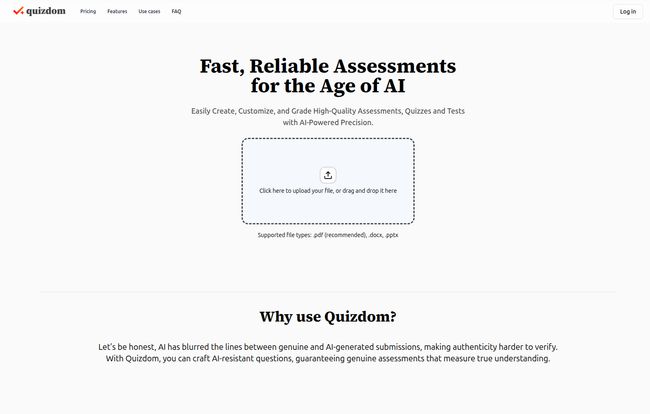
Hopping onto the Quizdom AI website, my first impression was… clean. It’s not cluttered with a million buttons or confusing jargon. The premise is refreshingly simple: you feed it your content—lecture notes, a research paper, a textbook chapter, you name it—and its AI gets to work generating questions based on that material. It’s like having a teaching assistant who actually read the textbook, for once.
Visit Quizdom AI
The platform supports a bunch of file types, like PDFs, DOCX files, and even direct text input. This flexibility is a huge plus right out of the gate. You don’t have to reformat all your existing materials just to use the tool. It’s clearly built for busy people—educators, corporate trainers, and as they say, “everyone in between.”
The Features That Actually Matter
A tool can look pretty, but it’s the engine under the hood that counts. Let’s break down what Quizdom AI actually does.
Intelligent Content Understanding and Question Generation
This is the core magic trick. The AI scans your document and pulls out key information to create relevant questions. I uploaded a 10-page article on Google’s SEO ranking factors, and in less than a minute, it spat out a series of multiple-choice and short-answer questions. Some were simple recall, but I was pleasantly surprised that a few required connecting different concepts from the text. Of course, the old saying “garbage in, garbage out” applies here. If your source document is a mess of rambling notes, the questions won’t be as sharp. A well-structured document is your best bet for getting quality results.
Creating Questions That Make Students Think
This is Quizdom AI’s biggest selling point: creating AI-resistant questions. It aims to generate higher-order questions that can’t be easily answered by a quick query to a chatbot. In my testing, this worked… to a point. It’s not a perfect system, and I found myself wanting to tweak the wording on a few questions to make them a bit more challenging. But that’s the thing—it’s not meant to be a full replacement for a teacher’s brain. I see it more as a powerful brainstorming partner. It gets you 80% of the way there, saving you hours of work, and you just provide the final 20% of human polish. That’s a trade I’ll take any day.
Flexible Customization and Sharing
Once the questions are generated, you’re not stuck with them. You can edit every question, add your own, or delete the ones you don’t like. This customization is critical. You can then export the whole thing as a PDF or DOCX file, which is perfect for printing or uploading to your school’s learning management system like Canvas or Moodle. You can also publish the assessment directly on the Quizdom platform and share a link with your students. It’s a nice, simple workflow.
The Grading Gauntlet and AI Assistance
And now, for every teacher’s least favorite word: grading. Quizdom AI offers smart, AI-assisted grading. For multiple-choice, it’s instant and accurate. For short-answer questions, it uses the source document to check for accuracy. It’s a huge time-saver, but I’d still recommend giving the short answers a quick human review, especially for more nuanced topics. Think of it as a reliable first pass that catches the obvious stuff, freeing you up to focus on giving more meaningful feedback.
Let’s Talk Money: The Quizdom AI Pricing
Okay, the part everyone’s waiting for. How much does this magic cost? Honestly, it’s surprisingly affordable. The pricing model is based on credits, where generating questions and grading submissions uses a certain number of credits.
| Plan | Price | Credits | Good For |
|---|---|---|---|
| Free | $0 | 50 credits | Trying it out, no strings attached |
| Plus | $5 / month | 200 credits | Regular use for a single class or small projects |
| Pro | $7 / month | 350 credits | Heavy users, multiple classes, or professionals |
My take? The free tier is genuinely useful. 50 credits is more than enough to create a few quizzes and get a real feel for the platform. For my money, the $5 Plus plan is the sweet spot for most teachers. It’s less than the price of two fancy coffees a month. The credit system is something to be aware of, as it means usage isn’t unlimited, but the costs are so low that it feels very reasonable for the value provided.
The Good, The Bad, and The Realistic
Where Quizdom AI Really Shines
The biggest win here is time. The hours you’d spend poring over texts to craft thoughtful questions can be condensed into minutes. It’s a massive efficiency boost. I also genuinely appreciate its focus on authentic assessment in an AI world. It’s a tool that’s not running from the new technology but adapting to it. The interface is clean, the price is right, and it solves a very real, very annoying problem.
A Few Things to Keep in Mind
It’s not a silver bullet. As mentioned, the quality of the output depends heavily on the quality of your input. And you should still act as the final editor. The AI is an assistant, not an autonomous employee. You are still the expert in your subject matter, and your final touch is what makes an assessment truly great. The credit-based system also means you have to be mindful of your usage, but again, the plans are pretty generous.
Who is Quizdom AI Actually For?
The obvious answer is teachers and university professors. It’s a no-brainer for anyone managing a classroom. But I think its reach is wider. Corporate trainers can quickly create knowledge checks for new hires or annual compliance training. Tutors can generate practice tests for their students. I could even see motivated students using it to create their own study guides from their notes—talk about active learning!
The Final Verdict: Is Quizdom AI Worth Your Time?
After spending some quality time with the platform, my answer is a resounding yes. Quizdom AI is a smart, well-designed, and timely tool that understands the modern challenges of assessment. It doesn’t try to replace the educator; it empowers them. It acts as a safety net, not a hammock, taking care of the tedious grunt work so you can focus on the more human elements of teaching.
Is it perfect? No, but it’s pretty darn good. Given that you can try it for free with no credit card required, there’s absolutely no reason not to give it a spin. Go upload a document and see what it cooks up. You might just get your weekends back.
Frequently Asked Questions
- How does the credit system work in Quizdom AI?
- You use credits for specific actions, mainly generating a set of questions from a document or grading student submissions. The Free plan starts you with 50 credits, and you can buy more with the Plus ($5 for 200) or Pro ($7 for 350) plans.
- What file types can I upload?
- Quizdom AI is pretty flexible. It accepts common formats like PDF and DOCX, and you can also copy and paste text directly into the platform, which is great for using online articles or other digital content.
- Are the AI-generated questions always perfect?
- They are surprisingly good, but not always perfect. It’s best to think of the AI as a highly efficient assistant. You should always give the questions a quick review to tweak wording, check for nuance, and ensure they perfectly match your learning objectives. A little human oversight goes a long way.
- Can I use Quizdom for corporate training?
- Absolutely. It’s a fantastic tool for corporate trainers who need to quickly develop knowledge checks, compliance quizzes, or onboarding assessments from training manuals or policy documents.
- What happens if I run out of credits?
- If you’re on the free plan, you’ll need to upgrade to a paid plan to get more credits. If you’re on a paid plan and run out, your credits will refresh when your subscription renews the next month. You can always upgrade to a higher tier if you find you need more regularly.
- Is Quizdom AI difficult to learn?
- Not at all. The user interface is one of its strong points. It’s very intuitive and straightforward. You can go from signing up to creating your first quiz in just a few minutes without needing to watch lengthy tutorials.
Conclusion
In a world where technology often adds more complexity to our lives, it’s refreshing to find a tool that genuinely simplifies a difficult task. Quizdom AI hits that sweet spot between powerful functionality and user-friendly design. It’s a practical solution for a modern problem, and it might just be the tool that helps educators reclaim some of their most valuable resource: time.


