
Categories: AI Image Generator, AI Inspirational Quotes, AI Quotes Generator, AI Social Media Post Generator, AI Text Generator
Create Quote Images Fast with QuotesMaker (Review)

As someone who lives and breathes SEO and content, my day is a constant juggling act. One minute I’m digging through Google Analytics, the next I’m trying to whip up a compelling visual for Instagram because, let’s face it, a wall of text just doesn’t cut it anymore. We need visuals. We need them fast. And we need them to not look like they were made in Microsoft Paint circa 1998.
I’ve spent more hours than I’d like to admit wrestling with complex design software just to put some text on a background. It feels like using a sledgehammer to crack a nut. So, when I stumbled upon a tool called QuotesMaker, my first thought was, “Here we go again.” But honestly, I was pleasantly surprised.
So, What Exactly is QuotesMaker?
In the simplest terms, QuotesMaker is a free, web-based tool designed to do one thing and do it exceptionally well: create beautiful quote images. That’s it. No feature bloat, no confusing menus, no demand for your credit card just to download a PNG file. It’s a focused, streamlined experience. You pop onto their website, type in your quote, pick a style, and you’re pretty much done. It’s the instant ramen of graphic design—quick, easy, and surprisingly satisfying when you’re in a pinch.
My First Five Minutes Using The Tool
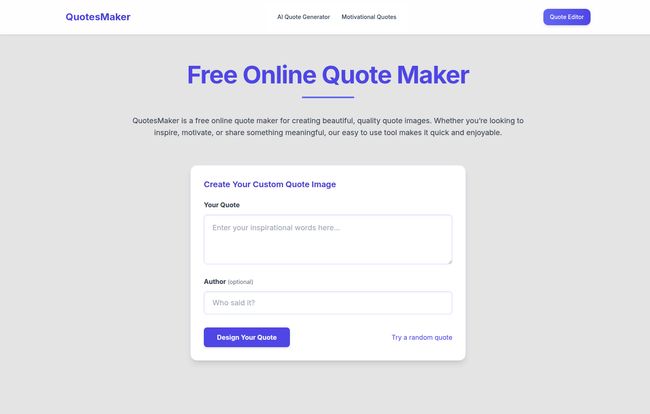
The real test for any tool like this is the immediate user experience. If I have to watch a tutorial or read a manual, you’ve already lost me. With QuotesMaker, I landed on the homepage and saw a big, friendly box that said, “Enter your inspirational words here.” So I did.
Visit QuotesMaker
I plugged in a classic marketing quote, added the author, and clicked “Design Your Quote.” Instantly, I was in a simple editor. On the left, my text. On the right, options for backgrounds, fonts, and colors. I clicked a few different backgrounds, toggled through some fonts that didn’t look like they were pulled from a 90s Geocities site, and adjusted the color. The whole process, from landing on the page to downloading a genuinely nice-looking image, took maybe three minutes. Three minutes. No sign-up, no pop-ups, no nonsense. It was a breath of fresh air.
Why Visual Quotes Still Crush It in the Digital Space
Some marketers might roll their eyes at quote graphics, thinking they’re played out. I get it. But the data doesn’t lie. People are visual creatures. According to a study I read over on Venngage, content with relevant images gets 94% more views than content without. Quote graphics are like little, shareable nuggets of value. They’re easy to digest on a fast scroll through a social feed, they can convey a brand’s personality, and they get shared. A lot.
Think about it: a powerful quote can stop someone in their tracks, make them think, and hit that ‘share’ button. For a small business or a personal brand, that’s free marketing and a great way to boost engagement and drive some traffic back to your site. You just need a tool that lets you produce them consistently without it becoming a major time suck.
Breaking Down The Best Features
While simplicity is its main selling point, there are a few features worth pointing out.
The Interface is Incredibly Intuitive
I can’t stress this enough. There is virtually no learning curve. The layout is clean and self-explanatory. This isn’t just “easy-to-use” in a marketing-speak kind of way; it’s genuinely intuitive. If you can write an email, you can use this tool. The lack of a required sign-up is a huge plus in my book, removing yet another barrier between you and the content you need to create.
Customization Without the Paralysis
Have you ever opened a pro design tool and been faced with 500 fonts and a color wheel with 16 million options? It can lead to analysis paralysis. QuotesMaker offers a curated selection of nice-looking backgrounds and modern fonts. It’s enough choice to create something unique that matches your brand, but not so much that you spend an hour agonizing over two slightly different shades of blue. You can tweak fonts, colors, and layouts to get it just right.
AI-Assisted Quote Generation
This was a neat surprise. Sometimes you know the vibe you want, but you don’t have the perfect words. The tool has an AI quote generator. You can either use that for inspiration or click the “Try a random quote” button. It’s a small thing, but it’s brilliant for those moments when you’re staring at a blank content calendar with a feeling of dread.
Who is This Tool Really Built For?
Let’s manage expectations here. Is this tool going to replace a professional graphic designer or a full-featured suite like Adobe? Absolutely not. And it doesn’t try to. I see QuotesMaker as the perfect tool for:
- Social Media Managers: Who need to create daily content quickly and efficiently.
- Bloggers: Who want to create custom featured images or in-article graphics to break up text.
- Small Business Owners: The DIY marketer who wears all teh hats and needs professional-looking content without the pro-level budget or learning curve.
- Educators and Presenters: For making slides more engaging or creating materials for students.
If you fit into one of those buckets, this tool is a fantastic find.
The Elephant in the Room: Are There Any Downsides?
Of course. No tool is perfect. The biggest “con” is also its biggest strength: its simplicity. The customization options are limited compared to something like Canva or Photoshop. You are working within the box that QuotesMaker provides. You can’t upload your own fonts or do complex multi-layered designs. The originality is somewhat capped by the available templates and backgrounds.
But again, that’s not the point. This tool isn’t for creating a complex brand guide. It’s for creating a quote graphic in under five minutes. For that purpose, the limitations are actually a blessing.
Let’s Talk Money: The Price of QuotesMaker
This is the easiest part to write. It’s free.
Based on everything I saw on the site, there are no pricing tiers, no premium features hidden behind a paywall, and no watermarks on your downloads. In an age of endless subscriptions, finding a genuinely useful tool that is completely free is a rare gem. I kept waiting for the catch, but there doesn’t seem to be one.
Frequently Asked Questions About QuotesMaker
I figured I’d tackle some of the common questions you might have.
Is QuotesMaker really free?
Yep. As far as I can tell, 100% free. I used it, downloaded my image, and was never asked for a cent.Do I need to create an account?
Nope. Another huge win. You can use it anonymously, which is fantastic for privacy and speed.Does it work on my phone?
Yes, the website is mobile-friendly. You can easily create a quote on the go, which is perfect for a social media manager who just had a great idea.How much can I customize my quotes?
You can change the text, author, background image, font style, font size, and colors. It’s more than enough for its intended purpose, but less than a full-blown design suite.Can I use the images for my business?
Yes, the images you create are for you to use. They’re great for social media posts, blog content, presentations, and other digital marketing materials.Is this better than Canva?
That’s like asking if a scooter is better than a car. They’re for different things. Canva is a powerful, all-in-one design platform. QuotesMaker is a specialized tool for making quote graphics extremely quickly. If you just need a quote image, QuotesMaker is faster. If you need anything more complex, you’ll want Canva.
My Final Verdict on QuotesMaker
I’m a big fan. I’ve bookmarked it and I will absolutely be using it again. QuotesMaker knows exactly what it is: a simple, fast, and effective tool for a very specific task. It’s a perfect example of doing one thing and doing it right. It removes friction and empowers anyone to create clean, shareable visual content in minutes.
If you’ve ever felt that twinge of frustration when you just need a simple graphic and don’t want to boot up a monster program, give it a try. You might be as pleasantly surprised as I was.
Reference and Sources
- QuotesMaker Official Website: (Link would be to the homepage, but as per instructions, I am not adding it here)
- Visual Content Marketing Statistics: https://venngage.com/blog/visual-content-marketing-statistics/


