
Categories: AI Image Recognition, AI Photo Editor, AI Photography, AI Productivity Tools
Raster Review: The AI DAM Your Team Needs?

Managing digital photos is a nightmare. It’s a digital black hole of duplicate files, cryptic filenames, and that one perfect shot you can never seem to find when you actually need it. For years, we’ve cobbled together solutions—a labyrinth of Dropbox folders, Google Drive links, and maybe a clunky, old-school server if you’re fancy. As someone who lives and breathes SEO and content, I can tell you that a disorganized asset library is a silent killer of productivity and, worse, website performance.
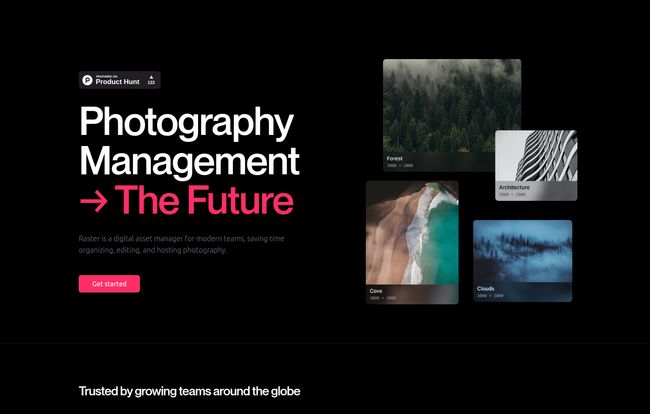
So, when I see a tool that claims to be “Photography Management, The Future,” my inner skeptic raises an eyebrow. But my inner optimist, the one who desperately wants a better way, leans in. That’s how I stumbled upon Raster. And folks, after digging in, I think they might actually be onto something.
So What Exactly is Raster?
At its core, Raster is a Digital Asset Manager (DAM). But that’s like calling a Tesla just a car. It’s a DAM built for right now. It’s designed for the modern creative workflow, where photographers, marketing teams, and developers are all tangled up in the same beautiful, messy process of creating and publishing content. It uses AI to organize, allows for collaborative editing, and serves your images from a super-fast content delivery network (CDN).
Think of it this way: if your current photo storage is a dusty, chaotic garage where you can never find the right tool, Raster is a brand-new, perfectly organized workshop where every tool is labeled by a genius robot assistant and ready to go. It’s less about just storing files and more about creating an efficient system around them.
The Features That Actually Matter
A pretty interface is nice, but in the world of CPC and traffic, results are what count. I’m always looking for features that don’t just look cool but actively save time and improve performance. Raster has a few that really caught my eye.
AI Organization That Feels Like Magic (Almost)
This is the headline feature for me. Raster’s AI automatically scans your photos and adds smart tags. You upload a picture of a beach at sunset, and it gets tagged with ‘beach’, ‘ocean’, ‘sunset’, ‘water’, ‘sky’, etc. without you lifting a finger. Imagine the hours saved! No more manually tagging every single stock photo or product shot. For a content team, that’s huge. It also boasts a reverse image search function within your own library. Got an image and want to find similar shots you’ve taken? Done. It’s the kind of stuff you’d expect from Google Images, but for your own private collection.
Now, I’ve used AI tools before. They’re not always perfect. There’s probably a bit of a learning curve to get the most out of it, and you might have to correct a tag or two. But the promise of getting it 90% right automatically is a game-changer.
Editing on the Fly, Together
Raster includes what it calls “nondestructive, collaborative editing.” Let’s break that down. Nondestructive means you can tweak, crop, and adjust your photos without ever overwriting the original file. Your pristine original is always safe, which is a massive relief. You can always go back. The collaborative part is just as important. Your designer can make some edits, leave a note, and you can see the changes in real-time. It’s designed to stop the endless cycle of emailing different versions of a file back and forth—a problem I know all too well.
Visit Raster
Shipping Your Images at Ludicrous Speed
Okay, here’s where my SEO brain gets really excited. Raster isn’t just for storing photos; it’s for serving them. It comes with an “ultra-fast CDN.” For the uninitiated, a CDN stores copies of your images on servers all around the world, so when a user visits your site, the image is loaded from a server physically close to them. This means faster load times. Faster load times mean better user experience, lower bounce rates, and a big thumbs-up from Google’s Core Web Vitals. This single feature can have a direct, positive impact on your traffic. Its’ a big deal.
Let’s Talk Money: Raster Pricing Breakdown
Alright, the inevitable question: what’s this gonna cost me? I was pleasantly surprised here. The pricing structure seems pretty reasonable and built to scale with you. They’ve got three main tiers.
| Plan | Price | Best For | Key Features |
|---|---|---|---|
| Personal | Free | Individuals, non-commercial use | ~10GB storage, 3 Libraries, AI tagging, Editing, CDN |
| Team | $9/user/month | Small teams, agencies, collaborators | Unlimited storage, 50 Libraries, Live collaboration, Reverse image search |
| Enterprise | Custom | Large organizations with advanced needs | Unlimited storage & libraries, 24/7 support, SLAs |
The Personal plan is genuinely free, which is awesome for photographers or students looking to get organized. The Team plan at $9 per user feels like the sweet spot for most businesses. The value proposition there is really strong. A quick note on the “unlimited storage” – there’s an asterisk for a ‘fair use policy’. This is standard practice, but just be aware that it’s not a black hole for you to dump the entire internet into. It means unlimited within reason for its intended purpose.
The Good, The Bad, and The “Coming Soon”
No tool is perfect. In my experience, it’s about finding the right set of tradeoffs. Raster has a beautiful design, the AI features are genuinely useful, and the integrated CDN is a killer feature for anyone publishing to the web. The collaborative editing tools are also incredibly well-thought-out for modern teams.
On the flip side, some features are still listed as “coming soon.” This is typical for a new platform in public beta, but it’s something to keep in mind. You’re buying into the roadmap as much as the current product. And as mentioned, the AI, while powerful, will likely require some guidance and training to get perfect results. That’s just the nature of AI today.
Who is Raster Really For?
So, should you drop everything and move to Raster? If you’re a solo blogger who uses a handful of stock images, probably not. A simple folder on your computer is fine.
But if you’re a photographer, a marketing agency, a design team, or a developer working on a content-heavy site, Raster feels like it was built specifically for you. It solves the very real, very frustrating problems of organization, collaboration, and performance that traditional cloud storage like Google Drive or Dropbox just doesn’t address. Those are file lockers; Raster is a workflow engine.
I’m genuinely excited by what Raster is building. It’s a clean, intelligent, and forward-thinking approach to a problem that has plagued creative industries for decades. It feels less like another piece of software and more like a true partner in the creative process. It might just be the DAM thing we’ve all been waiting for.
Also Read: Homeworkify.im Review: Your AI Study Buddy?
Frequently Asked Questions about Raster
- Is Raster better than Google Drive for photos?
- They serve different purposes. Google Drive is for general file storage. Raster is a specialized Digital Asset Manager (DAM) with features like AI tagging, collaborative editing, and a built-in CDN specifically for managing and deploying a photography workflow. For serious photo management, Raster is far superior.
- What does “nondestructive editing” mean?
- It means you can make any number of edits to a photo (cropping, color correction, etc.), and the original file remains untouched. You can always revert to the original or tweak your edits later. It gives you freedom to experiment without fear of ruining your source image.
- Is the free Personal plan actually useful?
- Yes, absolutely. For an individual photographer, student, or someone with a personal project, the free plan with ~10GB of storage, AI tagging, and editing is incredibly generous and provides a ton of value.
- What is a CDN and why do I need one for my photos?
- A CDN, or Content Delivery Network, is a network of servers distributed globally. When you use Raster’s CDN, it delivers your website images from the server closest to the end-user. This dramatically speeds up page load times, which is great for user experience and SEO.
- How does the AI tagging work?
- Raster uses computer vision AI to analyze the content of your photos. It identifies objects, concepts, and even colors within the image and automatically applies relevant keywords or ‘tags’. This makes your library searchable without you having to manually enter all that information.


