
Categories: AI Copilot, AI Email Assistant, AI Meeting Assistant, AI Note Taker, AI Search Engine, AI Summarizer, AI Transcriber
Read AI Review: The Meeting Assistant You Actually Need?

You’re in your fourth Zoom call of the day, someone says something brilliant, you make a mental note to ‘circle back’, and then… poof. It’s gone. Lost to the ether of back-to-back meetings and a caffeine-addled brain. The modern workday can feel like a constant battle against information overload, where vital decisions and action items are buried under an avalanche of conversation.
For years, we’ve been promised that AI would be our savior. And while I’ve tested my fair share of AI tools that were more gimmick than game-changer, I’ve recently been kicking the tires on a platform called Read AI. It calls itself an AI meeting assistant, but that description feels a bit… modest. After using it for a few weeks, I think it’s closer to a collective brain for your entire team. And I’ve got some thoughts.
So, What is Read AI, Really?
On the surface, Read AI joins your meetings—on Zoom, Google Meet, Microsoft Teams, you name it—and transcribes them. Okay, cool. Lots of tools do that. But that’s just the opening act. Where Read AI really starts to shine is what it does after the call ends.
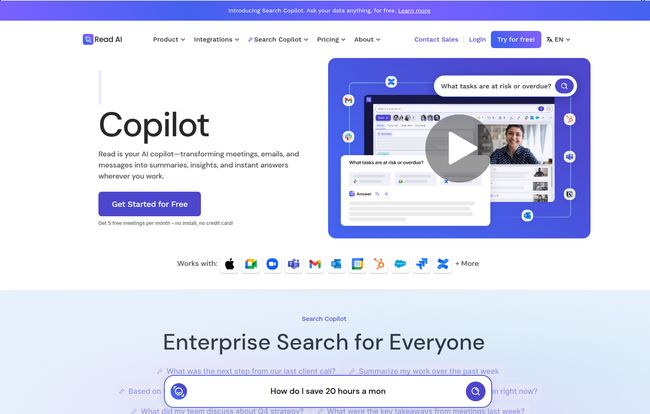
Instead of just giving you a giant, intimidating wall of text, it intelligently summarizes the entire conversation. It pulls out key topics, highlights critical questions, and, most importantly, identifies action items. But the real magic, the part that made me sit up and pay attention, is its “Search Copilot.” It doesn’t just index your meetings. It connects to your emails, your Slack messages, your documents and creates a single, searchable knowledge base. It’s like giving your company a photographic memory. Frighteningly cool.
The Standout Features That Genuinely Help
Any tool can boast a long list of features. But which ones will you actually use? In my experience, these are the bits of Read AI that make a tangible difference.
More Than a Scribe: Smart Summaries and Transcription
The quality of an AI summary is everything. I’ve seen tools that just pull out random sentences with buzzwords. Read AI’s summaries are different. They feel… coherent. You get a quick narrative of the meeting, a list of topics discussed with timestamps, and those golden action items. Plus, with support for over 20 languages, it’s built for modern, global teams. No more getting lost in translation.
The “Aha!” Moment: Enterprise Search Copilot
This is the feature that really separates Read from the pack. Imagine this scenario: You vaguely remember a conversation from three months ago about a client’s budget for a project. Where was it? Was it an email? A Slack DM? A comment in a meeting? Instead of spending an hour digging, you just ask Read AI: “What was the budget we discussed for Project Phoenix with Acme Corp?” It searches everything and gives you the answer with citations. Honestly, this feature alone could justify the price of admission for many teams.
Your Personal, Data-Driven Meeting Coach
This was an unexpected surprise. After each meeting, Read AI generates a report with metrics on things like talk-time balance, sentiment, and engagement. At first, I thought it was a bit of a novelty. But then I started looking at it. Am I talking too much in team check-ins? Did the client’s sentiment dip when we discussed pricing? It offers these little data-driven nudges to actually make your meetings better, not just to record them. For a data nerd like me, it’s fascinating stuff.
Let’s Talk Money: A Look at Read AI’s Pricing
Alright, the all-important question: what’s this going to cost me? This is another area where Read AI impressed me. They have a surprisingly generous approach.
| Plan | Price (Annual Billing) | Who It’s For |
|---|---|---|
| Free | $0 / month | Individuals or anyone wanting to test it out. Includes 5 meeting transcripts/month. |
| Pro | $15 / month | Small teams needing collaboration, more file uploads (100/mo), and premium integrations. |
| Enterprise | $22.50 / month | Larger teams that need video playback, highlights, and more file credits (200/mo). |
| Enterprise+ | $29.75 / month | Organizations with strict compliance needs (HIPAA), SSO, and custom data policies. |
The Unbeatable Free Plan
I have to spend a moment on this. The free plan is not some crippled trial version. You get five full meeting transcripts and summaries a month, forever, without a credit card. For a freelancer or someone on a small team, this is more than enough to see the value and seriously reduce your meeting note-taking stress. In my book, it’s one of teh best free offerings I’ve seen in this space.
Visit Read AI
The Good, The Bad, and The AI
No tool is perfect, right? Here’s my no-fluff breakdown.
On the plus side, the cross-platform functionality is a huge win. It works where you work. The commitment to privacy, with SOC II certification right out of the gate, gives me peace of mind—something that’s often an afterthought for new tech tools. And the data-driven insights are a genuinely unique touch that can lead to actual improvements in communication.
But it’s not all sunshine and automated action items. To really get the most out of it, especially that powerful search feature, you need to integrate it with everything. That takes a little bit of setup. Also, some of the coolest features, like video playback and highlights, are naturally reserved for the paid plans. That’s fair, but something to be aware of if you’re eyeing the free tier.
My Final Verdict: Should You Use Read AI?
So, do I recommend it? Yes, with a couple of caveats.
If you’re an individual, a freelancer, or part of a small team that lives and dies by virtual meetings, I think Read AI is a no-brainer. Start with the free plan. There is literally no risk, and the benefit of having your meetings automatically transcribed and summarized is immediately obvious. For project managers, team leads, and anyone in a client-facing role, this tool can feel like a superpower.
If you’re part of a large corporation with very stringent, pre-existing workflows or security protocols that forbid third-party integrations, the path might be trickier. But for everyone else? It’s a powerful solution to a universal problem.
Read AI doesn’t eliminate meetings, but it does eliminate the frustrating amnesia that follows them. It transforms those fleeting conversations into a lasting, searchable asset. And in today’s knowledge economy, that’s incredibly valuable.
Frequently Asked Questions about Read AI
Final Thoughts
In a sea of AI tools that promise to change the world, Read AI is a refreshingly practical one. It tackles a real, everyday problem with a smart, well-designed solution. It won’t do your work for you, but it will make sure that the important work you discuss in meetings doesn’t just vanish into thin air. Give the free plan a spin—you might be surprised at how much you’ve been forgetting.


