
Categories: AI Agent, AI API, AI Copilot, AI CRM, AI Developer Tools, AI Email Generator, AI For Finance, AI Healthcare, AI Legal Assistant, AI Meeting Assistant, AI Note Taker, AI Recording, AI Sales Assistant, AI Transcription
Recall.ai Review: The Universal API for Meeting Bots?

Alright, let’s have a little chat. If you’re a developer, a PM, or a founder who’s ever had the bright idea to build a tool that integrates with online meetings, you know the pain. You start with Zoom, feeling pretty good about yourself. You wrestle with its API, you get a bot to join a call, life is good. Then someone in marketing says, “This is great! When can we have it for Microsoft Teams?”
And then for Google Meet. And Webex. And BlueJeans.
Suddenly, your simple, elegant project has turned into a multi-headed hydra of authentication tokens, SDKs, and documentation that seems to be written in a different language for each platform. I remember a project a few years back where we spent the better part of a quarter just trying to get a stable Zoom bot working. When the Teams request came in, I think our lead engineer is still rocking in a corner somewhere. It’s a massive resource sink. A real momentum killer.
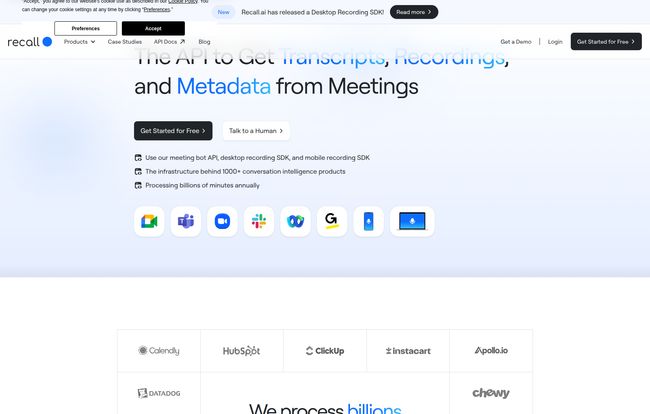
So when I first stumbled upon Recall.ai, my initial reaction was a healthy dose of skepticism, followed by a surge of, “Wait, is this for real?” The promise is just so… simple. One API to access real-time data, recordings, and transcripts from all the major meeting platforms. It sounded too good to be true. So, I did what any self-respecting tech geek would do. I went digging.
So, What Exactly is Recall.ai?
Think of Recall.ai as a universal translator for the Tower of Babel that is the video conferencing world. Instead of you having to learn the specific dialect of Zoom, Teams, and Google Meet, you just talk to Recall.ai. It handles the rest. It’s an abstraction layer, a piece of infrastructure that sits between your application and the chaotic ecosystem of meeting platforms.
At its core, it provides a unified API that lets you do two main things:
- Get real-time data: Using their Meeting Bot API, you can have a bot join a live meeting and get access to the raw audio and video streams as they’re happening.
- Get post-meeting data: Through their Recording API, you can pull down recordings, transcripts, and all sorts of useful metadata after a meeting has ended.
It’s not just a simple API wrapper, though. It’s the whole shebang. They manage the bot infrastructure, the scaling, the process of actually getting the bot into the meeting reliably. You send an API call, and their bot appears in the meeting, ready to stream data back to you. Simple as that.
Why This is a Much Bigger Deal Than You Think
Okay, saving developer time is great. Everyone loves that. But the real impact here is much deeper. The rise of “conversation intelligence” has been one of the most interesting trends in SaaS over the last few years. Tools like Gong and Chorus have completely changed sales by analyzing call transcripts. Apps like Fathom and Otter.ai have made meetings suck less for everyone.
But building those tools required a colossal upfront investment in platform integration. It was the moat that kept smaller players out. What Recall.ai does is effectively drain that moat.
It democratizes access to meeting data. Now, a small, scrappy startup with a brilliant idea for a user research tool or a real-time compliance checker doesn’t have to spend six months building and maintaining fragile integrations. They can plug into Recall.ai and focus on what actually makes their product special. It lowers the barrier to entry, and that’s when you start to see some really cool innovation.
Breaking Down the Key Features
Let’s get into the nuts and bolts. What makes this platform tick? I’ve found a few features that are particularly impressive.
The Unified API: One Ring to Rule Them All
This is the headline feature, and for good reason. The sheer efficiency of writing code once and having it work across Zoom, Google Meet, Microsoft Teams, and more cannot be overstated. This isn’t just about saving time on the initial build. It’s about maintenance. When Microsoft inevitably changes something in the Teams API (and they will), it’s Recall’s problem, not yours. Your integration remains stable. That peace of mind is worth its weight in gold.
Real-Time Data Streams: The ‘Live’ Advantage
This is where things get futuristic. Getting a recording after a call is one thing. Tapping into the audio and video during the call is another level entirely. This opens up possibilities for tools that provide live assistance. Think about a sales rep getting real-time suggestions on how to handle an objection, or a customer support agent being fed relevant knowledge base articles based on the live conversation. This is the stuff that gets me excited about the future of work, and Recall makes teh architecture for it surprisingly accessible.
Visit Recall.ai
Speaker Diarization: Finally, Knowing ‘Who Said What’
Have you ever seen a raw transcript from a meeting with more than two people? It’s a wall of text. Utterly useless without context. Recall’s ability to perform speaker diarization—tagging each part of the transcript with the person who said it—is absolutely critical. It turns that useless wall of text into structured, analyzable data. You can track speaker talk time, analyze sentiment by participant, or just find that one thing your boss said five minutes in. It’s a non-negotiable feature for any serious meeting analysis tool.
Bot Infrastructure Management: The Dirty Work, Done For You
This might be the most underrated part of the whole offering. Anyone who’s tried to run bots at scale knows it’s a nightmare. You have to worry about provisioning servers, managing state, handling failures, scaling up and down for peak meeting times… it’s a full-time job. A very boring, very frustrating full-time job. Recall.ai just takes that entire headache off your plate. You ask for a bot, it appears. You don’t have to care how. That is a beautiful thing.
Who is This Actually For?
Let’s be clear, this isn’t a tool for your average Joe. It’s for builders.
I see the sweet spot being early-stage startups who are building a product in the conversation or revenue intelligence space. It lets them compete with the big guys without a massive Series A dedicated to backend engineering. It’s also a fantastic fit for established SaaS companies, like a CRM or project management tool, who want to add meeting intelligence as a feature. For a company like HubSpot or ClickUp, using Recall.ai to quickly layer in meeting analysis is a no-brainer compared to building it from scratch.
Basically, if you’ve ever looked at the API docs for a video conferencing platform and felt a deep, existential sigh bubble up from your soul, Recall.ai is probably for you.
The Not-So-Great Stuff (Let’s Be Honest)
No tool is perfect, and it wouldn’t be an honest review if I didn’t point out a few of the wrinkles. It’s not all sunshine and rainbows.
The Pricing Mystery
The first thing many people will notice is the lack of a public pricing page. Instead, you get the classic “Talk to Sales” button. As a potential customer, I get it, its a bit annoying. You just want to know if you’re in the ballpark. But from a business perspective, it makes sense. Their pricing is likely based on volume (minutes processed, number of bots, etc.), and enterprise deals are always custom. Still, it creates a bit of friction for smaller teams who just want to kick the tires without a sales call. A ‘starter’ or ‘developer’ tier with clear pricing would be a welcome addition.
The Black Box Factor
When you use a service like Recall.ai, you are placing a lot of trust in them. You’re building a core part of your product on their infrastructure. If they have a major outage, your product has a major outage. That’s the fundamental trade-off of using any third-party API for a mission-critical function. You trade control for convenience. For most, the convenience will win out, but it’s a dependency you have to be comfortable with.
The Bottom Line: My Take on Recall.ai
So, after all my digging, what’s the verdict? Is Recall.ai the magic bullet I was hoping for?
I think for the right team, it absolutely is. It’s a phenomenally powerful enabler. It’s one of those tools that feels so obvious in retrospect, you wonder why it didn’t exist sooner. It feels a lot like Stripe did for payments or Twilio did for telephony. It’s abstracting away a huge, messy, and undifferentiated problem so that builders can focus on building.
It won’t be for everyone. A massive enterprise that only uses Microsoft Teams and has a dedicated army of engineers might opt to build their own integration for maximum control. But for the 99% of other companies—startups and scale-ups who need to be nimble, support multiple platforms, and focus on their unique value—Recall.ai feels like a game-changer. It turns a six-month engineering nightmare into a weekend project. And that is incredibly powerful.
Frequently Asked Questions
- What meeting platforms does Recall.ai support?
- Recall.ai supports all the major platforms you’d expect, including Zoom, Google Meet, Microsoft Teams, and Webex. Their goal is to be a universal solution, so they are continuously adding support for more platforms.
- How does Recall.ai handle security and compliance?
- This is a big one since meeting data is sensitive. They state they are built with enterprise-grade security and compliance. This typically means things like SOC 2 compliance, data encryption in transit and at rest, and robust access controls. For specifics on your use case, you’d need to discuss directly with them.
- Is Recall.ai only for real-time meetings?
- Nope! While the real-time capabilities are very cool, they also have a robust API for asynchronously fetching completed meeting recordings, transcripts, and metadata. This is perfect for analysis that doesn’t need to happen live.
- So, how much does Recall.ai actually cost?
- This is the million-dollar question. Their pricing isn’t public. It’s usage-based and tailored to the client’s needs. You’ll have to contact their sales team for a quote based on your expected volume of meeting minutes and features required.
- Can I get just a transcript without storing the video or audio?
- Yes, the API is flexible. You can configure it to process the audio for transcription and then discard the raw media files if that fits your privacy and data-handling requirements. It’s designed to be configurable for different use cases.
- How difficult is it to integrate the Recall.ai API?
- It’s designed for developers, so you’ll need engineering resources. However, compared to building and maintaining individual integrations for each meeting platform, it’s exponentially simpler. They provide clear documentation and an API that abstracts away the complexity of each platform’s native SDK.
Conclusion
In the end, the story of Recall.ai isn’t just about a clever API. It’s about reducing friction. It’s about taking a problem that is complex, expensive, and frankly, boring to solve, and making it simple. By doing so, they’re not just selling a tool; they’re unlocking potential for a whole new wave of products and features that will change how we collaborate and communicate. And as someone who has been on the receiving end of that complexity, I’m genuinely excited to see what people build with it.


