
Categories: AI Calendar, AI Meeting Assistant, AI Productivity Tools, AI Scheduling, AI Task Management
Reclaim.ai Review: Is This AI Calendar Worth It?

If you’re anything like me, your calendar is less of a neatly organized plan and more of a chaotic battlefield. It’s a color-coded mess of meetings, tentative appointments, and sad, lonely blocks of “Focus Time” that get steamrolled by the first urgent request that lands in your inbox. For years, I’ve played a losing game of calendar Tetris, constantly dragging and dropping blocks, trying to carve out a few precious hours for deep work. It’s exhausting.
So when the buzz about AI-powered scheduling tools started getting louder, my interest was piqued. Another productivity app? Sure. But one that promises to act like a personal assistant, automatically defending my time and actually scheduling my to-do list for me? Okay, you have my attention. The name that kept popping up was Reclaim.ai, claiming it could save users up to 40% of their workweek. A bold claim. One I had to put to the test.
What Exactly Is Reclaim.ai? (And Why Should You Care?)
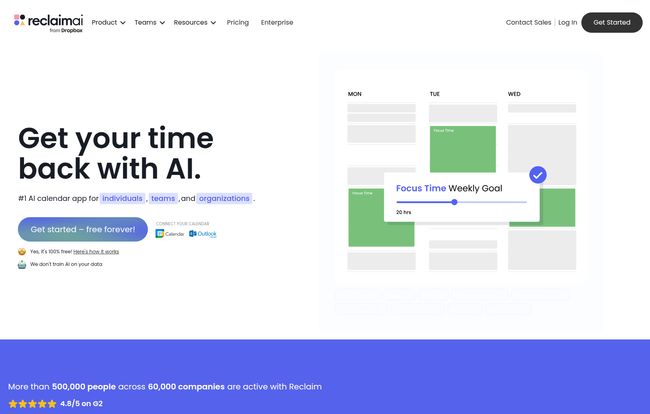
At its core, Reclaim.ai is an intelligent calendar assistant that hooks into your existing Google Calendar or Outlook Calendar. You don’t ditch your current setup; you enhance it. Think of it less as a new calendar and more like hiring a hyper-efficient, slightly obsessive executive assistant who lives inside your computer. Their only job is to look at your to-do list, your recurring habits (like lunch!), and your meeting schedule, and make it all fit together without you having a nervous breakdown.
The whole point isn’t just to cram more stuff in. It’s the opposite. It’s about creating breathing room and ensuring your priorities get the time they deserve. It wants to stop you from just being busy and help you actually be productive. You know, that holy grail we’re all chasing.
Visit Reclaim.ai
How Reclaim.ai Actually Works Its Magic
So, how does it pull this off? It’s not just one thing, but a combination of smart features that work together. It took me a week or so to really get the hang of it, but once I did, things started to click.
The Magic of Automated Task Scheduling
This is the headline feature for me. I use Todoist, and the integration is fantastic. I can just throw a task on my list, tell Reclaim how long it’ll take and when it’s due, and just… let it go. Reclaim then scans my calendar for the best open slots and automatically blocks out the time. If a last-minute meeting pops up? No problem. The AI just shuffles my task to the next best available spot. This is a game-changer compared to me manually finding and rescheduling my own work blocks three times a day.
Building Better Habits, Automatically
I am terrible at taking a proper lunch break. It’s a bad habit. With Reclaim, I set up a recurring “Habit” for lunch every day between 12 and 2 PM. Reclaim automatically finds a slot and defends it. But it’s flexible—if my morning is packed, it might schedule lunch for 1:15 PM. If something critical comes up, I can tell it to reschedule. It does the same for my morning reading and end-of-day planning. It makes these non-negotiables feel non-negotiable, but with the intelligence to adapt.
Smart Meetings and Scheduling Links
Okay, so it helps you manage your own time, but what about time with others? Reclaim’s Scheduling Links are its answer to tools like Calendly. You can create links for different meeting types, and it will only show people the slots where you’re genuinely free, according to your actual priorities (including those tasks and habits it just scheduled). It’s smarter than just showing every white space on your calendar. This has cut down on the back-and-forth “What time works for you?” emails by, like, a lot.
My Honest Take: The Good, The Bad, and The AI
No tool is perfect, and I’m not here to sell you a silver bullet. After a few months of using Reclaim.ai pretty religiously, here’s my unvarnished opinion.
The Good Stuff (The “Aha!” Moments)
The feeling of seeing my to-do list items appear as protected blocks of time on my calendar without me lifting a finger is, honestly, a little bit magical. The single biggest lifesaver, though? The automatic insertion of Buffer Time between meetings. I didn’t even realize how much the back-to-back meeting grind was burning me out until Reclaim started automatically adding 15-minute breaks. It’s glorious. I finally have time to grab water or just reset my brain.
The Not-So-Good Stuff (The Reality Check)
First off, Reclaim.ai operates on a “Garbage In, Garbage Out” principle. If you don’t feed it your tasks, priorities, and deadlines, it can’t do its job. It requires a bit of discipline to keep your task list updated. Second, handing over full access to your calendar can feel a little unnerving. You have to trust the system. For privacy-conscious folks, this might be a hurdle. Lastly, while it’s not rocket science, there is a small learning curve. You have to learn to let go and trust the AI to manage your schedule, which can feel weird for a control freak like me.
Also Read: Poised Review: Your AI Communication Coach?
Who is Reclaim.ai Really For?
I’ve been thinking about this, and I don’t think it’s for everyone. If you have three appointments a week, this is probably overkill.
- For the Overwhelmed Professional: If you’re a freelancer, a manager, or anyone whose day is a mix of meetings and a long to-do list, this could be your new best friend. It’s for the person who ends the day wondering where all the time went.
- For Growing Teams: The team features are pretty slick. It can help find the best meeting times across multiple schedules and even visualize team capacity. It’s a great way to reduce scheduling friction in marketing, engineering, or sales teams.
- For Large Organizations: With features like SSO, user provisioning, and people analytics, the Enterprise plan is clearly built for companies looking to improve productivity culture at scale.
Let’s Talk Money: Reclaim.ai Pricing
Alright, the all-important question: what’s this gonna cost? The pricing is pretty straightforward, and I appreciate that they have a genuinely useful free tier.
| Plan | Price (Billed Yearly) | Best For |
|---|---|---|
| Lite | Free | Individuals wanting to try out the basics. It’s limited but gives you a real feel for the platform. |
| Starter | $8 /seat/month | Small teams and serious solo users. This is the sweet spot, unlocking more integrations and analytics. |
| Business | $12 /seat/month | Larger teams needing advanced coordination, unlimited scheduling links and delegated access. |
| Enterprise | $18 /seat/month | Big companies that need enterprise-grade security and support like SSO and SCIM. |
Note: Prices are lower when billed yearly. They also offer some pretty generous discounts for students, nonprofits, and startups, which is a nice touch.
Frequently Asked Questions about Reclaim.ai
Is Reclaim.ai safe to use?
This is a big one. Reclaim needs extensive permissions to manage your calendar. According to their site, they are SOC 2 Type 2 compliant and GDPR compliant, which are major security certifications. For me, the productivity gain was worth the trust, but everyone should review their security policies and decide for themselves.
Does Reclaim work with Outlook?
Yes! It was originally a Google Calendar tool, but they have since rolled out support for Outlook Calendar as well, which covers the vast majority of professionals.
Can it replace my to-do list app like Todoist or Asana?
Not really. It’s not meant to be a project management tool. It’s designed to work with your existing task manager. You still manage your projects in Asana, Jira, or Todoist; Reclaim’s job is to pull those tasks into your calendar and make time for them.
Is the free version of Reclaim.ai actually useful?
Surprisingly, yes. For a solo user who just wants to try out automatic habit and task scheduling, the Free plan is plenty to get started. You’ll hit limitations (like only one calendar sync and three habits), but its enough to see if the workflow is right for you before you pay a dime.
The Final Verdict: Is Reclaim.ai Worth the Hype?
So here’s the bottom line. Reclaim.ai is not a magic wand that will instantly solve all your productivity problems. It requires a bit of buy-in and a willingness to let go of manual control. However, if your calendar is a source of constant stress and you feel like you’re drowning in busywork, it is an incredibly powerful ally.
It’s one of the few tools I’ve tested in recent years that has fundamentally changed my daily workflow for the better. The automated scheduling and time-defense features have given me back hours of focus time that I thought were lost forever. My calendar is still full, but now it’s full of the right things. And that makes all the difference.
If you’re on the fence, just try the free version. You’ve got nothing to lose but a bit of that calendar chaos.
Reference and Sources
- Reclaim.ai Official Website
- Reclaim.ai Pricing Page
- Todoist – For Task Management Integration


