
Categories: AI Dialogue Generator, AI Marketing, AI Reply, AI Short Video Generator, AI Social Media Post Generator, AI Tiktok Video Generator
ReplyShort Review: The AI Tool for Viral Fake Conversations?

The content hamster wheel is exhausting. You spend hours brainstorming, scripting, shooting, and editing a 30-second video for TikTok or Reels, only for it to get, like, 12 views. It can feel like you’re shouting into the void. Meanwhile, you see these super simple ‘texting story’ videos pulling in millions of views. You know the ones—dramatic breakups, funny family chats, wild AITA threads, all played out in a text message interface.
I’ve always wondered how people churn those out so fast. Do they have a team? Are they just insanely fast with screen recording and video editing? Well, I think I’ve found the answer. It’s a tool called ReplyShort, and it’s been popping up in some of my creator circles. The premise is simple: it lets you generate these realistic, shareable fake conversations with AI, specifically for social media. So, naturally, I had to see what all the fuss was about.
So What Exactly Is ReplyShort?
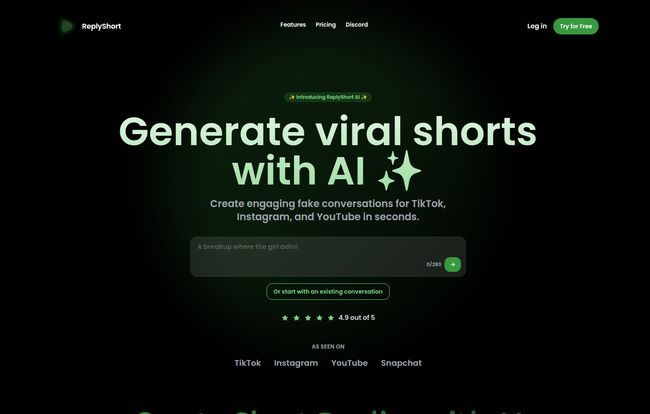
Think of ReplyShort as a specialized film studio for text messages. Instead of cameras and actors, you have a slick interface and an AI scriptwriter. Its entire purpose is to help you create engaging, fake text message conversations and then export them as ready-to-post videos for platforms like TikTok, Instagram, YouTube, and even Snapchat. It’s not a general-purpose AI writer or a complex video editor; it’s a niche tool designed to do one thing really well.
This isn’t just about typing out a script. The tool formats it to look exactly like a real phone screen, complete with user profiles, typing indicators, and message bubbles. It’s this visual authenticity that makes the content so effective and, dare I say, believable.
Why Are Fake Conversations Crushing It on Social Media?
It’s all about storytelling and voyeurism, isn’t it? We’re naturally nosy. Peeking into someone else’s DMs or text threads feels like getting the inside scoop. This format taps directly into that curiosity. It’s a powerful way to tell a story—be it funny, dramatic, or educational—in a format that is native to our daily lives.
Short-form video platforms thrive on high-engagement, easily digestible content. Texting stories are perfect for this. They’re quick, they build suspense with each new message, and they often end with a punchline or a shocking twist that gets people commenting. According to a 2023 Wyzowl report, short-form video has the highest ROI of any social media marketing strategy. When you can create that content 5x faster, as ReplyShort claims, you’re giving yourself a serious advantage.
How to Create a Video with ReplyShort
The landing page boasts a 3-step process, and from my playing around with it, that’s pretty accurate. It’s refreshingly straightforward.
Step 1: Choose Your Starting Point
First, you decide if you want to create a conversation from scratch or use an existing one as a base. Maybe you have a viral tweet or a funny customer service exchange you want to animate. You can just plug that in. Or, you can start with a blank slate and let your imagination (and the AI) run wild.
Step 2: Let the AI Craft Your Dialogue
This is where the magic happens. You give the AI a prompt—something like “a conversation where someone breaks up with their partner because they eat pizza with a knife and fork”—and it generates the dialogue for you. You can then edit it, add your own lines, or just keep regenerating until you get something you love. It’s like having a co-writer who never gets tired.
Step 3: Polish and Share
Once your script is locked in, you move to the editor. Here you can tweak the timing, change names, add profile pictures, and then export the whole thing as a video file perfectly formatted for your platform of choice. No need to fiddle with aspect ratios or resolutions in a separate app. It just works.
A Closer Look at the Key Features
While the three-step process is the core, a few specific features are worth mentioning.
- AI-Powered Generation: The quality of the AI-generated dialogue is surprisingly good. It’s not just stilted back-and-forth; it can capture different tones and personalities. It’s a fantastic starting point, especially when you have creator’s block.
- Customizable Templates: You’re not stuck with one look. You can adjust the look and feel to mimic different messaging apps, which is a nice touch for authenticity. The Pro plan even lets you request custom templates, which could be huge for brands wanting to match their aesthetic.
- Optimized Exports: The ability to export directly for TikTok, Instagram, and YouTube is a massive time-saver. Anyone who has fought with video formatting knows what a pain that can be. This simple feature is a huge quality-of-life improvement.
Let’s Talk Money: The ReplyShort Pricing Plans
Alright, the all-important question: what does it cost? ReplyShort has a tiered structure that seems to cover everyone from the curious tinkerer to a full-blown content agency. It’s pretty straightforward, which I appreciate.
Here’s a quick breakdown as of writing this:
| Plan | Price | Key Features |
|---|---|---|
| Free | $0 /month | Up to 3 conversations per month, video export, and community support. Great for trying it out. |
| Creator | $29 /month (The site shows $19/month, so this might be a limited-time deal!) | Up to 20 conversations/month, no watermark, priority support. The sweet spot for most creators. |
| Pro | $49 /month | Unlimited conversations, dedicated manager, custom templates. For the power users and agencies. |
A couple of important notes here. First, there’s a discrepancy on their site for the Creator plan. The main pricing block says $19/month, while other data suggests $29. This could be a special offer, so if you see it for $19, it might be worth grabbing. Second, they’re very upfront that the Pro plan price of $49/month is a limited-time offer that will be increasing soon. If you’re planning on going all-in on this type of content, locking in that rate now could save you a good chunk of change down the line.
The Good, The Bad, and The Honest Truth
No tool is perfect, right? After spending some time with ReplyShort, here’s my honest take. The ease of use is a massive plus. You can genuinely go from idea to exported video in minutes, not hours. For content creators focused on volume and testing ideas quickly, this is invaluable. The AI is a great creative partner, and the optimized exports are a godsend.
On the flip side, the free plan is quite limited. Three conversations per month is enough to get a feel for the tool, but not enough to build a content strategy around. You’ll need to upgrade pretty quickly if you’re serious. And that upcoming price increase on the Pro plan is a bit of a downer, even if it’s a good marketing tactic. It creates some pressure to decide quickly.
Frequently Asked Questions about ReplyShort
- Is it ethical to post fake conversations?
- This is a big one. It all comes down to intent. If you’re creating fictional stories for entertainment, it’s generally fine—just like writing a movie script. Most audiences understand this format is for storytelling. However, if you’re creating fake conversations to spread misinformation or impersonate real people maliciously, you’re crossing a major ethical (and potentially legal) line. Be responsible.
- Can I remove the ReplyShort watermark?
- Yes, you can. You’ll need to upgrade to the Creator or Pro plan to remove the watermark from your video exports.
- Will people be able to tell the conversations are fake?
- Honestly, the quality is very high. To the casual scroller, they look quite authentic. That’s what makes them so effective. The templates are designed to mimic real messaging apps very closely.
- Can I use my own brand colors and fonts?
- The standard plans offer customizable templates, but for truly bespoke branding (like specific fonts or a custom template), you’d likely need the Pro plan, which offers the ability to request custom templates and a dedicated account manager to help with that.
- What kind of content works best with this format?
- The sky’s the limit! I’ve seen it used for funny skits, dramatic short stories, retelling wild customer service interactions, visualizing posts from Reddit like r/AmItheAsshole, and even for simple marketing messages or product tutorials.
So, Is ReplyShort Worth Your Time?
After digging in, my verdict is pretty clear. If you’re a content creator or marketer looking to tap into the proven trend of texting-story videos, ReplyShort is an incredibly powerful and efficient tool. It takes a tedious, technical process and makes it simple, fast and fun. It’s not for everyone, of course. If you’re a long-form vlogger, this isn’t for you.
But for those of us fighting for eyeballs in the fast-paced world of short-form video, this could be a secret weapon. It allows you to A/B test story ideas rapidly, produce content at scale, and jump on trends without spending your entire weekend editing. I’d say give the free plan a spin. You’ll know within your first three creations if it’s the right fit for your content strategy. For me, it’s a definite keeper.


