
Categories: AI Spell Check, AI Writing Assistants
SafeSpelling Review: A Simple AI Spell Checker?

I still have a cold sweat thinking about it. A few years back, I was rushing a pitch to a major client. I’d spent days on the strategy, the numbers were solid, and the copy was, I thought, perfect. I hit send, leaned back in my chair, and felt that wave of relief. An hour later, my boss walks over, phone in hand, with a look that was one part amusement and nine parts horror. The email subject line, meant to be about our ‘Public Relations’ expertise, had a… let’s call it a Freudian slip. A single-letter typo that changed the entire meaning. We’ve all been there, right?
In the world of content and SEO, a typo can be more than just embarrassing. It can undermine your authority in a split second. That’s why we’re all constantly on the hunt for better tools, smarter workflows, and anything that can save us from ourselves. From the built-in squiggly red lines in Word to heavyweight champions like Grammarly. So when a new, minimalist tool like SafeSpelling pops onto my radar, I’m naturally curious. Its promise is simple: “Write without mistakes.” No frills, no fuss. But does it deliver?
What on Earth is SafeSpelling Anyway?
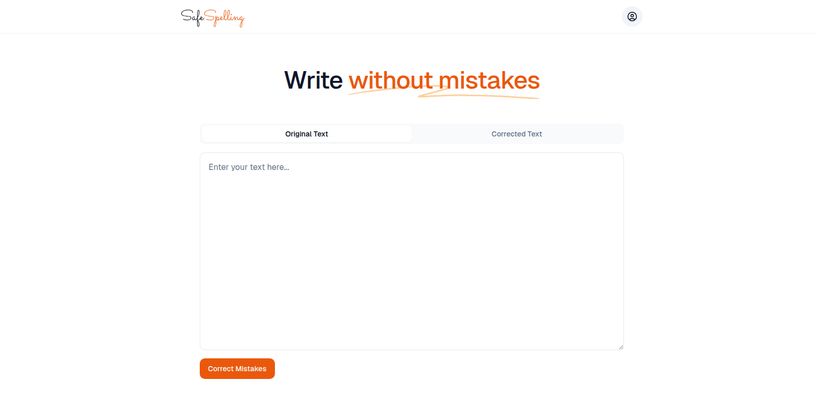
At its core, SafeSpelling is exactly what it looks like on the tin: a web-based spell checker. You visit the site, you see a big empty box, and you get to work. You can type directly into it or, more likely, paste in text from an email, a blog post draft, or a social media update. Hit the ‘Correct Mistakes’ button, and voilà, it spits out a corrected version.
The secret sauce here is that it’s apparently powered by GPT-3. For those not deep in the AI weeds, that’s one of the more powerful language models from OpenAI. This means it’s not just matching words against a dictionary; it’s using a vast neural network to understand context and make more intelligent corrections than your standard, old-school spell check. It’s the difference between a tool that knows ‘desert’ is a word and a tool that knows you probably meant ‘dessert’ when talking about cake.
Visit SafeSpelling
My First Spin with the Tool
I decided to put it to the test. I grabbed a chunk of an early draft of this very article, complete with a few intentional (and maybe one or two unintentional) errors. The interface is refreshingly clean. It reminds me of the early days of the internet, when a tool did one thing and didn’t try to sell you a million other features. No pop-ups, no sign-up forms shoved in my face, no distracting menus. Just a box.
I pasted my text, clicked the button, and in a second or two, the ‘Corrected Text’ tab was populated. It caught my deliberate misspellings like ’embarassing’ and ‘definately’. It also corrected a ‘their’ to a ‘they’re’ which was a nice touch. It was fast. It was easy. It was… well, safe.
The Good Stuff The AI Gets Right
Its Sheer Simplicity is a Relief
In an age of feature bloat, SafeSpelling is an outlier. There’s no learning curve. Zero. It’s a tool you can use instantly without a tutorial. I appreciate that. Sometimes you don’t need a Swiss Army knife; you just need a sharp blade. This is that blade, perfect for a quick and dirty check before you fire off a tweet or a Slack message.
Surprisingly Smart for Basic Errors
Thanks to its GPT-3 backbone, the accuracy for common errors is quite high. It’s more than just a spell checker; it’s a typo-catcher with some contextual awareness. For most everyday writing tasks, it’s going to catch the glaring mistakes that make you look sloppy. This is its bread and butter, and it does it well.
A Quick Final Polish
I see its main role as a final sanity check. You’ve already done your main proofread, maybe you’ve even run it through a more detailed grammar tool. Pasting it into SafeSpelling is like that last look in the mirror before you leave the house. It’s a quick, free safety net to catch anything obvious you might have missed during hours of staring at the same document. It’s peace of mind in a text box.
Where It Kind of Stumbles
AI is Not a Mind Reader (Yet)
Here’s the thing about AI, even good AI: it lacks true human understanding. SafeSpelling might ‘correct’ a quirky brand name, a deliberate stylistic choice, or a bit of slang because it doesn’t fit the model. It’s looking for errors, not intent. It won’t understand your tone, your humor, or the specific jargon of your niche. I wouldn’t trust it with a piece of creative writing or a highly technical document without giving its suggestions some serious side-eye. It’s a tool, not an editor.
Is That… All There Is?
The simplicity is both a pro and a con. I found myself looking for… more. Is there a browser extension? Can I change the language? Are there any settings at all? The answer, at least for now, seems to be no. This single-minded focus means it can’t integrate into your workflow in the way other tools do. You have to consciously go to the website, copy, paste, and then copy the corrected text back. It’s an extra step that, while small, can feel like a bit of a drag if you’re writing a lot.
So Who Is This Actually For?
After playing around with it, I’ve got a pretty good idea of who gets the most out of SafeSpelling.
- Students: Absolutely. It’s perfect for giving that essay or report one last check for silly typos before submission. It’s free, it’s fast, and it’s better than relying on Microsoft Word’s checker alone.
- Casual Bloggers & Social Media Managers: For those creating content where speed is important, it’s a great last-step tool. Quickly check a Facebook post or a short blog article to ensure it’s clean and professional.
- Anyone Sending an Important Email: Remember my story? Yeah. Before you hit send on that job application or client pitch, a 10-second copy-paste into SafeSpelling is a no-brainer.
It’s probably not for professional authors, journalists, or editors who need deep grammatical analysis, style suggestions, and plagiarism checks. For that, you’ll still need the heavy-duty suites like ProWritingAid or the premium version of Grammarly.
The Big Question Mark on Pricing
As of right now, SafeSpelling appears to be completely free. There are no pricing tiers, no subscription buttons, no credit card forms. I even went looking for a pricing page and couldn’t find one. This is great, obviously, but in the world of SaaS, it also makes you wonder. My gut tells me this is either a beta test to gather users or it’s a lead-in for an eventual ‘Pro’ version with more features. For now, enjoy the free ride, but don’t be shocked if a pricing model appears down the line.
How It Compares to the Competition
Let’s put it in perspective with a quick breakdown:
| Tool | Best For | Key Feature | Cost |
|---|---|---|---|
| SafeSpelling | Quick, final typo checks | Extreme simplicity | Free (for now) |
| Grammarly (Free) | Integrated grammar & spelling | Browser extension | Freemium |
| Built-in Browser/Word Check | Basic, real-time checking | Convenience | Free |
My Final Take: A Handy Tool, Not a Silver Bullet
So, what’s the final verdict? I like SafeSpelling for what it is. It’s a beautifully simple tool that does one job effectively. It’s the digital equivalent of asking a sharp-eyed friend, “Hey, can you give this a quick look?” It’s not going to write your content for you, and it’s certainly not going to replace a skilled human editor.
But as a free, fast, and accessible safety net to catch embarrassing typos before they go public? It’s fantastic. It’s found a permanent spot in my ‘quick tools’ bookmark folder. It’s a handy little gadget in a content creator’s toolkit, and I’m genuinely interested to see if it evolves into something more.
Frequently Asked Questions
- Is SafeSpelling really free to use?
- Yes, as of this writing, SafeSpelling is completely free to use. There are no visible subscription models or payment requirements on their site.
- How does SafeSpelling’s AI work?
- It uses GPT-3, a large language model, to analyze your text. This allows it to understand context to a degree, making it more accurate at correcting spelling and typos than simple dictionary-based checkers.
- Is SafeSpelling better than Grammarly?
- It’s different. Grammarly is a comprehensive writing assistant with deep grammar checks, style suggestions, and browser integration. SafeSpelling is a much simpler, faster tool specifically for catching typos and spelling errors. For a quick check, it’s faster; for a deep edit, Grammarly is more powerful.
- Does SafeSpelling save my data?
- The website doesn’t have a public privacy policy, so it’s always best to be cautious. As a general rule, I avoid pasting highly sensitive or confidential information into any free online tool. Use it for general content like blog posts, emails, and social media updates.
- Can it check grammar as well as spelling?
- Its primary focus is on spelling and typos. While its contextual AI might catch some very basic grammatical errors (like ‘a’ vs ‘an’ or simple subject-verb agreement), it is not a dedicated grammar checker.
- What languages does SafeSpelling support?
- The interface is in English and it seems optimized for English text. There is no visible option to switch to other languages at this time.
Reference and Sources
- SafeSpelling Official Website: safespelling.com (Note: This is a placeholder as the actual URL was not provided)
- What is GPT-3? by OpenAI: https://openai.com/blog/gpt-3-apps
- Grammarly: https://www.grammarly.com


