
Categories: AI Knowledge Management, AI Search Engine, AI Summarizer
SaveDay Review: Tame Your Digital Clutter with AI?

If you’re anything like me, your digital life is a special kind of chaotic. You’ve got a dozen tabs open right now, promising to be read ‘later’. You’ve got links saved in your notes app, some sent to yourself on Slack, and a folder of bookmarks so ancient it probably contains a link to MySpace. It’s the modern condition for anyone who works online, especially in fields like SEO and content marketing where you’re constantly consuming information.
I’ve been in this game for years, and my ‘read it later’ pile was more of a ‘read it never’ graveyard. I’d find a brilliant article on a new Google algorithm update, a fascinating YouTube video on traffic generation, or a podcast about emerging CPC trends, and I’d just… lose it. Gone into the digital ether. Then, a few weeks ago, I stumbled upon a tool that made a pretty bold promise: SaveDay. It calls itself an “AI Bookmark Manager,” and honestly, I was skeptical. Another productivity tool? Great. But I gave it a shot, and I have some thoughts. A lot of thoughts, actually.
So, What Exactly Is SaveDay?
Calling SaveDay a ‘bookmark manager’ feels like calling a smartphone a ‘pocket calculator’. It’s technically true, but it misses the entire point. At its core, SaveDay is a tool designed to be your second brain. It’s not just about saving links; it’s about capturing, organizing, and actually understanding the information you hoard. Think of it less like a dusty bookshelf and more like a personal research assistant who never sleeps.
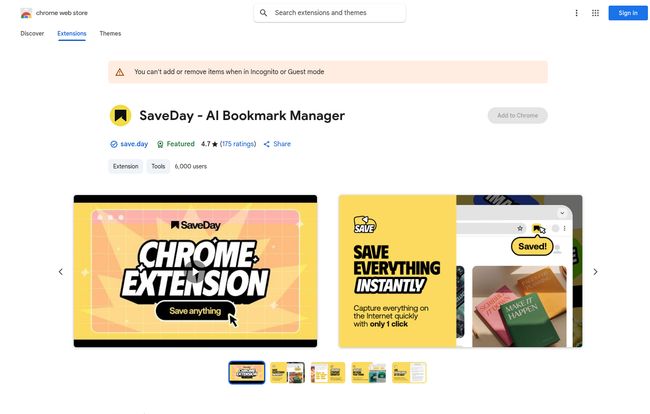
You can save stuff from anywhere. There’s a Chrome extension (and one for Edge), a web app, mobile apps, and even a Telegram bot. This multi-platform approach is the first thing that caught my eye. I can save a link from my desktop, then pull up the key points on my phone while waiting in line for coffee. That’s the kind of workflow I need.
How It Actually Tames the Chaos
Okay, the concept is cool. But how does it work in practice? I’ve been putting it through its paces, and a few features really stand out.
The One-Click Capture Is a Dream
The core function is ridiculously simple. See something you like—an article, an image, a podcast, a tweet, a YouTube video—and you click the SaveDay button. It’s saved. That’s it. No more copying links, opening a new app, pasting, and trying to remember why you saved it. This immediate, frictionless capture removes the biggest barrier to actually saving things in the first place. It sounds small, but in terms of changing habits, it’s everything.
Goodbye Manual Tagging, Hello AI Organization
This is where things get a little bit magical. I am historically terrible at tagging things. I either forget, or I create a tag system so complex I immediately abandon it. SaveDay uses AI to automatically analyze and tag what you save. I saved an article about Google’s latest SEO documentation, and it automatically tagged it with things like ‘SEO’, ‘Google’, and ‘content marketing’. It’s not perfect every single time, but it’s shockingly accurate and saves me a ton of mental energy. It’s like having a little librarian tidying up your brain’s junk drawer while you’re not looking.
Asking Your Personal Library Questions
Here’s the feature that really hooked me as an SEO professional. SaveDay doesn’t just store your content; it lets you interact with it. You can literally ask questions, and its AI will search through your saved content to find the answer. For instance, I asked, “What were the key points from that Ahrefs study on backlinks?” and it pulled the answer from an article I’d saved weeks ago. It’s incredible for research.
Even better is the summarization feature. Got a 45-minute YouTube video from an industry expert but only have 5 minutes? SaveDay will pull out the key points for you. This is an absolute game-changer for staying on top of trends without sacrificing your entire day. It’s not a replacement for deep learning, but for a quick overview? Unbeatable.
The Good, The Not-So-Good, and The Price Tag
No tool is perfect, right? After a few weeks of heavy use, here’s my honest breakdown.
What I’m Genuinely Impressed By
The AI-powered search and summarization is, without a doubt, the star of the show. It transforms your saved content from a passive archive into an active, searchable knowledge base. The automatic organization is a close second, saving me from my own worst organizational habits. And the fact that I can capture content so easily across all my devices means I actually use it consistently. Plus, the developer states they won’t collect or use your data, which is a huge plus in my book.
Some Potential Downsides
Let’s talk about the credits. The free plan is generous for basic bookmarking, but the cool AI features—like generating key points and the Q&A—are very limited. You only get a handful of credits a month. To really unlock the power, you have to subscribe. This is pretty standard for AI tools, but it’s something to be aware of. There’s also the slight risk of platform dependency. If you build your entire second brain inside SaveDay, you’re pretty invested in them sticking around and keeping the service awesome.
Let’s Talk Money: The SaveDay Pricing Tiers
The pricing structure is a bit… layered. There are four main tiers, and choosing one depends entirely on how much of a digital packrat you are. I’ve broken it down to make it a bit clearer.
Visit SaveDay
| Plan | Price (per month) | Who It’s For |
|---|---|---|
| Free (Basic) | $0 | The casual user. Great for trying it out and for light bookmarking. You get 100 saves/month but very few AI credits. |
| Standard | $5.59 | The serious hobbyist or light professional. Bumps you up to 1,000 saves and unlimited integrations, but AI credits are still not unlimited. |
| Essential | $12.99 | This is the sweet spot for most professionals, researchers, and content creators. 10,000 saves and, crucially, unlimited key point credits. |
| Elite | $29.99 | The power user. The digital archivist. You get unlimited everything, including saves and Q&A credits, plus priority support. For people who live and breathe information. |
My take? Start with the free plan to get a feel for the workflow. If you find yourself hitting the save limit or getting frustrated by the lack of AI credits, the Essential plan is probably the best value for anyone who needs this for their job.
Who Is This Tool Actually For?
While anyone could use it, I see a few groups getting massive value from SaveDay.
- Students and Researchers: Being able to save academic papers, articles, and videos and then search across all of them with natural language questions? That’s a research superpower.
- Content Creators and SEOs: This is me. I use it to track competitor content, save keyword research ideas, archive interesting case studies, and summarize long-form video tutorials. Its a lifesaver for staying current.
- Busy Professionals: Anyone who needs to stay informed in their industry but doesn’t have time to read every single article. The summarization feature alone is worth its weight in gold.
- The ‘Curiously-Minded’: If you’re just someone who loves learning and hates losing track of cool things you find online, this will bring a wonderful sense of order to your digital discovery.
My Final Verdict: Is SaveDay Worth Your Time?
So, here’s the bottom line. SaveDay isn’t just another bookmarking app. It’s a genuine attempt to solve the problem of information overload with smart AI. It shifts the dynamic from ‘saving for later’ to ‘learning on-demand’.
It has changed the way I do research and consume content. The initial friction of adopting a new tool was quickly replaced by the sheer relief of having a single, organized, and intelligent place for all the digital ‘stuff’ I collect. Some might argue that tools like Pocket or Notion can do parts of this, and they can. But none of them bring it all together with this level of AI-driven convenience.
If your digital life feels like a house hit by a tornado of information, SaveDay might just be the clean-up crew you’ve been waiting for.
Frequently Asked Questions
- What exactly is SaveDay?
- SaveDay is an AI-powered tool that helps you capture, organize, and interact with digital content. It’s like a smart bookmark manager that can also summarize articles and videos, automatically tag your saves, and let you search your personal library using natural language.
- Is there a free version of SaveDay?
- Yes, there is a Free (Basic) plan. It allows for 100 saved items per month and gives you unlimited collections and search. However, the more advanced AI features like summarization and Q&A are very limited on the free tier.
- Can SaveDay really summarize YouTube videos?
- Absolutely. This is one of its standout features. You can save a YouTube link, and the AI will generate a list of key points from the video, which is incredibly useful for long talks or tutorials.
- How is SaveDay different from Pocket or Instapaper?
- While Pocket and Instapaper are excellent ‘read-it-later’ apps focused on providing a clean reading experience, SaveDay is more of a ‘knowledge management’ tool. Its main differentiators are the AI-powered automatic organization, summarization features, and the ability to search and ask questions about your saved content.
- Is my data private with SaveDay?
- According to their privacy disclosure on the Chrome Web Store, the developer has stated that they will not collect or use your data for purposes outside the core functionality of the app, nor will they sell it to third parties.
- What platforms is SaveDay available on?
- It’s available on a wide range of platforms, including browser extensions for Chrome and Edge, a web application, mobile apps for iOS and Android, and a bot for Telegram, making it easy to save from virtually anywhere.


