
Categories: AI Document Extraction, AI OCR, AI Productivity Tools, AI Transcription
ScanTextAI Review: A Free Image to Text Converter?

Staring at a screenshot of a brilliant quote, a photo of a textbook page, or a scanned document from a client, and the thought of manually typing it all out is just… soul-crushing. It’s the kind of tedious work that makes you question your life choices. For years, the solution was either shelling out cash for bulky software or wrestling with the often-clunky OCR features built into programs like Adobe Acrobat. It was never a smooth process.
So, when I stumbled upon a tool called ScanTextAI, my professional skepticism immediately kicked in. Another browser-based tool promising the world for free? Yeah, right. But as someone who lives and breathes digital content, I’m a sucker for anything that claims to make life easier. So I dove in. And honestly? I was pleasantly surprised.
So, What’s the Deal with ScanTextAI?
At its heart, ScanTextAI is an online Optical Character Recognition (OCR) tool. That’s a fancy way of saying it’s a piece of digital alchemy that looks at an image, identifies the letters and words, and magically transforms them into editable, searchable text. Think of it as a translator, but instead of converting Spanish to English, it’s converting a static, ‘dead’ image into living, breathing text you can copy, paste, and edit in a Word doc or PDF.
It’s not new technology, OCR has been around for ages. But making it this simple, this accessible, and this… free? That’s what caught my attention. There’s no software to install, no sign-up required, no credit card on file. You just go to the website and it’s ready to go.
Visit ScanTextAI
My First Impressions of the Interface
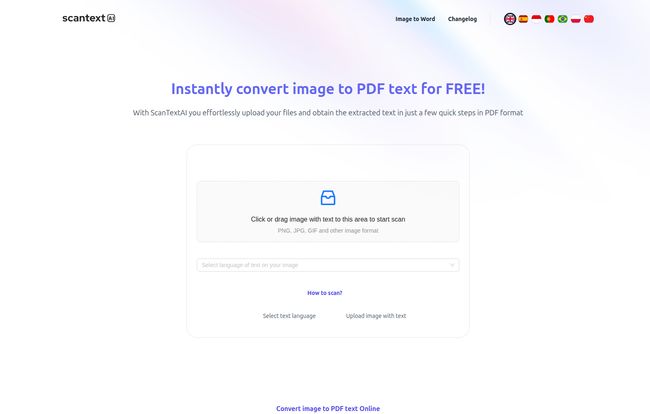
The first thing you notice when you land on their page is the beautiful lack of… well, anything. It’s wonderfully minimalist. There isn’t an explosion of ads, pop-ups, or confusing buttons. You’re greeted with a simple box: “Click or drag image with text in this area to start scan.” That’s it. That’s the entire onboarding process.
I grabbed a screenshot of an article snippet I had saved on my desktop, dragged it over, selected ‘English’ from the dropdown, and hit the upload button. A few seconds later, I had a clean block of text ready to be copied or downloaded. It felt almost too easy. No fluff. No friction. It just worked.
The Standout Features of ScanTextAI
Beyond its simplicity, a few things make this tool genuinely useful and not just another gimmick destined for the junk drawer of the internet.
More Than Just English: The Language Support is Wild
I work with international clients, so I was curious about its multilingual capabilities. The site claims support for over 50 languages. I tested it with some German and Spanish text I had, and it handled them without a hitch. This is a huge win. It moves ScanTextAI from a simple utility to a seriously powerful tool for anyone working in a global environment, from academic researchers to localization teams.
Your Content in Your Preferred Format
Flexibility is the name of the game in content. ScanTextAI gets this. It accepts a whole host of image formats – your standard JPGs and PNGs, but also GIFs, BMPs, and even WEBP files. But the real magic is on the output side. You can instantly save the extracted text as a PDF or a Word (.docx) file. That direct-to-Word conversion is a massive time-saver, cutting out the entire copy-paste-reformat step.
Is It Actually Free Though?
This is the question I kept asking myself. In the world of SaaS, ‘free’ usually means ‘free trial’ or ‘freemium with major limitations.’ I hunted around the site for a pricing page, clicked a few links, and even hit a 404 error page where a pricing section might have been. As far as I can tell, yes, it’s completely free to use. There are no visible tiers, no usage caps, no features locked behind a paywall. It’s a bit of a unicorn in that respect, and I’m here for it.
Who Is This Image to Text Converter Really For?
I can see a few groups of people getting a ton of value out of this.
- Students and Researchers: Imagine being able to take a photo of a library book or academic journal and instantly have the text ready for your notes or citation manager. It’s a game-changer for study sessions and dissertation writing.
- Office Administrators and Data Entry Pros: Got a stack of invoices, receipts, or printed forms to digitize? This is your new best friend. It can dramatically cut down on manual data entry time.
- Content Creators and Social Media Managers: See a great quote or testimonial in an image? You can extract it in seconds for a blog post or a tweet without retyping a thing.
- Anyone trying to declutter: If you have boxes of old letters, newspaper clippings, or printed recipes, this is an incredibly easy way to digitize them and make them searchable. The site even mentions converting handwritten notes, which is ambitious and your mileage may vary depending on your penmanship!
A Reality Check: The Good and The Not-So-Good
No tool is perfect, right? While I’m pretty high on ScanTextAI, it’s only fair to talk about the whole picture. I loved the clean UI, the zero cost, and the multi-format support. The accuracy, for clear, printed text, was excellent.
However, there are a few things to keep in mind. First, you need an internet connection. It’s a web-based tool, so no offline work. Second, the accuracy is directly tied to the quality of your image. A blurry, low-light photo with weird fonts isn’t going to give you perfect results. It’s the old ‘garbage in, garbage out’ principle. For best results, use clear, well-lit scans or screenshots.
Finally, there’s the security question. The site states, “Your files are safe. We don’t store your files. When you upload your files, they always remain stored on your computer.” This is great, but as a general rule for any free online service, I’d personally be cautious about uploading highly sensitive or confidential documents. It’s just good digital hygiene.
How It Stacks Up in a Crowded Field
The OCR space isn’t empty. There are heavy hitters and integrated solutions everywhere. But many of them are either expensive, part of a larger software suite you don’t need, or clunky to use. ScanTextAI’s main advantage is its radical simplicity and zero-cost barrier to entry. It does one thing, it does it well, and it doesn’t ask for anything in return. For quick, everyday tasks, it blows the more complicated options out of the water.
FAQs about ScanTextAI
Is ScanTextAI really free to use?
From all my testing and exploration of the site, yes. There are no pricing tiers, subscription models, or hidden costs that I could find. It appears to be a completely free online service.
What types of files can I upload?
ScanTextAI is quite flexible, accepting common image formats like JPG, PNG, GIF, and WEBP. After processing, you can download your extracted text as a PDF or a Microsoft Word (.docx) file.
Is my data safe with ScanTextAI?
The platform’s privacy policy states that they do not store your files and that everything remains on your computer. While this is a strong privacy stance, it’s always wise to be careful with sensitive information on any free third-party website.
Can it actually read handwriting?
The site claims it can transform handwritten notes. The effectiveness of this will heavily depend on how neat and clear the handwriting is. Cursive or messy script will be a challenge for any OCR, but for clear, printed handwriting, you might have some success. It’s worth a try!
Do I need to create an account or install software?
Nope. And that’s one of its best features. It is a fully browser-based tool. There’s no registration, no login, and no installation required. You just visit the website and start converting.
My Final Verdict
Look, ScanTextAI isn’t going to overhaul your entire enterprise document management system. It’s not designed for that. But for the 99% of us who occasionally need to pull text from an image without a massive headache, it’s a fantastic, no-brainer solution. It’s a sharp, effective, and beautifully simple tool that I’ve already bookmarked.
It’s a perfect example of a tool that does exactly what it promises, without friction and without cost. And in today’s noisy digital world, that kind of straightforward utility is something to be celebrated.
References and Sources
- ScanTextAI Official Website: https://scantextai.com/


