
Categories: AI Email Generator, AI Lesson Plan Generator, AI Productivity Tools, AI Quiz Generator, AI Teachers, AI Text Generator, AI Writing, AI Writing Assistants
SchoolAI Review: An AI Assistant for Overworked Teachers?

If you’re an educator, your to-do list is probably a mile long and written on three different half-used notebooks. Between lesson planning, grading, and trying to compose that perfectly worded email to a parent, the actual teaching can sometimes feel like the smallest part of the job. It’s a constant battle against the clock, and frankly, it’s exhausting.
For years, we’ve been hearing about how AI is going to change everything. And as an SEO and trends guy, I’ve seen it tear through marketing, coding, and a dozen other industries. But education? That always felt a bit more… sacred. Can a robot really understand the nuance of a fifth-grade classroom? Well, I stumbled upon a tool called SchoolAI that claims it can at least handle the paperwork, and my curiosity was officially piqued.
It promises to save hours of writing time for schools. A bold claim. One I’ve heard a thousand times before. So, I decided to pull back the curtain and see if this is just another shiny tech toy or a genuinely useful tool for the people on the front lines of education.
So, What’s the Big Deal with SchoolAI?
At its core, SchoolAI is an AI-powered writing assistant built specifically for the world of education. Think of it less like a cold, calculating robot and more like a very efficient, very fast teaching assistant who’s had way too much coffee. Its main goal is to take the grunt work out of writing the dozens of documents teachers and administrators have to create every single week.
We’re talking about everything from drafting daily lesson plans and creating student progress reports to brainstorming ideas for the school newsletter or even crafting a quick Tweet for the school’s social media account. The idea is simple: you give it a prompt, and it gives you a solid first draft, freeing up your brainpower for the stuff that really matters—like connecting with students.
Visit SchoolAI
First Impressions and Getting Started
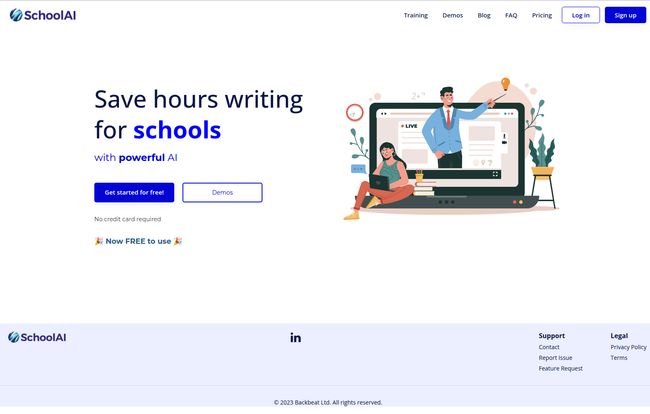
My first visit to the SchoolAI website was… clean. Refreshingly simple, actually. There were no confusing pop-ups or flashy videos. Just a clear headline: “Save hours writing for schools with powerful AI.” It gets straight to the point, which I appreciate. They know their audience doesn’t have time to waste.
The big, blue “Get started for free!” button is front and center. No credit card required. This immediately lowers the barrier to entry. There’s nothing worse than getting excited about a new tool only to hit a hard paywall. SchoolAI seems to understand that letting people try it out is the best way to prove its worth. It feels confident.
A Look Inside the Teacher’s Toolkit
Okay, so it’s easy to sign up. But what can it actually do? The platform is packed with a bunch of specialized tools, and while I couldn’t test every single one, the feature list gives a pretty clear picture of its capabilities.
The Lesson Plan Generator
This is the big one for a lot of teachers. I’ve seen friends spend their entire Sunday evening mapping out the week. With SchoolAI, you can supposedly feed it a topic, a grade level, and a few objectives, and it will generate a structured lesson plan. Imagine typing “Create a 45-minute lesson plan for 8th graders on the causes of the American Revolution, including a warm-up activity and an exit ticket.” The time-saving potential here is just massive. Of course, you’ll want to tweak it to fit your unique teaching style, but having that framework done in seconds instead of an hour? That’s a game-changer.
Taming the Inbox with AI Email Drafting
Ah, the parent email. It’s an art form. You need to be polite, firm, informative, and diplomatic, all at once. SchoolAI has an email drafter that can help. Need to send a gentle reminder about an overdue assignment? Or maybe a positive note about a student’s breakthrough? The tool can whip up a professional draft that you can then personalize. This could seriously reduce the anxiety that comes with hitting ‘send’ on those tricky communications.
Creating Quizzes and Assessments in a Flash
Coming up with unique quiz questions, especially multiple-choice ones with plausible distractors, is a creative drain. SchoolAI can generate quizzes based on a topic or a chunk of text you provide. This is fantastic for quick comprehension checks or creating study guides. It’s another one of those tasks that isn’t hard, but it just… takes time. Time you could be using for literally anything else.
Beyond the Classroom Walls
The tools aren’t just for individual teachers. There’s functionality for creating school-wide documents like newsletters, briefings for staff meetings, and even those pesky progress reports. For an administrator, this could be a godsend, automating the process of keeping the entire school community informed and on the same page.
Let’s Talk About the Price. Or… The Lack Of It?
This is where things get interesting. The homepage proudly states, “Now FREE to use 🎉”. My inner skeptic immediately went looking for the catch. I clicked on the “Pricing” link in the navigation bar, and… I landed on a 404 error page.
But it wasn’t a boring, sterile 404 page. It said, “The page you’re looking for does not exist. But here’s a friendly looking ice cream 🍦”. I have to admit, that made me smile. It shows a bit of personality. My best guess? They’re either in a beta phase, gathering users and feedback before launching paid tiers, or they’re planning a ‘freemium’ model where the basic tools are free and more advanced features will eventually cost money. For now, it seems to be genuinely free, which is an incredible value proposition. My advice? Get in now while the getting is good.
The Good, The Bad, and The AI-Generated
No tool is perfect, especially in the rapidly-changing world of AI. It’s important to go in with your eyes open.
The obvious upside is the massive time savings. It’s a productivity machine that can automate the most tedious parts of an educator’s job. This isn’t just about getting work done faster; it’s about preventing burnout and freeing up mental space for more creative, impactful teaching. It’s super easy to use, so you dont need a degree in computer science to figure it out.
However, there are things to watch out for. The biggest concern is an over-reliance on the tech. AI is a fantastic starting point, a co-pilot, but it’s not the pilot. Every single piece of content it generates—whether it’s a lesson plan or a parent email—must be reviewed and edited by a human. You. AI can sometimes be confidently incorrect, have subtle biases, or just miss the specific context of your classroom. It lacks your personal touch, your anecdotes, your unique way of explaining things. Using AI effectively means using it as a brainstorming partner, not a replacement for your professional judgment.
From an SEO perspective, this is a lesson we learned a long time ago. Pure, unedited AI content is often soulless and doesn’t connect with people. Your students and their parents deserve that human touch. Think of SchoolAI as the assistant who gathers all the ingredients and lays them out on the counter for you. You still have to be the chef.
Who Is SchoolAI Really For?
Honestly? Pretty much any educator who feels like they’re drowning in administrative tasks.
- K-12 Teachers: This is the sweet spot. Lesson plans, quizzes, emails, reports… it’s a digital Swiss Army knife for the modern teacher.
- School Administrators: Principals and department heads can use it to streamline communication, draft reports, and create materials for staff development.
- Homeschooling Parents: It could be a valuable resource for creating structured learning materials and lesson plans at home.
If you’ve ever looked at a blank page and thought, “I don’t even know where to start,” this tool is for you. It’s designed to break through that writer’s block and get momentum going.
My Final Verdict
After digging into what SchoolAI offers, I’m genuinely optimistic. It’s not a silver bullet that will solve all the problems in education, but it’s a powerful and practical tool that addresses a very real pain point: the never-ending mountain of paperwork. By handling the first draft, it gives educators back their most valuable resource: time.
As long as you remember to use it as a co-creator and not a crutch, SchoolAI could be one of the most impactful productivity tools to enter the classroom in years. And since it’s currently free, there’s literally no reason not to give it a try. Go on, save yourself a few hours this week. You’ve earned it.
Frequently Asked Questions about SchoolAI
- Is SchoolAI really free to use?
- As of right now, yes. Their website states it is “Now FREE to use” and there is no credit card required to sign up. This might change in the future, but for now, you can access the tools without a subscription.
- Can SchoolAI completely automate my grading?
- It can help by creating quizzes and assessment questions, which can streamline the grading process for objective answers. However, it’s not designed to grade subjective work like essays or complex projects. That still requires your expert human eye.
- Do I need to be a tech expert to use SchoolAI?
- Not at all. The platform is designed to be very user-friendly and intuitive. If you can write an email or use a search engine, you’ll be able to navigate SchoolAI with ease. The focus is on simplicity and efficiency.
- Is the content generated by SchoolAI original?
- The content is generated by an AI model, so it creates new text based on your prompts. However, like any AI, it learns from vast amounts of existing data. It’s always a best practice to review the content and add your own unique perspective to ensure it’s a perfect fit for your needs and to avoid any potential plagiarism issues, however unlikely.
- What kinds of documents can I create with SchoolAI?
- It’s quite versatile! You can create lesson plans, quizzes, parent emails, student reports, newsletters, staff briefings, brainstorms, and even social media posts like Tweets for your school’s account.


