
Categories: AI Art Generator, AI Drawing, AI Illustration Generator, AI Image Generator, AI Sketch Generator, Text to Image
Scribble Diffusion AI: Turn Your Doodles into Masterpieces

How many times have you had a brilliant idea for an image, scribbled it down on a notepad, a whiteboard, or the back of a receipt, and then just… stared at it? That clumsy drawing is a million miles away from the polished graphic you need for your blog post, your ad campaign, or your social media feed. The gap between idea and execution can feel like a chasm.
I live in that chasm. As an SEO and content guy, I need a constant stream of unique visuals. Stock photos are fine, but they can be generic. High-end design tools are great, but they require time and, frankly, artistic talent I just don’t possess. My stick figures have a certain… rustic charm, but they’re not going to win any awards.
So when I stumbled upon Scribble Diffusion AI, my curiosity was definitely piqued. A tool that promises to turn my chicken scratch into a refined image? It sounds like something out of science fiction. But here we are. I’ve spent some time with it, and I have some thoughts. Lots of them, actually.
So What on Earth is Scribble Diffusion AI?
Imagine you have a magic coloring book. You draw a rough outline of a horse, whisper to the book, “a majestic brown stallion galloping through a field,” and—poof!—the page fills with a photorealistic image that looks exactly like you described. That’s the closest analogy I have for Scribble Diffusion AI. It’s a sketch-to-image AI generator. You give it a basic drawing and a text prompt, and its algorithm gets to work, interpreting your lines and your words to create a brand-new, often stunning, piece of art.
This isn’t just about color-by-numbers. The AI, built on what’s known as a diffusion model, deconstructs your image into a noisy mess and then rebuilds it based on your prompt. The results can be anything from a realistic photo to a fantastical painting. The tool itself is the bridge. Your doodle is the foundation, and your words are the architectural blueprint.
My First Awkward Doodle with the AI
To really test it, I decided not to upload a nice, clean sketch. Oh no. I went straight to the built-in drawing tool and, with all the grace of a toddler using a mouse, drew a lopsided circle with a stem. A thing that was, generously, an apple. My first prompt was simple: “a shiny red apple on a white table.”
I hit generate. And I waited. A few seconds later, an image appeared that was… surprisingly good. It was a shiny red apple. On a table. It looked nothing like my pathetic drawing, but it had captured the essence of it. The shape was right. The concept was there. My lopsided circle had been understood.
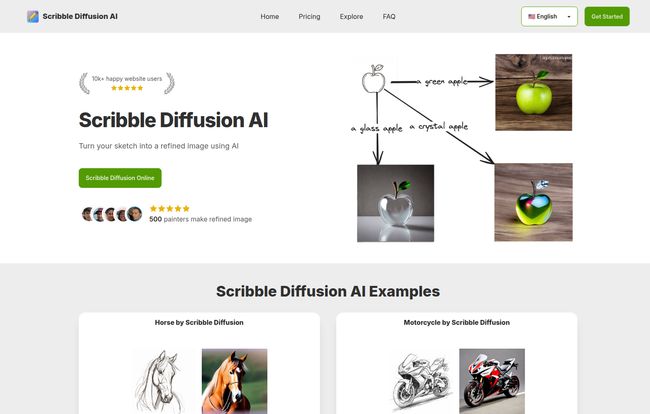
That’s when I saw the real power. I kept the same terrible sketch and just changed the prompt. “A glass apple.” Boom. A beautiful, transparent apple. “An apple made of stars.” Double boom. A cosmic, swirling apple that looked like a mini-galaxy. This is where the fun really begins.
The Interface is Deceptively Simple
You’d think a tool this powerful would have a dashboard like an airplane cockpit. It doesn’t. You have two choices:
- Draw it live: Just open the tool and start sketching on the canvas. Don’t worry about being perfect. The AI seems to thrive on imperfection.
- Upload your sketch: Got a drawing you already made? Just upload the image file.
That’s it. Then you type your prompt in the box and go. There’s no steep learning curve, no hundred-page manual. It’s incredibly accessible, which, in a world of increasingly complex software, is a massive breath of fresh air.
Visit Scribble Diffusion AI
The Standout Features
Okay, let’s get into the nitty-gritty. What makes this thing tick? After playing around, a few things really stood out to me.
From Brain to Blog Post in Minutes
The biggest win for me is the speed. I can go from a vague concept to a high-quality, completely unique blog header image in under five minutes. For content creators, marketers, and small business owners, the time saved is immeasurable. That’s more time for writing, for strategy, for keyword research… you know, the stuff that moves the needle. This isn’t just a fun toy; it’s a productivity machine.
No Art School Debt Required
I think the most significant barrier to creating custom visuals is the skill requirement. Scribble Diffusion AI kicks that barrier down. It democratizes design. You don’t need to understand perspective, shading, or color theory. You just need an idea. This opens up visual creation to a whole new group of people—writers, developers, teachers, and entrepreneurs who can now bring their ideas to life without hiring a designer for every little thing.
The Magic is in the Prompt
Your sketch provides the basic structure, but your text prompt is where you become the director. This is the creative playground. The examples on their site show it perfectly. A simple sketch of an apple becomes a green apple, a glass apple, or a crystal apple based on the words you use. I’ve found that getting specific works wonders. Instead of “a fast car,” try “a cherry red 1960s sports car racing on a coastal road at sunset.” The more detail you give the AI, the more it has to work with.
Let’s Talk About the Price Tag
Alright, the all-important question: what’s this going to cost? The pricing structure is actually pretty straightforward, which I appreciate. They seem to be running a ‘summer sale’ right now, so these prices might not stick around forever.
| Plan | Price | Credits | Best For |
|---|---|---|---|
| Free Plan | $0 | 3 credits | Just trying it out and seeing if you like it. |
| Starter Plan | $5 (one-time) | 100 credits | Occasional users or those with a small, one-off project. |
| Premium Plan | $9 / month | 300 credits | Content creators, bloggers, and regular users who need a steady supply of images. |
| Advanced Plan | $80 / year | 5000 credits | Power users, agencies, or anyone who wants the best long-term value. |
The free plan is more of a quick taste than anything else—3 credits will be gone in minutes, trust me. But it’s enough to see the potential. The Starter plan is a great, low-risk entry point. For someone like me, the Premium or Advanced plans make the most sense for creating a consistent volume of content. The annual plan offers a pretty hefty discount if you know you’re going to be using it a lot.
The Not-So-Perfect Parts
No tool is perfect, and it’s important to be transparent. There’s one major thing to be aware of: their no-refund policy. Now, before you run for the hills, their reasoning makes sense. Generating AI images is computationally expensive. Every time you click ‘generate,’ you’re using serious server resources. A refund policy would be tough to manage. So, my advice is simple: start with the free plan. Then, if you’re ready to commit, maybe try the $5 starter plan before jumping into a subscription. Make sure it’s the right fit for you before you go all-in.
Also, the site mentions that the price may increase next month. Classic marketing scarcity? Maybe. But also pretty common for new AI tools as they gain users and features. It’s something to keep in mind.
Final Thoughts: Is Scribble Diffusion AI a Keeper?
After all my doodling and prompting, I’m genuinely impressed. Scribble Diffusion AI isn’t going to replace professional human artists and designers—and it shouldn’t. But for the rest of us? For the marketers, the founders, the bloggers, the people with more ideas than artistic ability? It’s a game-changer.
It’s a tool that closes the gap between imagination and reality. It’s fast, fun, and shockingly effective. It turns what used to be a major production—creating a custom image—into a simple, creative exercise. For me, it’s already earned a spot in my digital toolbox. If you’ve ever wished you could bring your quick sketches to life, you owe it to yourself to give their free plan a whirl. You might just surprise yourself.
Frequently Asked Questions
What exactly is Scribble Diffusion AI?
Scribble Diffusion AI is a web-based tool that uses artificial intelligence to transform your rough sketches or drawings into high-quality, detailed images. You provide a sketch and a text prompt describing what you want, and the AI generates an image based on both inputs.
How do I use Scribble Diffusion AI?
It’s super simple! You can either draw a sketch directly on their website’s canvas or upload an existing drawing from your computer. After that, you write a descriptive text prompt (e.g., “a colorful bird sitting on a branch, impressionist style”) and click the generate button.
Who is this tool for?
It’s for a wide range of people! This includes content creators needing unique blog images, marketers designing ads, social media managers creating posts, UI/UX designers mocking up concepts, and even hobbyists who just want to have fun turning their doodles into art. Its ease of use makes it great for people without formal design training.
What about copyright for the images I create?
This is a common question with AI art. Generally, with many AI image generators, you own the rights to the images you create on paid plans. However, the exact terms can vary, so I always suggest checking the platform’s most current Terms of Service for the specifics on commercial use and ownership. It’s better to be safe than sorry!
Is the payment process secure?
Yes, according to their site, they use a secure payment service for all transactions. This is standard practice for reputable online tools, so you can expect your payment information to be handled safely.
Can I get a refund if I don’t like it?
No. Scribble Diffusion AI has a strict no-refund policy because the process of generating images is very resource-intensive. This is why it’s a good idea to use the 3 free credits to test the service thoroughly before purchasing a plan.
Reference and Sources
For more information, pricing details, and to try the tool yourself, please visit the official website:
- Scribble Diffusion AI Official Website: https://www.scribblediffusion.ai/
- Pricing Page: https://www.scribblediffusion.ai/#pricing


