
Categories: AI Assistant, AI Chatbot, AI Customer Service, AI Lead Generation, No-Code&Low-Code
SensiBot Review: Is This AI WhatsApp Chatbot Legit?

WhatsApp for business is a bit of a double-edged sword, isn’t it? On one hand, it’s incredible. You’re right there in your customer’s pocket, having personal, direct conversations. The engagement is off the charts compared to email. But on the other hand… you’re right there in your customer’s pocket. All the time. The pings are relentless, and the expectation for an instant reply is real.
For years, I’ve seen small businesses and even larger marketing teams get absolutely swamped by their WhatsApp channel. It starts as a great lead generator and then quickly becomes a time-sucking monster. We’ve tried everything, from dedicated staff to complicated routing systems. The old-school chatbots? Forget it. They were clunky, robotic, and frustrated customers more than they helped. “Press 1 for sales, Press 2 for support.” Ugh.
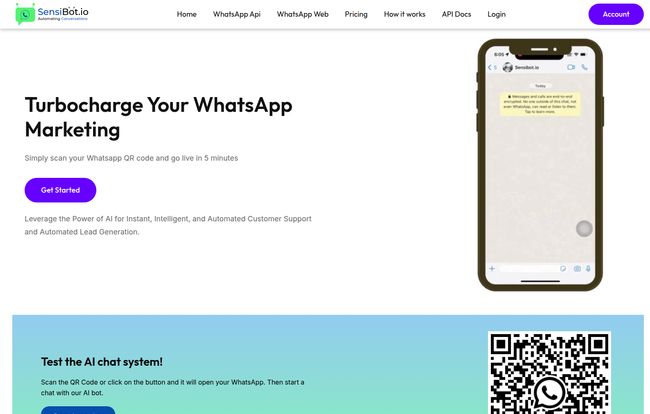
So when I stumbled upon a tool called SensiBot, which claims to “turbocharge your WhatsApp marketing” with an AI-powered chatbot, my ears perked up. It promises intelligent, automated customer support that’s live in 5 minutes. A bold claim. But is it just another shiny tech object, or could this actually be the solution we’ve been looking for? I had to find out.
What Exactly is SensiBot? (And Why Should You Care?)
Okay, so let’s break it down. SensiBot isn’t your dad’s chatbot. At its core, it’s an AI assistant designed specifically for WhatsApp, and it’s powered by the same brain behind ChatGPT. This is the key difference. Instead of just matching keywords, it understands context, intent, and can hold a surprisingly natural conversation.
Think of it like hiring a super-smart, incredibly fast intern who never sleeps, never takes a coffee break, and has already memorized all your company’s FAQs. You feed it your business information—your products, services, store hours, return policy, you name it—and it takes over the front lines of your customer communication on WhatsApp. It’s there to answer the repetitive questions, so your human team can focus on the stuff that really needs a human touch.
For any business that feels like they’re drowning in routine inquiries, this is a pretty compelling idea.
Visit SensiBot
My First Impressions and the 5-Minute Setup Promise
The SensiBot website boasts you can “go live in 5 minutes.” As someone who has wrestled with new software integrations for days, I was skeptical. Too often, “easy setup” is marketing speak for “easy if you’re a developer.”
But the process looks genuinely straightforward. The dashboard seems clean, and the steps are logical: connect your WhatsApp, feed the bot your data (you can literally just upload documents or paste text), and customize its personality. This last part is pretty cool—you can tell it to be formal, friendly, witty, or whatever fits your brand’s voice. A far cry from the soulless bots of yesteryear.
I haven’t timed it with a stopwatch, but the promise of a sub-10-minute setup feels achievable here, which is a massive win for busy entrepreneurs who don’t have an IT department on standby.
The Core Features That Actually Matter
A long list of features can be overwhelming. Let’s cut through the noise and talk about what really makes a difference here.
The Always-On Customer Service Rep
This is the most obvious benefit. Having 24/7 customer support changes the game. Your e-commerce store gets a query at 2 AM from someone in a different time zone? SensiBot is there to answer it instantly. No more lost sales because of a delayed reply. It handles the initial contact, answers common questions, and ensures every single customer feels heard, immediately. This alone can seriously boost customer satisfaction and loyalty.
Getting Smart with ChatGPT Integration
The fact that SensiBot is “Powered by ChatGPT” is its secret sauce. It means the bot can handle variations in how people ask questions. A customer could ask “What’s your return policy?”, “How do I send something back?”, or “I bought this and it’s not right, what do I do?” and the AI understands they all mean the same thing. It can provide customized, intelligent answers that feel less robotic and more like a real conversation. This is the leap forward that makes AI chatbots finally feel… useful.
A Lifesaver for Your Support Team
Here’s the thing: SensiBot isn’t about firing your custome service team. It’s about making them better. By automating up to 80% of the routine questions, you free up your human experts to deal with the complex, high-value problems. The angry customer who needs empathy, the massive potential client who needs a custom quote—that’s where your people should be spending their time. SensiBot acts as a filter, an incredibly efficient one, that elevates your entire support structure.
Let’s Talk Money: SensiBot Pricing Breakdown
Alright, the all-important question: what’s this going to cost? I appreciate that SensiBot has a clear pricing page, no “contact us for a quote” nonsense. They’ve got plans for different business sizes, and they offer both monthly and yearly subscriptions (with a nice discount for the annual commitment).
| Plan | Monthly Price | Key Feature | Best For |
|---|---|---|---|
| Free Trial | $0 for 10 Days | 200 AI Chat Responses | Testing the waters and seeing if it fits your workflow. |
| Startup | $9 / month | 1,000 AI Chat Responses | Solopreneurs or small businesses just starting with WhatsApp support. |
| Business | $29 / month | 5,000 AI Chat Responses | Growing businesses and e-commerce stores with moderate query volume. |
| Agency | $99 / month | Unlimited AI Chat Responses | Marketing agencies or larger businesses with high customer interaction. |
Frankly, the pricing seems very reasonable. The Startup plan at $9/month is less than a couple of fancy coffees. When you compare that to the cost of a human agent’s time, the ROI is a no-brainer. The Business plan at $29/month seems like the sweet spot for most established small businesses. And for agencies managing multiple clients, the unlimited plan is a fantastic deal.
The Not-So-Perfect Bits (A Reality Check)
No tool is perfect, and it’s important to go in with open eyes. I’ve seen enough AI tools to know their limitations.
First, an AI chatbot is only as good as the data you give it. The initial setup requires you to be thorough in providing your business details. If your return policy isn’t in the knowledge base, the bot can’t answer questions about it. So yes, there’s some upfront work involved.
Second, AI can still get things wrong. For highly complex or emotionally charged issues, it might not provide the perfect nuanced response. You’ll still need a clear escalation path for the bot to say, “I’m not sure about that, let me connect you with a human specialist.”
Lastly, there’s a dependency on OpenAI’s infrastructure. If ChatGPT has an outage (it happens!), your bot’s ‘brain’ might be temporarily offline. It’s a risk with any cloud-based service, but one to be aware of.
Who is SensiBot Really For?
After looking it all over, I have a clear picture of the ideal SensiBot user. This tool is a fantastic fit for:
- E-commerce Stores: Answering endless questions about shipping, stock, and returns.
- Small Businesses: Providing professional, instant support without hiring a full-time person.
- Real Estate Agents: Qualifying leads and scheduling viewings automatically.
- Marketing Agencies: Managing WhatsApp communications for multiple clients efficiently from one platform.
Who isn’t it for? Probably large enterprises with extremely specialized, high-stakes technical support where a single misunderstanding could be catastrophic. They likely have their own bespoke, in-house solutions. For the other 99% of businesses, though, this is a powerful and accessible tool.
Frequently Asked Questions about SensiBot
I figured I’d round up some common questions people might have.
How hard is SensiBot to set up for a non-techy person?
Based on their interface, it looks very user-friendly. It’s a no-code platform, meaning you don’t need to be a programmer. If you can copy and paste text or upload a file, you can train the bot.
Can I customize the SensiBot responses to sound like my brand?
Yes. This is one of its best features. You can instruct the AI to adopt a specific tone—whether it’s professional, casual, funny, or empathetic—to make sure it aligns with your brand’s voice.
Does SensiBot completely replace my human customer service team?
No, and it shouldn’t. It’s designed to handle the majority of repetitive queries to free up your human team for more complex issues. Think of it as a force multiplier, not a replacement.
What happens if a customer asks something the bot doesn’t know?
You can set it up to recognize its own limits. A good practice is to have it provide a message like, “That’s a great question. I need to get one of my human colleagues to help. They’ll be with you shortly,” and then notify your team.
Is there a free trial for SensiBot?
Yes, they offer a 10-day free trial with 200 AI chat responses. It’s a great way to test it out with your own customers and see the results before committing.
My Final Verdict on SensiBot
So, is SensiBot the real deal? In my opinion, yes. It’s a smart, well-designed, and affordably priced solution to a very real problem for modern businesses. It takes the power of advanced AI and packages it into a simple tool that can genuinely reduce workload, improve customer satisfaction, and even help you make more sales.
It’s not a magic wand that will solve every business problem. You still need to do the work of defining your brand and processes. But as a piece of ammunition in your customer service arsenal, it’s a powerful one. It turns your WhatsApp from a chaotic inbox into an efficient, intelligent, and tireless front-line assistant. And for most businesses, that’s a pretty fantastic transformation.
Reference and Sources
- SensiBot Official Website
- SensiBot Official Pricing Page
- Statista – Most popular global mobile messenger apps (as of January 2024, showing WhatsApp’s massive user base)


