
Categories: AI Copilot, AI Email Assistant, AI Grammar Checker, AI Paraphraser, AI Productivity Tools, AI Rewriter, AI Social Media Post Generator, AI Spell Check, AI Summarizer, AI Writing, AI Writing Assistants
Shakespeare Toolbar Review: My AI Writing Sidekick

We’re all living in a world of a dozen open tabs. I know I am. My browser is a chaotic landscape of Google Docs, keyword research tools, social media schedulers, and, of course, that one trusty, always-open tab for ChatGPT.
You know the drill. You write a sentence in a doc. Hmm, that sounds clunky. You highlight it, Command+C, switch tabs, Command+V into the prompt box, type “rephrase this,” wait for the magic, copy the result, and tab-switch back again. It’s a workflow, sure, but it’s a clunky one. It’s the digital equivalent of constantly having to get up and walk to another room to grab a dictionary.
For weeks, I’ve been searching for something… better. Something that doesn’t break my flow. And I think I’ve found it. It’s called the Shakespeare Toolbar, and it’s been a quiet little game-changer for my productivity. It’s not about replacing ChatGPT wholesale, but about integrating that same power directly into every single text box I use. And the best part? It’s not another soul-crushing monthly subscription.
So What is the Shakespeare Toolbar, Anyway?
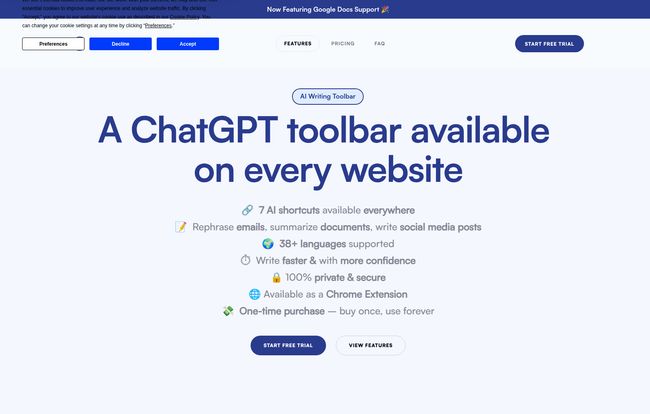
Think of the Shakespeare Toolbar as your AI ghostwriter, perched invisibly on your shoulder, ready to help whenever you’re typing. It’s a Chrome extension that embeds a suite of AI tools right into your browser. This means whether you’re writing an email in Gmail, a blog post in Google Docs, a witty reply on Twitter, or even filling out a contact form, Shakespeare is right there with you.
It eliminates that constant, disruptive tab-switching dance. Instead of going to the AI, the AI comes to you. A simple highlight and a right-click bring up a menu of options that have genuinely streamlined my day-to-day grind.
Breaking Free from the ChatGPT Tab-Switching Hell
This is the core appeal for me. The biggest bottleneck in my content creation process wasn’t writing or research; it was the micro-interruptions. Every time I switched tabs, I risked getting distracted by a new email, a Slack notification, or a shiny YouTube video in my recommendations. Each context switch, no matter how small, chips away at your focus.
Shakespeare solves this by living inside the websites you already use. Writing a product description on Shopify? Highlight a competitor’s text and ask Shakespeare to summarize its key points. Stuck on an email to a client? Type a blunt sentence, highlight it, and ask Shakespeare to make it more polite and professional. It’s this seamless integration that makes it feel less like a tool and more like an extension of your own brain.
I was working on a long-form article the other day and needed to simplify a really dense paragraph from a research paper I was citing. Before, this would have been a five-minute, multi-tab operation. With Shakespeare, I highlighted the text on the research site, right-clicked, chose ‘Simplify’, and got a bulleted list of the main ideas in seconds. That’s not just a time-saver; it’s a focus-saver.
My Favorite Features (and How I’m Actually Using Them)
A tool is only as good as its features, right? Well, Shakespeare isn’t just a one-trick pony. It’s more like a digital Swiss Army knife for writers.
Instant Summaries and Rephrasing That Just Work
This is my bread and butter. As an SEO, I read a LOT. I’m constantly scanning competitor articles, industry news, and technical documents. The Summarize feature is brilliant for getting the gist of a 3,000-word article without having to read every single line. It pulls out the main arguments into a neat little paragraph. The Rephrase function is equally powerful. We all write sentences that just don’t land right. Now, instead of agonizing over them, I just highlight, click, and get a few alternatives. It’s fantastic for breaking out of a creative rut.
The Google Docs Integration is a Dream
Okay, this is huge. The fact that it works directly within Google Docs is what truly sold me. Most of my writing happens there, and having the AI tools available without leaving the document is incredible. I can draft an entire article, then go back through, highlighting sections to improve clarity, expand on ideas, or check for a better tone. It makes the editing process so much more fluid and interactive. No more copy-paste, no more split-screen madness.
Visit Shakespeare Toolbar
One-Click Email and Social Media Wizardry
I’ll admit, I hate writing formal emails. The ‘Friendly Mode’ is a lifesaver. You can write a quick, blunt message like “Need the report by 5 pm” and it will transform it into a polite, professional request. It also has prompts specifically for things like writing Twitter threads or brainstorming social media captions. It’s great for those moments when your brain is just fried and you can’t think of a creative way to say something.
Let’s Talk Price, Because This is The Best Part
Alright, let’s get to the part that made my jaw drop. In an era where every piece of software wants a piece of your monthly budget, Shakespeare has gone a different route.
The Shakespeare Toolbar Pro is $49. Not per month. Not per year. A one-time payment for a lifetime license.
Let that sink in. ChatGPT Plus is $20/month. Jasper starts at $39/month. Most other serious AI writing assistants are in a similar ballpark. With Shakespeare, you pay once and you’re done. It pays for itself in just over two months compared to a ChatGPT Plus subscription. In a world of subscription fatigue, finding a powerful tool with a lifetime deal (LTD) feels like striking gold.
Here’s a quick look at what that $49 gets you:
| Feature | Included in Shakespeare Pro ($49 LTD) |
|---|---|
| One-Time Payment | ✅ Yes |
| Use on Any Website | ✅ Yes |
| Google Docs Support | ✅ Yes |
| Summarize, Rephrase, Simplify | ✅ Yes |
| Access to AI Text Editor | ✅ Yes |
| Use on up to 3 devices | ✅ Yes |
They do offer a free trial that gives you 2,000 words to play with, which is more than enough to see if its workflow clicks for you.
What’s the Catch? A Few Honest Considerations
No tool is perfect, and I believe in transparent reviews. So, are there any downsides? A couple of small things. The free trial is limited to 2000 words, which is enough for a test drive but you’ll burn through it quickly if you’re really putting it through its paces.
I also saw a note about a potential account limitation for users who write over 500,000 words in a single month. To put that in perspective, that’s about the length of Leo Tolstoy’s War and Peace. Every. Single. Month. For the vast, vast majority of writers, bloggers, marketers, and students, this is a total non-issue. If you’re running an industrial-scale content farm, maybe you’ll hit that, but for us humans? It’s highly unlikely.
Who Should Get the Shakespeare Toolbar?
This is an easy one. I’d wholeheartedly suggest this tool to a few key groups:
- Bloggers and Content Creators: The seamless integration into Google Docs and your CMS is a workflow miracle for drafting, editing, and overcoming writer’s block.
- Marketers and Social Media Managers: Quickly whip up ad copy, social posts, and email campaigns without ever leaving your scheduling tools.
- Students: Summarize dense academic papers, rephrase your arguments for clarity, and ensure your essays are grammatically sound. The one-time cost is incredibly student-friendly.
- Customer Support & Remote Workers: The ‘polite mode’ and quick-reply features are brilliant for anyone who spends their day answering emails and messages.
- Non-Native English Speakers: It’s a fantastic tool for gaining confidence by quickly checking grammar, tone and sentence structure.
Final Thoughts on My New AI Sidekick
The Shakespeare Toolbar hasn’t replaced my need for deep, creative thinking, but it has removed an incredible amount of friction from my writing process. It’s an accelerator. It handles the small, tedious tasks, freeing up my mental energy to focus on the bigger picture: strategy, creativity, and connecting with my audience.
For a one-time price of $49, it’s one of the best value-for-money deals in the AI space today. It’s a practical, powerful, and refreshingly simple tool that does exactly what it promises: it puts the power of AI everywhere you write. My tab-switching days are over, and my workflow has never been smoother.
Frequently Asked Questions
- Is the $49 for Shakespeare Toolbar really a one-time fee?
- Yes! It’s a lifetime license (LTD). You pay $49 once and get to use the Pro version forever, including future updates. This is one of its biggest selling points.
- How is this different from just using the ChatGPT website?
- The main difference is integration. Instead of constantly copying and pasting text between your work and the ChatGPT website, the Shakespeare Toolbar works directly inside any text box in your browser, including Google Docs, Gmail, Twitter, etc. It saves time and reduces distractions.
- What browsers does the Shakespeare Toolbar work on?
- It’s available as a Chrome Extension, which means it works on Google Chrome and other Chromium-based browsers like Microsoft Edge, Brave, and Opera.
- Can it help me write in languages other than English?
- Absolutely. The tool supports over 38 languages, making it a versatile assistant for multilingual users or those communicating with a global audience.
- Is my data safe when using the toolbar?
- According to their website, they prioritize user privacy. They state that the tool is 100% private and secure, so your writing and data are not used for other purposes.


