
Categories: AI Assistant, AI Excel Formula Generator, AI For Data Analytics, AI Productivity Tools, AI Spreadsheet, Excel AI
SheetSavvy AI Review: Your New Spreadsheet BFF?

Spreadsheets. For those of us in the SEO, marketing, or any kind of data-adjacent world, they’re both the bedrock of our work and the source of so many late nights. We’ve all been there, right? Staring at a screen, a half-empty mug of cold coffee by your side, wondering why your VLOOKUP is screaming #N/A at you. You’ve tried INDEX MATCH, you’ve even whispered a desperate plea to the tech gods. Nothing. It’s a shared trauma we all carry.
For years, the answer has been to just… get better. Learn more formulas. Watch more YouTube tutorials. Bash your head against the keyboard until something works. But what if there was another way?
That’s the promise of tools like SheetSavvy AI. It popped up on my radar a while back, and I’ll admit, I was skeptical. Another AI tool promising to solve all my problems? Sure. But as someone who lives and dies by campaign data and keyword reports, I had to give it a shot. This isn’t just another review; this is a dispatch from the trenches.
So What Exactly is SheetSavvy AI?
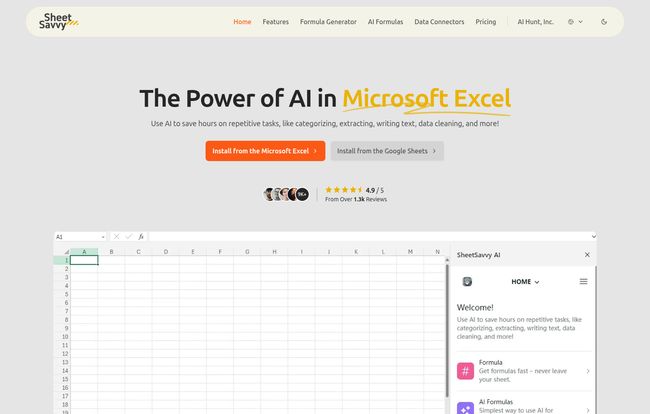
Think of SheetSavvy AI as a brilliant intern for your Excel or Google Sheets—one that’s fluent in every formula imaginable, never needs a break, and actually enjoys cleaning up messy data. It’s an AI-powered add-on that integrates directly into your spreadsheets. Its whole purpose is to take the most tedious, repetitive, and frankly, soul-crushing parts of spreadsheet management off your plate.
It’s not here to make you obsolete. It’s here to be a force multiplier. It handles the ‘how’ so you can focus on the ‘what’ and the ‘why’. Instead of spending an hour trying to write a complex formula to categorize customer feedback, you spend 30 seconds telling the AI what you need and the rest of the hour actually analyzing the results. See the difference? It’s a pretty big one.
Breaking Down the Core Features
Okay, let’s get into the nitty-gritty. What does this thing actually do? SheetSavvy AI isn’t just one magic button; it’s a suite of tools. Here are the ones that stood out to me.
The Formula Generator is a Sanity Saver
This is the feature that will probably get the most immediate gasps of relief. We’ve all got a mental block on certain formulas. For me, it was always complex nested IF statements. My brain just… short-circuits. SheetSavvy’s Formula Generator lets you type what you want to do in plain English.
For example, you could type: “If the value in column C is ‘USA’ and the value in column D is over 100, return ‘High Value’, otherwise return ‘Standard’.
Instead of you fumbling with syntax, commas, and quotation marks, it just spits out the perfect formula. It’s brilliant. This alone is worth the price of admission for anyone who isn’t a certified spreadsheet wizard.
The AI Assistant Does the Heavy Lifting
If the Formula Generator is a helpful translator, the AI Assistant is the powerhouse. This goes way beyond just creating formulas. This is about automating entire tasks. Think about all the manual data cleaning you do. Things like extracting names from an email list, categorizing a thousand keywords by search intent (informational, transactional, etc.), or even running sentiment analysis on a column of product reviews.
Normally, that’s a multi-hour, mind-numbing job. With the AI Assistant, you highlight the data, give it a prompt, and let it run. The potential here for marketers and business owners is huge. You’re basically getting data analysis superpowers without needing to learn Python. It’s pretty amazing to watch it work.
Visit SheetSavvy AI
AI Formulas That Actually Think
This feels like the next evolution. While the generator creates standard Excel/Sheets formulas, the AI Formulas are special functions that only work within SheetSavvy. They are designed to perform intelligent operations directly in a cell. For example, you could have a formula that takes a product description in one cell and writes a short, punchy social media post about it in the next. It’s a bit more advanced, but it opens up some wild possibilities for content creation and data enrichment right inside your sheet.
Data Connectors Mean No More CSV Hell
I saved this for last because, for me, this is a personal favorite. My ‘Downloads’ folder is a graveyard of CSV files. GA4 exports, Ahrefs reports, Google Ads data… it’s a mess. The process of exporting from one platform and importing into another is a constant, low-level annoyance. SheetSavvy’s Data Connectors aim to fix that, allowing you to pull data directly from various sources into your sheet. This is a massive timesaver and helps keep your data up-to-date without the manual busywork.
Let’s Talk Turkey: SheetSavvy AI Pricing
Alright, the all-important question: what’s it going to cost me? The pricing structure is actually pretty straightforward, and I appreciate that they have a genuinely useful free plan. It’s not one of those “free” plans that’s basically just a button to upgrade.
| Plan | Price (Monthly) | Best For | Key Features |
|---|---|---|---|
| Personal | $0 | Testing the waters, light personal use | GPT-3.5, limited requests, 1 data connector, 1000 import rows |
| Pro | $4.99 | Freelancers, students, power users | GPT-4, higher limits, 3 data connectors, email support |
| Premium | $9.99 | Small teams, data-heavy users | GPT-4, even higher limits, 5 connectors, unlimited import rows |
| Ultimate | $29.99 | Organizations, agencies | GPT-4, massive limits, full AI assistant access, 10+ connectors, priority support |
My take? The Personal plan is a no-brainer to install and play with. You’ll know pretty quickly if it fits your workflow. The Pro plan at five bucks a month feels like the sweet spot for most individuals. The jump to GPT-4 and the increased limits are well worth the cost of a fancy coffee. The big differentiator for the Ultimate plan is the full AI assistant access and more connectors, which makes sense for a business context.
The Good and The… Could Be Better
No tool is perfect. A real review needs to cover both sides. After using SheetSavvy AI, here’s my honest breakdown.
On the plus side, the ability to automate tasks you used to dread is just… a relief. It’s like a weight off your shoulders. It makes complex data manipulation accessible to everyone, not just people who think in cell references. For SEOs, being able to quickly cluster keywords or analyze SERP data without a complicated script is fantastic. The data connectors, as I mentioned, are a godsend for consolidating campaign reports. It genuinely reduces manual work and frees up mental energy for actual strategy.
However, it’s not without its drawbacks. My main gripe is that the full power of the AI Assistant is held back for the most expensive tier. I get it from a business perspective, but it’s such a core, impressive feature that it’s a shame it’s not more accessible. Also, the limits on data connectors in the lower tiers might be a bottleneck if you pull data from a lot of different sources. And remember, it’s an AI. It’s powerful, but it’s not a mind reader. If your initial data is a complete mess or your prompts are vague, it’s not going to work miracles. You still need to understand your data and what you want to achieve.
My Final Take: Is SheetSavvy AI Worth It?
So, here’s the bottom line. Is SheetSavvy AI worth installing? In my opinion, absolutely. For anyone who finds themselves staring at a spreadsheet for more than a couple of hours a week, there’s no reason not to try the free plan. It’s one of teh few tools I’ve tested recently that delivers on its core promise: it saves you time and makes you better at your job.
It won’t replace the need for critical thinking. It won’t magically make you a data scientist. What it will do is act as an incredibly capable copilot, handling the tedious mechanics so you can focus on steering the ship. It lowers the barrier to entry for powerful data analysis, and in a world where data is everything, that’s a powerful thing indeed.
Frequently Asked Questions about SheetSavvy AI
- Do I need to be a coding expert to use SheetSavvy AI?
- Not at all! That’s the whole point. It’s designed to translate your plain English instructions into the complex formulas or actions needed, so you don’t have to be a spreadsheet guru.
- Does SheetSavvy AI work with Google Sheets as well as Excel?
- Yes, it does. On their website, they provide options to install the add-on for both Microsoft Excel and Google Sheets, so you’re covered on the two biggest platforms.
- Is the free ‘Personal’ plan actually useful, or just a trial?
- It’s surprisingly useful. The limits are generous enough for you to handle smaller projects and, more importantly, to properly test all the core features to see if it’s a good fit for you before spending a dime.
- What’s the biggest reason to upgrade from the ‘Pro’ to the ‘Ultimate’ plan?
- The two biggest drivers are the full, unrestricted access to the AI Assistant for automating complex tasks, and the significantly higher number of data connectors (10+). If your work heavily relies on those two things, the Ultimate plan would be the logical choice.
- Is my spreadsheet data safe when using SheetSavvy AI?
- Data security is a major concern with any third-party tool. While you should always review the company’s latest privacy policy and security documentation directly on their site, most reputable AI tool providers use standard encryption and security protocols to protect user data. They know that their business depends on your trust.
The Future is Less Tedious
I started this journey as a skeptic, and I’ve come away as a convert. Tools like SheetSavvy AI represent a fundamental shift in how we interact with data. The days of being limited by our own knowledge of obscure formulas are numbered. The future of work is about partnership with technology, and this is a prime example of a partnership that just… works. It makes your work life easier, your insights sharper, and your afternoons free from the tyranny of the #REF! error. And that’s something I can definitely get behind.


