
Categories: AI Animated Video, AI Image Generator, AI Script Writing, AI Short Video Generator, AI Subtitle Generator, AI Tiktok Video Generator, AI Video Generator, AI Voice Generator, AI Youtube Video Maker, Text to Video
ShortsFaceless Review: AI Video Creation on Autopilot?

We’ve all seen them. Those strangely addictive YouTube Shorts or TikToks about ‘Amazing Historical Facts’ or ‘Psychology Tricks’ with a robotic voice, cool-looking images, and millions of views. The ‘faceless channel’ trend isn’t just a trend anymore; it’s a legitimate content strategy. But the grind… oh, the grind is real. Finding a topic, writing a script, sourcing images, doing a voiceover, editing it all together, adding subtitles. It’s a full-time job.
I’ve been in the SEO and content game for a long time, and if there’s one thing I’ve seen over and over, it’s the ‘next big thing’ that promises to solve all our problems. So when I stumbled upon a tool called ShortsFaceless, my veteran-blogger-cynicism immediately kicked in. Another AI tool promising the world? But, my curiosity got the better of me. It claims to automate the entire short video production process from a single keyword. A pretty bold claim. So I decided to take a look under the hood.
Visit ShortsFaceless
So What Exactly Is ShortsFaceless?
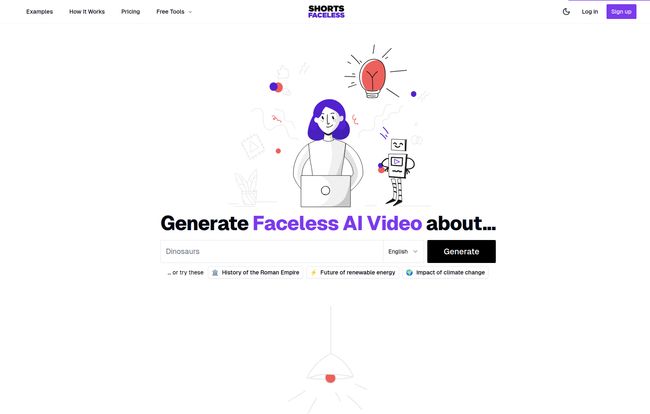
In a nutshell, ShortsFaceless is an AI-powered platform designed to spit out ready-to-post faceless videos for your socials. You give it a topic or a keyword—say, “The Roman Empire” or “The Future of Renewable Energy”—and it gets to work. It generates a script, creates corresponding AI images for each line, adds a surprisingly decent AI voiceover, and syncs animated subtitles. It’s like having a tiny, hyper-efficient content team living in your browser, ready to go at a moment’s notice.
The 3-Step Magic Trick: How It Actually Works
The process they advertise is refreshingly simple. No 50-step tutorials or confusing interfaces. It really does boil down to three main stages.
Step 1: The Spark of an Idea
Everything starts with a single keyword or a short phrase. This is the DNA of your video. You type in your idea, and the platform’s AI brainstorms a handful of video concepts or angles for you. This part is kinda neat because it can help you get past that initial writer’s block. We’ve all been there, staring at a blank screen. This gives you a starting point, a little nudge in the right direction.
Step 2: The AI Takes the Wheel
Once you’ve picked your idea, the magic happens. You select an AI voice from a list of over 40 options (and in more than 10 languages, which is great for reaching a global audience), and then you click ‘Generate’. The platform’s AI models then stitch everything together: the script, the voiceover, and a series of unique AI-generated images that match the script’s content. A few moments later, you have a fully-formed video ready to preview. No more hunting for stock footage for hours on end. Thank goodness.
Step 3: Making It Your Own
Here’s where I was pleasantly surprised. I expected a ‘take it or leave it’ final product. But ShortsFaceless gives you a decent amount of control. Don’t like a specific image the AI chose? Click a button to regenerate it or tweak the prompt. Want to change a line in the script? You can edit the text directly. The AI will even regenerate the audio for that specific line. You can also customize the subtitles—change the colors, position, etc.—to match your channel’s branding. This customization step is what separates it from being just a soulless content machine.
An All-in-One Solution? The Core Features
Beyond the main workflow, there are a few features that stand out. It’s not just a script-to-video tool; it feels more like a complete production suite. It handles script generation, image creation, high-quality AI voiceovers, and synced subtitles. The image effects are subtle but add a bit of motion to what would otherwise be static pictures, which is crucial for viewer retention on short-form platforms. You can also download the final video in HD or, and this is a big time-saver, publish and schedule it directly to your YouTube channel from within the platform. That integration alone could be a massive workflow improvement for busy creators.
My Honest Take: The Good, The Bad, and The AI
Alright, no tool is perfect. Let’s get into the nitty-gritty. After playing around with it, here’s what I genuinely liked and what gave me some pause.
What I Liked
The biggest pro is the sheer speed and efficiency. The claim of creating a video in minutes isn’t an exaggeration. The time saved is immense. For someone trying to scale a channel or a business looking to pump out social content, this is a massive win. The quality of the AI voices and images is also much better than I expected. They’re not going to win an Oscar, but for the intended purpose, they are more than good enough. The ability to regenerate bits and pieces without redoing the whole video is a godsend.
What Gives Me Pause
Of course, there are downsides. First, it’s a subscription service. While the pricing is reasonable, it’s not free. Second, you are somewhat at the mercy of the AI. While the customization is good, a true video editing pro might feel constrained. You can’t do complex transitions or multi-layered effects. The quality of the entire video also hinges heavily on that initial seed keyword. A vague keyword will likely give you a vague, generic video. You still need a good idea to get a good result—the AI can’t read your mind, at least not yet.
Let’s Talk Money: ShortsFaceless Pricing
The pricing structure is simple and transparent, which I appreciate. No hidden fees or confusing credit systems.
| Plan | Price | Key Features |
|---|---|---|
| Essential | $19 / month | Up to 30 videos per month, +40 voices, +10 languages, no watermark, all features. |
| Professional | $29 / month | Up to 60 videos per month, all the same features as Essential. |
Honestly, for what you’re getting, the value is pretty solid. The Essential plan at $19/month breaks down to less than a dollar per video. If you’re serious about content creation but short on time, that’s a very reasonable investment. The Professional plan is for those ready to scale their output significantly.
So, Who Is This Tool Really For?
I don’t think this is for everyone. If you’re a cinematic artist who loves the craft of intricate video editing, this will probably make you cringe. But, if you fall into one of these categories, it could be a game-changer:
- Aspiring YouTubers: Perfect for starting a faceless channel in niches like history, science, finance, or motivation without a huge upfront investment in gear or software.
- Social Media Managers: A fantastic way to quickly generate daily content for clients’ TikTok or Instagram Reels.
- Affiliate Marketers & Bloggers: A simple method to repurpose blog content into video format to drive traffic from other platforms.
- Educators and Coaches: Create quick, bite-sized educational videos to share knowledge.
Frequently Asked Questions about ShortsFaceless
Here are some quick answers to questions that popped into my head while I was testing it.
Can I actually edit the script?
Yep! And when you do, it automatically re-generates the AI voiceover for that section. It’s pretty slick and ensures the audio always matches the text on screen.
How long does it take to make a video?
Less than a minute, for real. From entering the keyword to having a preview ready, the process is incredibly fast. No more waiting for long render times.
What if I don’t like hte images or voiceover? Does it cost more to change?
Nope. You can regenerate the script, images, and voice as many times as you want until you’re happy with the result. There are no extra charges for tweaking your video.
Who owns the videos I create?
You do. Once you generate a video, it’s yours. You can use it for commercial purposes, upload it wherever you want, it’s your asset.
Can I choose the visual style?
Yes. Before generating, you can pick from different styles like ‘Anime’, ‘Neon’, ‘Watercolor’, and others to give your videos a consistent look and feel.
The Final Verdict on ShortsFaceless
So, is ShortsFaceless the magic bullet for content creation? No, of course not. You still need good ideas and a strategic approach. But is it a powerful, time-saving, and surprisingly effective tool for anyone serious about the faceless content game? Absolutely. It removes some of the biggest, most tedious hurdles in video production.
It’s a classic case of working smarter, not harder. For the price of a few fancy coffees a month, you’re essentially hiring a tireless video production assistant. In the fast-moving world of social media, speed and consistency are king. And this tool delivers both in spades. It might just be the shovel you need to start digging in that faceless channel gold rush.


