
Categories: AI API, AI Background Remover, AI Photo Editor
Simpleish Review: AI Background Remover That Saves Time?

Okay, let’s have a little heart-to-heart. If you’ve ever spent more than ten minutes in Photoshop with the Pen Tool, meticulously tracing around a person’s hair, you know the special kind of soul-crushing boredom I’m talking about. It’s a rite of passage for marketers, designers, and e-commerce folks. You do it, you hate it, and you bill for it. For years, I’ve been on the hunt for a tool that just… does it for me. Without the fuss. Without the carpal tunnel.
I’ve tried them all. The clunky desktop apps, the browser plugins that promise the world and deliver a pixelated mess. Most of them are just… meh. So when I stumbled upon Simpleish, my initial reaction was a healthy dose of professional skepticism. Another one-click wonder? Sure. But I gave it a shot. And folks, I think I’m in love.
This isn’t just another tool; it feels like a genuine shortcut. The kind of thing you almost want to keep a secret, but it’s too good not to share.
So, What’s the Big Deal with Simpleish?
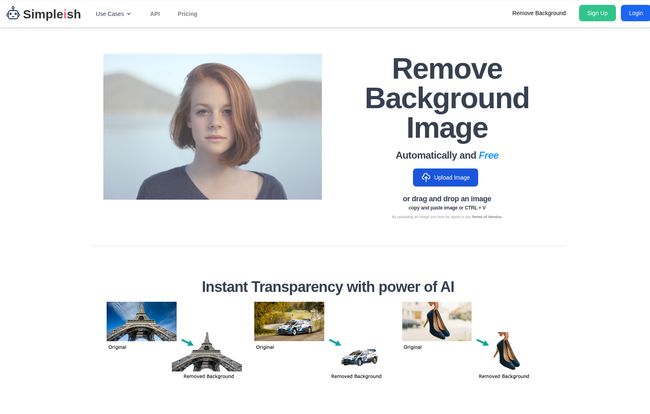
At its core, Simpleish is an online AI background remover. You give it a photo, and its brainy algorithm automatically finds the subject (a person, a car, a dog, your favorite rubber chicken) and digitally snips it out from its background. Poof. Gone. What you’re left with is a clean, transparent PNG file, ready to be dropped onto a new background, used in a product listing, or slapped onto a social media graphic.
And when they say it’s fast, they aren’t kidding. They claim 5 seconds. In my tests, it was often faster. Less time than it takes to decide what to watch on Netflix. That speed is its superpower.
My First Spin with Simpleish
The user interface is clean to the point of being minimalist. There’s a big blue button that says “Upload Image.” You can’t miss it. I grabbed a headshot I had lying around – complete with some messy hair and a slightly busy background. I clicked the button, selected my file, and blinked.
Seriously, that was it. The page processed for a few seconds, and then two images appeared side-by-side: the original and the cutout. The edges were crisp. Even the wispy bits of hair, the eternal enemy of background removal, were handled with surprising grace. It was like watching a magic trick.
Visit Simpleish
You can just copy the result or download a preview for free. To get the full, high-resolution version, you need to use a credit, but we’ll get to the money talk in a minute.
Who Is This Tool Actually Built For?
While anyone can use it, Simpleish really sings for a few key groups of people. It’s not just for making a funny meme of your cat.
- E-commerce Store Owners: This is a big one. Getting clean, consistent product photos is a must. Simpleish allows you to batch-process your entire inventory, creating that professional, uniform look that big brands like Amazon and Shopify champion. No more paying a freelancer a fortune for clipping paths.
- Marketers and Social Media Managers: We need to be fast. Creating graphics for ads, posts, and stories on the fly is the name of the game. Being able to pull a person or product from a photo in seconds is a game-changer for workflow. Think better looking thumbnails for YouTube, cleaner graphics for your CPC campaigns on Google Ads, and more dynamic Instagram stories.
- Photographers: A great tool for speeding up the initial culling and editing process, especially for portrait or product photographers who need to provide clients with isolated subjects.
- Developers: And now for the really nerdy, really cool part…
The Secret Sauce: Easy API Integration
Okay, stay with me here. For the non-coders, an API (Application Programming Interface) is basically a way for different software programs to talk to each other. Simpleish has one, and it’s a huge deal.
This means a developer can build the Simpleish background removal functionality directly into their own app, website, or workflow. Imagine an e-commerce platform where sellers can upload a product photo, and the background is removed automatically before it even goes live. Or a graphic design app with a built-in “remove background” button powered by Simpleish. It’s a force multiplier, letting businesses automate a previously manual and time-consuming task on a massive scale. It’s a pretty slick move and shows they’re thinking beyond just one-off users.
Let’s Talk Money: The Simpleish Pricing Structure
Ah, the all-important question. Is it going to break the bank? Honestly, the pricing model is pretty flexible, which I appreciate. They’ve broken it down into a few options, so you’re not locked into a massive subscription if you dont need one.
| Plan | Cost | Best For |
|---|---|---|
| Free Account | $0 | Testing the waters. You get 1 free credit to download a full-resolution image. No strings attached. |
| Pay As You Go | $1.99 for 10 credits | Casual users like me. If you only need to remove a few backgrounds a month, this is perfect. The credits last for two years! |
| Subscription Plan | $9.99 per month | The power users. You get 300 credits a month. Ideal for small businesses, e-commerce shops, or marketers with steady needs. |
The ‘credit’ system is straightforward: 1 credit = 1 full-resolution image download. I find this much more transparent than some other services with confusing pricing tiers. For my money, the pay-as-you-go plan is a fantastic value for freelancers and individuals.
The Real Talk: Pros and Cons
No tool is perfect, right? Even one I’m this excited about. It’s important to have a balanced view. So here’s my honest breakdown.
What I Absolutely Love
The speed is the number one thing. It’s just ridiculously fast. The ease of use is a close second; if you can click a mouse, you can use Simpleish. The API for developers is a professional-grade feature that sets it apart. And offering a free credit to properly test the high-res output? A confident, customer-friendly move.
What to Keep in Mind
It’s not a silver bullet for every single image. With extremely complex photos—think chain-link fences, fine mesh, or a field of grass—the AI can sometimes get a little confused. The results are still usually pretty good, but you might see a small artifact or two. It also requires JavaScript to be enabled in your browser, but let’s be real, what website doesn’t in this day and age? And finally, remember that the free previews are great, but for that print-quality, high-definition image, you’ll need to use a credit. Which is fair.
Frequently Asked Questions About Simpleish
- What exactly are credits?
- Think of credits as tokens. One credit lets you download one image in its highest possible resolution. You can get a free preview of any image without using a credit.
- Can I use the images for commercial purposes?
- Yes! Once you’ve used a credit to download the image, you can use that cutout for anything you want, whether it’s for a personal project or a client’s multi-million dollar ad campaign.
- What happens if I don’t use all my subscription credits in a month?
- Based on their site and common practice, subscription credits typically reset each month, they don’t roll over. That’s why the pay-as-you-go option is great for sporadic use, as those credits last two years.
- Is the API difficult to use?
- From what’s shown on their site, they’ve built it for simplicity. It seems to integrate with just a few lines of code, so a competent developer should find it pretty straightforward to implement.
- Is it better than Photoshop’s ‘Remove Background’ tool?
- This is the million-dollar question. In my experience, for speed and convenience on 90% of images, Simpleish wins hands-down. For that remaining 10% of hyper-complex images where you need absolute manual control down to the last pixel, Photoshop’s tools still have their place. Simpleish is the daily driver; Photoshop is the specialist surgeon.
My Final Verdict on Simpleish
Simpleish does exactly what it says on the tin, and it does it with surprising polish and incredible speed. It’s a tool that respects your time. It takes a tedious, skilled task and makes it accessible to everyone, from a small Etsy seller to a large company looking to automate its entire image workflow.
It has officially earned a permanent spot in my digital marketing toolbox. It’s not about replacing designers; it’s about empowering everyone to create cleaner, more professional visuals faster than ever before. If you’ve ever groaned at the thought of opening up Photoshop just to clip out an image, do yourself a favor and give Simpleish a try. That first free credit might just save you hours of work.


