
Categories: AI Description Generator, AI Image Description Generator, AI Text Generator
Smart Alt Text Generator: My Honest SEO Review

If you’ve spent any time in the digital marketing or SEO world, you know there are tasks that are, well, a grind. For me, right up there with manually building broken links, is writing alt text for a mountain of images. It’s one of those things that’s critically important but mind-numbingly tedious. You know you should do it. For SEO. For accessibility. For the good of the internet! But when you’re staring down the barrel of a 50-image gallery upload… ugh. The temptation to just write “blue-widget-1” is strong.
So, you can imagine my curiosity was piqued when I stumbled upon the Smart Alt Text Generator. Another AI tool promising to save us from ourselves? I’ve seen a dozen of these pop up. Most are clunky, inaccurate, or just spit out keyword-stuffed garbage that a screen reader would choke on. But this one looked… clean. Simple. Maybe, just maybe, it was different.
First, A Quick Refresher on Why Alt Text Isn’t Just ‘Busy Work’
I know, I know, you’re a pro. But it never hurts to hammer this point home. Alternative text (or alt text) is the copy that appears in place of an image if it fails to load. More importantly, it’s what screen readers use to describe an image to a visually impaired user. It’s a cornerstone of web accessibility. From an SEO perspective, it gives search engines like Google crucial context about what your image contains, helping it rank in image search and contributing to the overall topical authority of your page. It’s the unsung hero of on-page SEO. Neglecting it is just leaving ranking potential and a whole lot of user goodwill on the table.
Enter the Smart Alt Text Generator: First Impressions
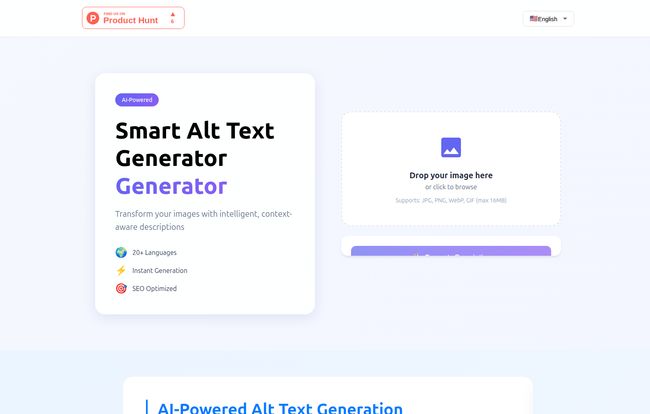
Hopping onto their site, the first thing I noticed was the lack of clutter. It’s a simple, elegant drag-and-drop interface. No crazy pop-ups, no confusing menus. Just a big, friendly box that says “Drop your image here.” You don’t need a manual or a 20-minute YouTube tutorial to get started. I love that. In an industry obsessed with overly complex dashboards, simplicity is a breath of fresh air.
Visit Smart Alt Text Generator
I decided to throw it a bit of a curveball for my first test: a picture of my dog, a scruffy terrier mix, sitting in a ridiculously oversized armchair. I dragged the JPG, the progress bar did its thing for a couple of seconds, and then… it spat out: “A scruffy brown terrier mix sits comfortably in a large, plush green armchair in a well-lit living room.”
Okay. I was impressed. It wasn’t just “dog in chair.” It got the texture (“scruffy,” “plush”), the colors, the object, and even the environment. It was descriptive, natural, and genuinely useful. This felt different.
The Features That Actually Make a Difference
So it passed the dog test. But what about the features that matter for a professional workflow? Let’s break it down.
The AI is Surprisingly Context-Aware
This isn’t just basic object recognition. The tool seems to grasp the context of the image, which is the holy grail for good alt text. It’s the difference between “Man and computer” and “A frustrated software developer points at a line of code on a glowing monitor in a dark office.” One is useless; the other paints a picture. My tests showed it leaning heavily towards the latter. This context-awareness is what separates a genuinely helpful tool from a gimmick.
Global SEO? It Speaks Your Language
The site boasts support for over 70 languages. Now, the documentation I found mentioned 20+, so maybe they’ve had a recent, massive update. Either way, this is a huge deal for anyone doing international SEO. Being able to generate accurate, localized alt text without having to rely on a clunky translation service (that often misses cultural nuance) is a powerful feature. You can ensure a user in Paris and a user in Tokyo get an equally good experience on your site. For e-commerce stores shipping worldwide, this is an absolute must-have.
It’s Built for Both SEO and Accessibility
The tool seems to understand that good alt text serves two masters: the Googlebot and the human user. The descriptions it generates are descriptive enough for WCAG guidelines but also seem to naturally incorporate relevant terms that search engines can pick up on. It’s a win-win. You’re making your site more inclusive and you’re improving your search visibility at the same time. You’re not forced to choose one over teh other.
But It’s Not Magic. Let’s Talk Reality.
As much as I like this thing, no tool is perfect. And as a seasoned SEO, I’m paid to be skeptical. The AI is good, but it’s not a human. You should still treat the generated text as a very good first draft, not the final product. For a simple product shot, it’s probably 99% of the way there. But for a complex infographic or a chart with specific data points, you’ll absolutely need to go in and manually edit the text for complete accuracy. The AI can tell you it’s a bar chart, but it might not be able to read the exact values on the Y-axis.
There’s also a file size limit of 16MB. For most optimized web images, this is a non-issue. My average blog post image is well under 1MB. But if you’re a photographer trying to upload a high-res portfolio piece, it’s something to keep in mind. And of course, the age-old rule of computing applies: garbage in, garbage out. A blurry, poorly lit, or overly complex image will yield a less accurate description. The tool can’t see what isn’t there.
So, What’s the Price for This Time-Saving Magic?
Here’s the million-dollar question. As of writing this, the pricing information isn’t readily available on their website. There’s no pricing page I could find. This could mean a few things: they might be in beta, they might be focusing on custom enterprise plans, or they might be about to launch a pricing structure.
Personally, I’m hoping for a generous freemium model—perhaps a certain number of images per month for free, with paid tiers for heavy users and API access. That seems to be the standard playbook for these kinds of SaaS tools. For now, it seems you can go to the site and try it out, which is great. I’d recommend doing that before they potentially put up a paywall!
FAQs About the Smart Alt Text Generator
What is an AI Alt Text Generator?
It’s a tool that uses artificial intelligence to automatically analyze an image and create a written description (alt text) for it. This helps make the image accessible to visually impaired users and improves its SEO.
How accurate is the AI-generated alt text?
It’s surprisingly accurate for most common images, but its precision depends on the clarity and complexity of the picture. The company notes their model is trained on millions of images. It’s best practice to review and, if needed, tweak the text for 100% accuracy.
Can I edit the generated alt text?
Absolutely. The tool provides a generated description that you can then copy and modify to perfectly match your needs or add specific keywords before putting it on your website.
What image formats does it support?
It supports the most common web formats: JPG, PNG, GIF, and WebP, with a maximum file size of 16MB.
Is the Smart Alt Text Generator free to use?
Currently, you can use the generator on their website without any clear cost. However, a formal pricing plan hasn’t been published, so this could change in the future.
How does this really improve my website’s SEO?
By providing keyword-rich, descriptive text for your images, you give Google more information to understand your content. This can help your images rank in Google Image Search and contributes to the overall authority and relevance of the page the image is on.
My Final Take: Is It Worth Your Time?
Yes. A thousand times, yes. The Smart Alt Text Generator isn’t going to replace human oversight, nor should it. But as a tool to obliterate 90% of the work involved in one of SEO’s most tedious tasks? It’s a massive win. It turns a 10-minute task into a 30-second one. Scale that across an entire website, and the time savings are enormous.
It will make your workflow faster, your site more accessible, and your on-page SEO stronger. It’s one of the few AI tools I’ve tested recently that feels genuinely useful and well-designed, solving a real, tangible problem for anyone running a website. Give it a shot. I think you’ll be pleasantly surprised.


