
Categories: AI Speech-to-Text, AI Transcription, AI Writing Assistants
Smart Dictate Review: The AI Dictation Tool I’m Using

As someone who lives and breathes content, my keyboard is both my best friend and my worst enemy. I’ve spent more hours than I care to admit staring at a blinking cursor, my fingers cramping up, trying to get complex ideas from my brain onto the screen. We’ve all been there, right? You’re in the zone, the ideas are flowing, but your typing speed is acting like a governor on a race car engine. It’s frustrating.
I’ve tried just about every voice-to-text solution under the sun. From the built-in stuff on my phone to some of the old-school desktop software that cost a small fortune. The result was always… meh. They’re fine for a quick text message, but throw some industry jargon or a complex name at them? Forget about it. The amount of time I’d spend correcting ‘Smart Dick Tate’ to ‘Smart Dictate’ or ‘CPC’ to ‘see pee sea’ just wasn’t worth it.
So when I stumbled upon Smart Dictate, my professional skepticism was at an all-time high. It claims to be a “context-aware” AI dictation tool. Big words. But what does that even mean? I decided to take it for a spin. And honestly, I’m a little bit blown away.
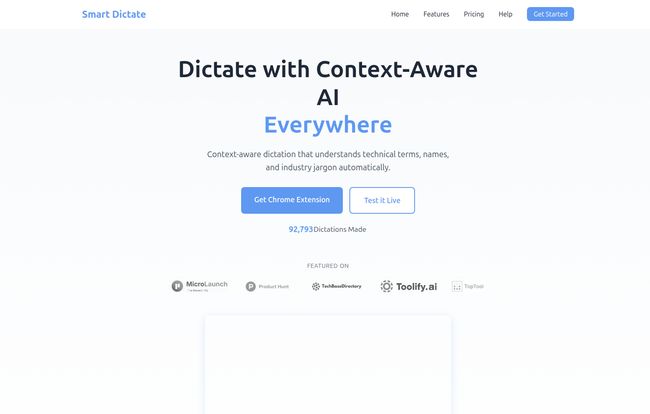
Visit Smart Dictate
So, What Exactly is Smart Dictate?
Think of it this way: most dictation tools are like a person listening to you with earmuffs on. They hear the sounds, but they have zero context. They don’t know if you’re writing an email to your mom or drafting a legal brief on intellectual property law.
Smart Dictate is different. It’s like having a hyper-intelligent stenographer perched on your shoulder. Before you even start talking, its Chrome Extension peeks at the webpage you’re on. It reads the room. It analyzes the content, the terminology, the names, and uses all of that as a cheat sheet. So when you start dictating, it’s not just guessing at words; it’s making highly educated predictions based on the context it already understands. This is the ‘context-aware’ magic they talk about, and it’s a genuine game-changer.
The Core Features That Make It Stand Out
Plenty of apps throw a bunch of features at the wall to see what sticks. Here, the features feel purposeful. They actually solve the core problems of voice-to-text.
Its Secret Sauce is Context Awareness
This is the big one. I tested this by opening up a technical SEO article from Search Engine Journal about Google’s latest algorithm update. I started dictating my thoughts, mentioning things like ‘Core Web Vitals’, ‘BERT’, and ‘E-E-A-T’. In any other tool, that last one would be a train wreck. Smart Dictate? Nailed it. Every. Single. Time. It understood I was in ‘SEO mode’ and adjusted its vocabulary accordingly. Then I switched to a medical forum to see what would happen, and it flawlessly transcribed complex drug names. Impressive stuff.
It Has a Dynamic Longterm Memory
This is another clever bit. The tool learns from you. It’s not just about the context of one page, but the context of you as a user. Over time, it starts to recognize your unique speech patterns, the specific acronyms you use, and the names you mention often. It’s subtle, but after using it for a week, I noticed it was getting even faster and more accurate with my personal quirks. It’s like breaking in a new pair of leather shoes – it just molds to you.
A Genuinely Fast Experience
There’s nothing worse than dictating a brilliant sentence and then waiting… and waiting… for the text to appear. That lag kills creativity. Smart Dictate is fast. Like, scary fast. The words appear almost as you say them, which keeps your train of thought on the tracks. For a fast talker like me, this is a must-have.
Who Should Be Using Smart Dictate?
Look, not everyone needs this. If you just dictate a shopping list once a week, your phone is probably fine. But if your job involves a significant amount of writing in a specialized field, this could be a revelation.
- Medical and Legal Professionals: The ability to handle complex terminology and client names without constant correction is huge. The user quotes on their site about ‘medical documentation’ aren’t just marketing fluff.
- Academics and Researchers: Taking notes on dense research papers or drafting your own work becomes so much more efficient.
- Content Creators and SEOs: Like me! Drafting articles, writing client emails, outlining strategies… it all gets done faster.
- Students: For taking lecture notes or writing essays, this could save you dozens of hours a semester.
The bottom line is, if you value your time and typing is a bottleneck in your workflow, you’re the target audience.
The All-Important Pricing Question
Okay, let’s talk turkey. How much does this magic cost? The pricing structure is refreshingly straightforward, which I appreciate.
| Plan | Price | Best For |
|---|---|---|
| Free | €0 | Kicking the tires. You get 25 ‘Premium Requests’ a month, which is enough to see if you like it. |
| Standard | €7.99 / month | The sweet spot. For power users. 500 requests is plenty for most professionals, and you get priority support. |
| Enterprise | Contact Sales | Large teams and organizations needing custom integrations, unlimited use, and things like GDPR compliance. |
For me, the Standard plan at €7.99 is a no-brainer. I easily waste more than that amount of money on coffee each month. If this tool saves me even just two or three hours of tedious typing and correcting, it’s already paid for itself many times over.
The Good, The Bad, and The AI
No tool is perfect, and it’s only fair to point out the potential downsides.
On the plus side, the time-saving is immense, the accuracy in niche fields is top-tier, and the fact that it just works seamlessly across different websites in my browser is fantastic. It’s a true workflow enhancer.
However, it does require a Chrome Extension. If you’re a die-hard Firefox or Safari user, you’re out of luck for now. Also, while the free plan is generous for a trial, the real power is unlocked in the paid tier. And finally, it’s still AI. It’s incredibly accurate, but it’s not infallible. You still need to give your final text a quick proofread, but that’s a world away from correcting every other word. It’s about working smarter, not turning your brain off completely.
So, What’s the Final Verdict?
I went in a skeptic and came out a convert. Smart Dictate isn’t just another voice-to-text tool; it’s a genuinely intelligent assistant that understands the context of your work. It has fundamentally changed how I approach drafting content. That initial friction of getting started is just… gone. I can just open a page, start talking, and watch my ideas appear on screen, correctly spelled and formatted.
If you’re a professional who writes, I can’t really recommend it enough. Give the free version a shot. I have a feeling you’ll be upgrading before your 25 free requests are up.
Frequently Asked Questions
How is Smart Dictate different from Siri or Google Voice Typing?
The main difference is context. Standard voice assistants are generalists; they don’t know the specific topic you’re writing about. Smart Dictate analyzes the webpage you’re on to understand the specific jargon, names, and technical terms, leading to much higher accuracy for specialized work.
Does Smart Dictate work on any website?
Yes, because it operates as a Chrome Extension, it’s designed to work on virtually any website you can open in your Google Chrome browser. From your email and Google Docs to forums and research portals.
Is the free version of Smart Dictate actually useful?
Absolutely. The free plan is perfect for testing the core functionality. With 25 premium requests per month, you can get a very good feel for its accuracy and speed to decide if a paid plan is worth it for your specific needs.
Is my data secure when using this tool?
According to their website, the Enterprise plan offers features like end-to-end encryption and GDPR compliance, which shows a commitment to security for organizational clients. For individual users, it’s always good practice to review the privacy policy of any extension you install.
Can it handle different accents?
While I can only speak to my own experience, modern AI transcription services are generally very good at handling a wide variety of accents. The ‘Dynamic Longterm Memory’ feature should also help the tool adapt to your specific way of speaking over time.
Is it really worth €7.99 a month?
This is subjective, but think about your hourly rate. If the tool saves you even one or two hours of work a month—which is a very conservative estimate if you write a lot—it has already provided a positive return on investment. For me, teh time saved makes it an easy decision.
Reference and Sources
- Smart Dictate Official Website
- Smart Dictate Pricing Page
- Search Engine Journal (Example of a technical site used for testing)


