
Categories: AI Headshot Generator, AI Linkedin Headshot, AI Profile Picture Generator
SmartShot.ai Review: AI Headshots Worth Your Time?

When was the last time you updated your LinkedIn profile picture? If you’re anything like me, the answer is probably somewhere between “When I started this job” and “Sometime during the last geological epoch.” Getting a new professional headshot is a pain. You have to find a photographer, coordinate schedules, figure out what to wear, and then spend an hour making awkward small talk while trying to look both professional and approachable. It’s expensive and, frankly, a hassle.
So, when the wave of AI headshot generators started crashing onto the scene, my curiosity was definitely piqued. Could a machine really replace a human photographer? Could it create something that doesn’t scream “I was made by a robot”? I’ve seen my share of wonky AI art, with six-fingered hands and soulless eyes. But I kept hearing whispers about tools that were getting… good. Scary good. That’s what led me to SmartShot.ai.
Visit SmartShot.ai
So, What’s the Deal with SmartShot.ai?
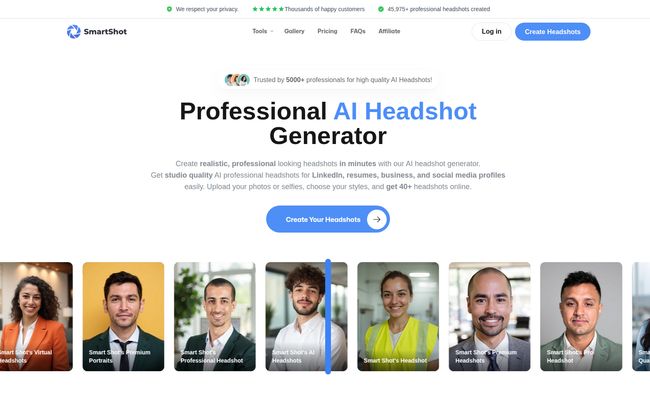
In a nutshell, SmartShot.ai is an online tool that promises to create professional, studio-quality headshots using artificial intelligence. You don’t need a fancy camera or a lighting rig. You just need a handful of decent selfies you already have on your phone. The idea is simple: upload your regular photos, and the AI spits out a whole gallery of professional-looking yous—different outfits, different backgrounds, the whole shebang. It’s designed for anyone needing a profile pic upgrade, from job seekers to entire corporate teams.
Sounds almost too good to be true, right? That’s what I thought too. So I threw down my own money to find out.
My Experience: The Good, The Bad, and The AI
I decided to put SmartShot.ai to the test. The whole process is broken down into three steps, which, I’ve gotta say, is refreshingly straightforward.
The Process: Almost Too Easy?
First up, uploading your photos. The platform asks for a bunch of clear, recent photos of yourself. This is probably the most important step. Garbage in, garbage out, as they say. I dug up about 15 selfies from the last few months—some smiling, some serious, different angles, different lighting. The key is to give the AI enough data to learn your face. They warn you: no sunglasses, no hats, no other people in the shot. Makes sense.
Next, you customize your look. This part was fun. You get to pick from different styles—corporate, casual, creative. You can tell it your profession, which supposedly helps it generate more appropriate backdrops and outfits. I went for a mix of business and casual looks.
Then, you wait. The site says it can take a few hours, which is a perfect excuse to go grab a coffee. For me, the email saying “Your headshots are ready!” landed in my inbox in just under 4 hours. Not bad for a completely digital photoshoot.
The Results: Studio Quality Without the Studio?
Okay, this is the moment of truth. I clicked the link, and there they were. A whole gallery of… me. But a slightly more polished, well-lit, professionally dressed version of me. I was genuinely surprised. The lighting was natural, the focus was sharp, and many of the shots were totally usable. I had options with me in a crisp blazer in a modern office, a casual button-down against a clean background, and even an outdoor shot that looked surprisingly authentic.
Now, were they all perfect? No. Out of the 40 headshots I got in my basic package, there were a few odd ones. A shirt collar that looked a little strange, an earring that appeared on one side but not the other. But that’s the thing—you get so many options. You’re not banking on one perfect shot. You have a whole portfolio to choose from. For every one that’s a little off, there are five or six that are spot-on. It’s a numbers game, and the odds are definitely in your favor.
Why AI Headshots Are More Than Just a Trend
As an SEO guy, I’m always thinking about online presence and personal branding. Your profile picture is your digital handshake. It’s the first thing a potential client, employer, or connection sees. A grainy, cropped photo from a wedding you attended five years ago just doesn’t build trust.
What I find really interesting about a tool like SmartShot.ai is its application for teams, especially remote ones. Remember the nightmare of trying to get a consistent look for the “Our Team” page on the company website? You’ve got Sarah’s professional studio shot, Dave’s dimly-lit selfie, and Maria’s picture from a family BBQ. It looks messy. With an AI generator, you can create a unified style for everyone, no matter where they are in the world. That kind of brand consistency is huge.
Let’s Talk Money: SmartShot.ai Pricing Breakdown
Cost is always a factor. A traditional photoshoot can set you back hundreds of dollars. SmartShot.ai’s pricing is, by comparison, a steal. Here’s how it breaks down:
| Package | Price | What You Get |
|---|---|---|
| Professional | $19 | 40 headshots, 5+ locations, 5+ outfits |
| Executive | $29 | 100 headshots, 15+ locations, 10+ outfits |
| Elite | $49 | 200 headshots, 30+ locations, 20+ outfits |
For my test run, I went with the $19 Professional package, and it was more than enough for a personal profile refresh. If you’re a content creator, speaker, or need photos for various platforms, the Executive package offers incredible variety for the price. The Elite package seems geared towards businesses or individuals who need a massive bank of images for long-term use.
Is SmartShot.ai Right for You?
So, who is this for? If you’re a job seeker, a freelancer, an entrepreneur, or just someone who wants to step up their online game without breaking the bank, the answer is a resounding yes. The convenience and quality-for-cost ratio are just unbeatable. It’s fast, it’s easy, and the results are frankly impressive.
That said, let’s keep it 100. A machine is still a machine. The final quality is heavily dependent on the photos you upload. If you feed it blurry, low-res images, you won’t get magic back. And while most photos look great, you might have to sift through a few that are slightly off. But for me, the convenience far outweighs these minor quibbles.
Frequently Asked Questions About AI Headshots
What kind of photos should I upload?
You’ll want to upload at least 10-15 clear, recent photos of just yourself. Use a variety of close-ups and different facial expressions. Good lighting is your best friend here! Avoid sunglasses, hats, or other people in the photos.
Who owns my AI photos?
According to SmartShot.ai’s terms, you own the photos you generate. You have the full commercial rights to use them for your website, social media, resume, or any other professional need.
Can I use AI headshots on LinkedIn?
Absolutely. That’s one of the main use cases. A polished AI headshot is a massive improvement over an old, unprofessional photo and can help you make a great first impression on the platform.
How long does the whole process take?
Uploading and setting up your styles takes maybe 10 minutes. The AI generation itself takes a few hours. SmartShot.ai quotes a 3-6 hour processing time, and they’ll email you when everything is ready to download.
Is it really better than a professional photographer?
It’s different. A great photographer can capture a certain spark and personality that AI is still learning to replicate. However, for sheer cost, speed, and variety, AI wins hands down. It’s a fantastic and accessible alternative for 99% of professional needs.
Final Thoughts: Is It a Smart Shot to Take?
I went into this a healthy skeptic and came out a convert. SmartShot.ai isn’t just a novelty; it’s a genuinely useful tool that solves a real-world problem for professionals. It democratizes the ability to have a high-quality, professional online image.
For less than the price of a couple of movie tickets, you can get a whole library of headshots that will make your profiles look sharp and build trust with your audience. Is it perfect? Not quite. But is it a game-changer for personal and corporate branding? Without a doubt. It’s a smart shot to take, and one I’m glad I did.


