
Categories: AI Meeting Assistant, AI Note Taker, AI Summarizer, AI Transcription
Spinach AI Review: Your New AI Meeting Assistant?

If you work in an office, or a remote team, or pretty much any collaborative setting, you’ve felt the soul-crushing dread of a poorly run meeting. You know the one. It starts late, has no clear agenda, a few people dominate the conversation, and you walk away an hour later wondering what, exactly, was accomplished. We’ve all been there. I’ve been in meetings that could have been an email, meetings that spawned other, more confusing meetings, and even—I kid you not—a meeting to prepare for a pre-meeting. It’s a productivity black hole.
For years, the solution was just… more discipline. Better agendas. A dedicated notetaker. But that’s a human solution to a systemic problem. And humans, well, we get distracted. We forget things. Which is why the new wave of AI meeting assistants has me so intrigued. I’ve been watching this space for a while, and a name that keeps popping up is Spinach.ai. Their claim? To be an AI assistant that helps run your meetings, summarizes them, and automates the boring stuff afterward.
A bold claim. So, as someone who lives and breathes efficiency (and despises wasted time), I had to see for myself if this was just more tech hype or a genuine fix for the meeting madness.
So, What is Spinach.ai, Anyway?
On the surface, Spinach.ai is an AI meeting assistant. But that term is getting thrown around a lot. What it actually does is act as a participant in your virtual meetings on platforms like Zoom, Google Meet, and Microsoft Teams. It listens in, records, and transcribes the entire conversation in real-time. But here’s where it gets interesting. It’s not just a fancy tape recorder. It uses artificial intelligence to understand the context of the conversation. It identifies decisions, pulls out action items, and creates a concise, intelligent summary. Think of it as a combination of a court stenographer, a project manager, and a team secretary, all rolled into one bot that sits quietly in your call.
The Agony of the Endless Meeting Cycle
Why is this even necessary? Because the traditional meeting workflow is broken. One person is usually tasked with taking notes, which means they’re only half-participating in the actual discussion. After the meeting, they have to decipher their scribbles, type up a coherent summary, and email it out. Then everyone has to read it, find their assigned tasks, and manually add them to whatever project management tool they’re using—Jira, Asana, Monday, you name it.
Each step is a potential point of failure. The notes are incomplete. The email gets lost in a crowded inbox. The tasks never make it to the to-do list. The result? You have another meeting a week later to ask, “So, what was the status of that thing we talked about last time?” It’s a vicious cycle. And it’s exhausting.
How Spinach.ai Tries to Fix It
This is where Spinach.ai comes in, aiming to automate that entire broken workflow. It’s not just about one feature, but how they connect to solve the bigger problem.
The ‘Autopilot’ Co-pilot
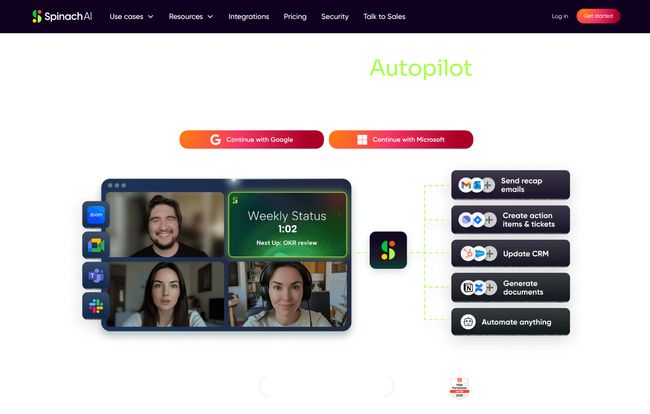
The main dashboard in their marketing materials shows this concept of an “Autopilot.” I like this framing. It’s not replacing the pilot (you), but it’s handling the tedious instruments so you can focus on flying the plane. While you and your team are talking, discussing, and debating, Spinach is in the background creating a transcript. This frees up everyone to be fully present and engaged, instead of having their head down, frantically typing. You can actually make eye contact (on video, anyway) and have a real conversation.
From Talk to Tasks: Action Items That Actually Happen
This, for me, is the real magic. A perfect transcript is nice, but it’s still just a wall of text. Spinach.ai’s ability to intelligently parse that conversation for action items is the game-changer. It recognizes when someone says, “Okay, so Sarah will follow up with the client by Friday,” and it flags that as a task assigned to Sarah. After the meeting, these action items are neatly listed in the summary. And thanks to its integrations, you can set it up to automatically create a new ticket in Jira or a new task in Asana. That’s how you close the loop. The commitment made in the meeting is instantly translated into a trackable item in the system your team already uses. No more falling through the cracks.
Visit Spinach AI
A Library of Your Team’s Brain
Here’s an underrated benefit: every meeting becomes a searchable asset. Ever have that feeling of, “I know we decided on the marketing budget for Q3 in a meeting last month, but I can’t find the email…”? With Spinach.ai, you can just search your meeting history for “marketing budget” and instantly find the transcript and summary. It creates an institutional memory that doesn’t depend on any single person’s inbox or notes. For onboarding new team members or getting stakeholders up to speed, this is incredibly powerful.
Let’s Talk Turkey: Spinach.ai Pricing
Alright, this is always the big question. Is it affordable? The pricing structure is actually quite interesting and flexible, which I appreciate. It’s not a one-size-fits-all approach.
| Plan | Price | Best For |
|---|---|---|
| Starter | Free | Individuals or teams just wanting to try it out for recording and basic AI summaries. It’s surprisingly generous for a free plan. |
| Pro | $2.90 / meeting hour | Freelancers, consultants, or teams with irregular meeting schedules. You only pay for what you use, which is a fantastic model. |
| Business | $19 / user / month (billed annually) | Standard teams and companies that have regular, frequent meetings. This is your more traditional SaaS subscription. |
| Enterprise | Custom | Large organizations needing volume discounts, advanced security, and dedicated support. |
The pay-as-you-go Pro plan is particularly clever. It lowers the barrier to entry for smaller players who don’t want to commit to a monthly per-user fee.
The Good, The Bad, and The AI-Generated
No tool is perfect. Let’s get real about what works and what you should be aware of.
What I Genuinely Like
The time savings are obvious. Automating notes and task creation is a huge win. But for me, the biggest benefit is the improvement in meeting quality. When no one is burdened with being the official scribe, everyone can participate fully. It leads to better brainstorming and more focused discussions. The integrations are also top-notch. It connects to the tools that teams are actually using day-to-day, which is critical for adoption. And the support for 100 languages? That’s not just a nice-to-have; for global teams, its a necessity.
Where You Need to Be Realistic
The elephant in the room with any AI tool is accuracy. Will the AI summary be perfect every time? No. Will it occasionally misinterpret a name or an acronym? Probably. You still need a human to give it a quick once-over before blasting it out to the whole company. But the tech is getting scarily good, and a 95% complete summary that needs a 30-second edit is infinitely better than a blank page. The tool’s true power is also locked behind its integrations. If you’re not using a project management tool like Jira or Asana, you’ll miss out on the best automation features.
Frequently Asked Questions About Spinach.ai
How does Spinach.ai compare to other tools like Otter.ai or Fathom?
While tools like Otter.ai are fantastic for transcription and basic summaries, Spinach.ai seems more focused on the actionable outcomes of a meeting. Its deeper integration with project management tools for task automation gives it an edge for teams focused on execution, not just documentation.
Is Spinach.ai secure for confidential meetings?
This is a huge concern for any business. According to their website, they have a dedicated security page outlining their policies. For any sensitive discussions, I’d always recommend reviewing a vendor’s security and compliance documentation directly. They seem to take it seriously, which is a good sign.
Does it work with both Zoom and Google Meet?
Yes. The images on their site clearly show compatibility with Zoom, Microsoft Teams, Google Meet, and Slack. It seems to cover all the major platforms where teams are having these conversations.
How good is the transcription accuracy, really?
Like most modern transcription services, it’s very good, but not flawless. Clarity of speech, accents, and background noise will all play a part. My rule of thumb is to expect 90-98% accuracy. It’s usually more than good enough to get the gist and find what you’re looking for, but you might need to correct a proper noun or a bit of jargon here and there.
Can I try it before I commit to a paid plan?
Absolutely. They have a very generous free Starter plan that includes unlimited recording and basic AI features. It’s a great way to kick the tires and see if it fits your workflow before spending a dime.
What exactly is the “AI Agent” feature?
This sounds like their term for the automation engine. The “agent” is the part of the AI that takes the information from the meeting (like a task) and performs an action in another program (like creating a Jira ticket). It’s the bridge between the conversation and the work.
My Final Verdict: Should You Add Spinach to Your Tech Stack?
So, is Spinach.ai the silver bullet for bad meetings? No, because a tool can’t fix a toxic meeting culture. You still need an agenda and a clear purpose.
But what it can do is remove a massive amount of friction and administrative overhead from the process. It’s like a power-up for your team’s discipline. It ensures that the valuable things said in a meeting don’t just evaporate into the ether the moment everyone clicks “Leave.” It creates accountability and a clear path from discussion to action.
If your team is constantly struggling with follow-through, losing track of decisions, or just wants to free up brainpower to focus on the actual work, then yes. I think giving Spinach.ai a try is a no-brainer, especially with the free plan. It might not make you love meetings, but it will almost certainly make you hate them a whole lot less.


