
Categories: AI Code Generator, AI Developer Tools, SQL Query Builder
SQLAI.ai Review: Your AI-Powered SQL Assistant?

SQL. The three letters that can strike both joy and fear into the hearts of tech professionals. One minute you’re a data wizard, pulling incredible insights with a perfectly crafted query. The next, you’re staring at a cryptic error message about syntax near the word ‘FROM’, convinced the database is personally mocking you.
We’ve all been there. It’s that moment when you’ve been staring at a query for an hour, tweaking a LEFT JOIN that should be an INNER JOIN, and wondering why you didn’t just become a baker instead.
Lately, the buzz around AI co-pilots for coding has been impossible to ignore. They promise to write code, fix bugs, and basically be the brilliant assistant you can’t afford. I’ve been skeptical of some, but when I kept hearing whispers about SQLAI.ai, a tool specifically for database languages, my curiosity got the better of me. A dedicated specialist? Now you’re talking my language. So, I jumped in to see if it lives up to the hype.
So, What Exactly is SQLAI.ai?
Alright, let’s break it down. SQLAI.ai bills itself as an “AI-powered SQL multi-tool.” In human terms? It’s like having a senior Database Administrator (DBA) sitting over your shoulder, ready to help, but without the awkward small talk. It’s designed to help you generate, fix, optimize, and even understand SQL and NoSQL queries. You give it plain English, and it gives you back a query. You give it a messy, confusing query, and it can explain it to you like you’re five. It’s pretty slick.
It’s not just a one-trick pony, either. The platform is a whole toolkit: from generating brand new queries from scratch to converting them between different database engines (a classic headache), formatting ugly code, and even suggesting database indexes to speed things up. It’s a veritable Swiss Army knife for anyone who deals with data.
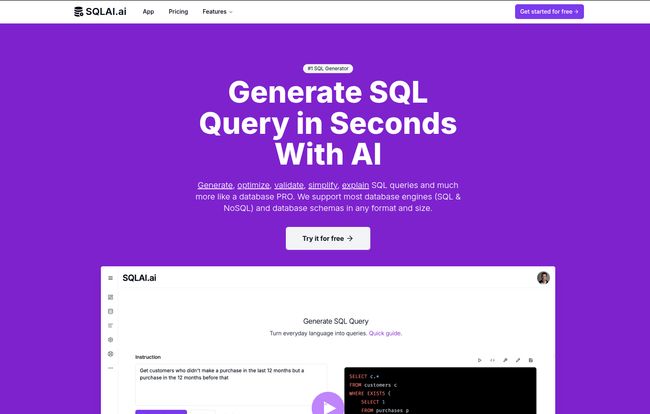
Visit SQLAI.ai
Who Is This Tool Really For?
I see two main groups of people getting a massive kick out of this tool. And they’re on opposite ends of the experience spectrum.
The Accidental Data Wrangler
You know who you are. You’re a marketer, a product manager, a startup founder. You need data to make decisions, but writing SQL isn’t your day job. You’re tired of bugging the engineering team for every little report. For this person, SQLAI.ai is a straight-up game-changer. The ability to just type,
Show me the total revenue from customers in Germany who signed up in the last 6 months
and get a functional query back is… well, it’s liberating.
The “Explain SQL with AI” feature is also a secret weapon here. It turns cryptic code into plain English, which is an incredible way to actually learn what’s going on. You start to pick up the patterns and become more self-sufficient. It lowers the barrier to entry for data access, which is huge.
The Seasoned SQL Veteran
Okay, now for my people. The DBAs, the data engineers, the backend devs. I can hear the skepticism already. “An AI that writes queries? Pfft. It’ll never understand my complex schema.” And you’re not entirely wrong to be cautious. But you’re looking at it the wrong way.
This isn’t about replacing your expertise. It’s about accelerating your workflow. Think about the tedious stuff. Formatting a 300-line query someone else wrote with no consistent style. That’s a 2-second job for the AI. Or optimizing a slow query – the “Optimize SQL” feature can instantly suggest more performant alternatives. And the “SQL Query Converter”? I once spent two days manually converting a bunch of scripts from MySQL to PostgreSQL. This tool could have done it in minutes. It’s about automating the grunt work so you can focus on the hard architectural problems.
My Favorite SQLAI.ai Features (The Good Stuff)
After playing around with it for a while, a few features really stood out to me as more than just gimmicks.
- The “Magic Translator” (Query Generator): The core function works surprisingly well. The quality of the output really depends on the quality of your input, but for well-defined questions, it’s spot on.
- The “What The Heck Does This Do?” Button (Explain Query): I fed it some gnarly legacy code and its explanations were shockingly clear. It’s like having an instant code review and documentation writer. An absolute lifesaver for onboarding or taking over old projects.
- The Performance Tuner (Optimize & Generate Indexes): This is a pro-level feature. It doesn’t just write a query that works; it helps you write a query that’s fast. It looks for inefficiencies and suggests better ways to write it, or even recommends database indexes you should create. That’s real value.
- Connecting Your Actual Database: This, for me, is the killer feature. Instead of just pasting your database schema, you can actually connect your data source. Why does this matter? Because the AI now knows your exact table names, column names, data types, and relationships. The accuracy of the generated queries goes way, way up. It’s the difference between giving a map to a tourist versus giving them a live GPS. It even claims to support large database schemas, which is a common failing point for other tools.
Also Read: Ratio1 Review: The AI OS on a Blockchain?
Let’s Talk Brass Tacks: The Pricing
So, what’s this magic going to cost you? I was honestly expecting a hefty price tag, given the corporate logos like Amazon and J.P. Morgan on their site. But the entry-level “Explorer” plan is just $6 a month. Let me repeat that. Six dollars.
That gets you 200 queries per month. For a marketer or PM who needs a few reports a week, that’s plenty. For a power user, you’ll likely need to look at their higher-tier plans, but the entry point is incredibly accessible. It’s less than a couple of fancy coffees. They also offer a yearly plan that gives you two months free, which is a nice touch. For anyone on the fence, they even have a 7-day free trial so you can kick the tires yourself.
The Not-So-Perfect Bits (Because Nothing Is)
Look, no tool is perfect. Let’s be real. There are a couple of things to keep in mind.
First, the query limits. 200 queries on the base plan is great for casual use, but if you’re in the tool all day, every day, you’ll burn through that. It’s a classic SaaS model, so just be aware of your usage.
Second, and this is true for ALL AI tools, is the GIGO principle: Garbage In, Garbage Out. If you write a vague, confusing prompt, you will get a vague, and possibly incorrect, query back. You still need to understand your own data and what you’re asking for. I see SQLAI.ai as a co-pilot, not an autopilot. It’s there to assist and speed you up, not to do your job for you. Its accuracy depends on your instructions, though that gets much better when you connect your data source directly.
The Final Verdict: Is SQLAI.ai Worth It?
After spending some quality time with it, I’m genuinely impressed. It’s not just another generic AI wrapper. It’s a thoughtfully designed toolkit that addresses real, specific pain points for people who work with data.
For the beginner, it’s an incredible learning aid and a way to get immediate results. For the expert, it’s a massive productivity booster that handles the boring stuff so you can be more effective. It won’t replace a skilled data professional—critical thinking is still required—but it will make that professional faster, more efficient, and maybe just a little bit happier.
So, is it worth the six bucks? In my book, that’s a resounding yes. It’s a small price to pay to get back hours of your time and save yourself a ton of frustration. I’ve already added it to my personal toolkit.
Frequently Asked Questions
What kind of databases does SQLAI.ai support?
It supports a wide range of popular SQL and NoSQL databases. The list includes titans like MySQL, PostgreSQL, SQL Server, Oracle, and even NoSQL databases like MongoDB. This broad support means it’s likely to fit into most existing tech stacks.
Is SQLAI.ai good for beginners?
Absolutely. In fact, it might be one of the best ways for a beginner to learn SQL. The feature that translates plain English to SQL gets you started, and the “Explain SQL” feature teaches you the ‘why’ behind the code. It’s like having a patient tutor on-demand.
Can it really handle a large, complex database schema?
According to their documentation, yes. The key is its ability to connect directly to your data source. This allows the AI to have the full context of your schema, no matter the size, which is far superior to trying to paste thousands of lines of schema text into a prompt.
Will AI like this replace my job as a data analyst or DBA?
I really don’t think so. Think of it as a productivity multiplier, not a replacement. It automates repetitive tasks, allowing you to focus on more complex problem-solving, data strategy, and interpreting the results. The human element of critical thinking and business context is still irreplaceable.
How accurate are the AI-generated queries?
The accuracy is highly dependent on two things: the quality of your prompt and whether you’ve connected your data source. A clear, specific prompt will yield a much more accurate query. Connecting your data source improves accuracy dramatically as the AI knows your exact schema.
Is there a free trial for SQLAI.ai?
Yes, there is! Their pricing page shows a “Start 7-day free trial” button for their subscription plans, which is perfect for trying out all the features before committing.


