
Categories: AI Flashcard Maker, AI Homework Helper, AI Productivity Tools, AI Quiz Generator
Stady Review: Notion Flashcards to Study Smarter?

You spend hours meticulously crafting the most beautiful, organized notes in Notion. Your databases are linked, your toggles are nested, your headers are perfect. It’s a work of art. Then exam season hits, and you open up that digital masterpiece only to realize… you don’t remember a single thing. You’re just staring at a pretty page. Sound familiar?
I’ve been in the digital marketing and SEO game for years, and I see the same pattern everywhere: people collecting information without actually absorbing it. We do it with articles, with analytics data, and, yes, with our study notes. We fall into the Passive Learning Trap. We reread, we highlight until the page glows in the dark, and we hope for some kind of academic osmosis. It’s a complete waste of time. According to the folks behind Stady, a staggering 76% of students forget what they’ve studied within days. Yikes. That one hits a little too close to home.
For years, Notion has been my second brain for work. But for studying? It’s always felt like a brilliant filing cabinet, not a personal tutor. Until I stumbled upon Stady.
So, What Exactly is Stady?
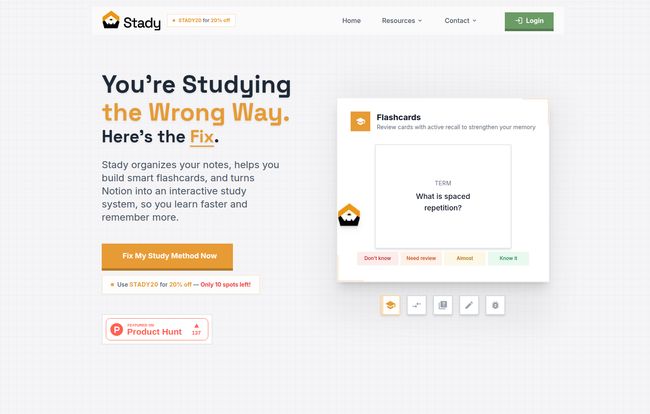
Put simply, Stady is the tool that finally makes your Notion notes work for you. It’s a clever system that integrates directly into your Notion workspace, transforming your static notes into interactive flashcards and a full-blown active learning system. No more exporting lists to a separate app. No more clunky, disjointed workflows. You write your notes and create the tools to master them in the very same place. It’s built on two principles that learning science nerds (like me) absolutely adore: active recall and spaced repetition.
Think of it like this: Notion is the kitchen where you prep all your ingredients (your notes). Stady is the master chef that turns those ingredients into a Michelin-star meal that actually nourishes your brain.
Visit Stady
The Science of Not Forgetting Stuff
Let’s be honest, “active recall” and “spaced repetition” sound like they were cooked up in a lab. But the concepts are simple. Active recall is the act of actively trying to retrieve information from your brain, like answering a question on a flashcard. It’s the difference between recognizing a face in a crowd and having to draw that face from memory. It’s hard, and that’s why it works.
Spaced repetition is the genius part. Instead of cramming, the system shows you a flashcard right before you’re about to forget it. It adapts to you. The stuff you know well? You see it less often. The concepts that make your brain ache? You’ll see them more frequently, until they stick. It’s efficient, it’s effective, and it’s something I wish I had in my university days instead of my caffeine-fueled all-nighters.
A Look at The Stady Experience
I’m always skeptical of tools that promise to revolutionize my workflow, but Stady’s integration is pretty slick. Here’s a breakdown of what you get.
Flashcards That Live in Notion
This is the core of it. As you’re typing out your notes in Notion, you can create flashcards on the fly using a simple toggle format. The front of the card is the question, and the content inside the toggle is the answer. Stady then pulls these into its system for you to review. You tell the system how well you knew the answer (“Don’t know,” “Need review,” “Almost,” or “Know it”), and it schedules the next review accordingly. It’s all so… integrated. No friction.
Welcome to the StadyVerse
Now this is where things get interesting. Stady includes a gamified system called the StadyVerse. It turns your study sessions into an interactive journey. You get points, unlock achievements, and progress through levels based on your knowledge. Some might find this cheesy, but I’m a sucker for a good progress bar. Seeing those virtual rewards pop up for correctly remembering the intricacies of the Krebs cycle? It’s a small dopamine hit that can make the difference between studying for 20 minutes and powering through for an hour.
Real Progress Tracking
Stady provides analytics and insights into your learning. You can see which topics are your weak points and where you’re excelling. This is huge. Instead of blindly reviewing an entire chapter, you can focus your limited time and energy on the 10% of the material that’s actually giving you trouble. It’s about studying smarter, not just for longer hours. This is the kind of data-driven approach we use in SEO to get results, applied to learning. Love it.
The Price of Smarter Studying
Alright, the all-important question: what’s the damage? Stady isn’t free, but I’d argue it’s priced very reasonably, especially for the value it provides. It’s a simple, single-tier subscription model.
| Plan | Price | What’s Included |
|---|---|---|
| Yearly Plan | $30 / year | Unlimited flashcards, Smart spaced repetition, Progress analytics, Daily goals, The StadyVerse, a Notion Study Template, and a 30-day money-back guarantee. |
Thirty bucks for a year. That’s less than a single textbook, and infinitely more useful than most of them. When you think about the time you’ll save and the potential grade improvement, it feels like a no-brainer. The 30-day money-back guarantee also means you can give it a proper test run without any real risk. Plus, they seem to run promos—I saw one for 20% off on their site. Keep an eye out for those.
Frequently Asked Questions about Stady
What is Stady and who is it for?
Stady is a study tool designed to work inside Notion. It turns your notes into smart flashcards that use spaced repetition. It’s perfect for any student or lifelong learner who already uses Notion for note-taking and wants a more effective way to retain information.
Do I absolutely need a Notion account to use it?
Yes, you do. Stady is built specifically to enhance the Notion experience. It’s not a standalone app; its magic comes from its deep integration with your existing Notion workspace. The good news is, Notion has a fantastic free personal plan.
How does the spaced repetition actually work?
When you review a flashcard, you rate your confidence in the answer. Based on your rating, Stady’s algorithm calculates the optimal time to show you that card again—just before you’re likely to forget it. This strengthens your memory over time, moving information from short-term to long-term memory.
Can I use Stady for any subject?
Definitely. Whether you’re memorizing legal precedents, anatomical terms, programming functions, or historical dates, Stady works. If you can write it down as a question and answer in Notion, you can turn it into a Stady flashcard.
What’s the ‘ULTIMATE Notion Study Template’ they mention?
It’s a free, pre-built Notion template they give you to help get you started. It’s designed to work perfectly with Stady, providing a structured layout for your courses, notes, assignments, and exams. It’s a nice little bonus that lowers the barrier to entry.
Final Thoughts: Is Stady a Must-Have for Notion Students?
Look, there are other flashcard apps out there. Anki is powerful but has a face only a mother could love and a steep learning curve. Quizlet is good, but it’s another silo, another place your information has to live. The beauty of Stady is its seamlessness. It doesn’t ask you to change your primary workflow; it just makes it infinitely better.
If you’re a student who lives in Notion, I think Stady is an incredibly smart investment. It bridges that frustrating gap between taking great notes and actually knowing your stuff. It transforms passive review into active, efficient learning. And for $30 a year, it’s one of the highest-ROI tools a student could ask for. Stop letting your notes die a slow death in your workspace. Make them work for you.


