
Categories: AI App Builder, AI Code Generator, AI Developer Tools, AI Diagram Generator, AI Workflow
Stately Review: Is This AI State Machine Tool Worth It?

If you’ve spent any time building a modern web app, you’ve been there. You’re staring at a component that’s grown into a monster. A tangled mess of useState, useEffect hooks, and conditional rendering flags that make your head spin. You change one little thing, and three other things break. It’s like trying to untangle Christmas lights in the dark. I’ve personally lost hours, maybe days, to state management bugs that were completely avoidable.
For years, the community has been searching for a better way. We’ve had Redux, MobX, Zustand… you name it. They all help, but they don’t always solve the fundamental problem: visualizing and understanding the flow of your application’s logic.
Then a tool called Stately started popping up on my radar. It promised to turn complex logic into clear, visual diagrams. And it had AI? Okay, you have my attention. I decided to take it for a spin, and honestly, it’s one of the more interesting tools I’ve seen in a while.
Visit Stately
So, What is Stately, Anyway?
At its core, Stately is a platform for building, testing, and even deploying your app’s logic using state machines.
Hold on, don’t click away! I know “state machines” can sound a bit… academic. Like something you’d learn about in a computer science class and then promptly forget. But the idea is simple: your application can only be in one state at a time (e.g., loading, success, error, idle). You define all the possible states and the specific events that can cause a transition from one state to another (like a FETCH button click).
This approach forces you to think through every possible user flow, which means fewer bugs and a much more predictable application. The problem has always been that writing state machines by hand, especially with a library like XState, can be a bit verbose.
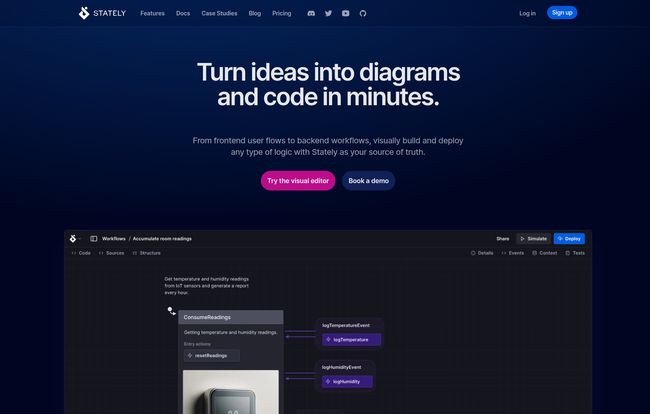
This is where Stately comes in. It’s a visual editor for state machines. It’s like a GPS for your app’s logic. You draw out the flows, connect the dots, and Stately helps you generate the actual code. It’s built on top of the powerful, open-source XState library, giving you the best of both worlds: a simple visual interface and a robust, battle-tested engine underneath.
My Favorite Stately Features
I’ve been playing around with it for a bit, and a few things really stand out. It’s not just a diagramming tool; it’s a full-on development environment for logic.
The Visual Editor is a Game-Changer
This is the main event. Being able to see your logic laid out as a flowchart is incredible. You can literally watch your app move from idle to loading to success or error as you simulate user actions. When a new developer joins the team, you don’t have to spend two hours explaining a giant component. You just show them the diagram. This is the state, these are the events. Boom. They get it.
It acts as living documentation. You know, the kind that never gets out of date because it’s directly tied to the code. No more outdated Confluence pages. The diagram is the source of truth.
Let’s Talk About the AI Assistant
Alright, the AI buzz is everywhere, and I’m usually pretty skeptical. But Stately’s implementation is genuinely useful. You can describe a piece of logic in plain English—”Create a state machine for a login form with loading and error states”—and it will generate a diagram and the corresponding code for you.
It’s not perfect, but it’s an amazing starting point. It’s also great for generating tests. It analyzes your state machine and writes test cases to cover all the possible paths. It’s like having a very focused, very fast pair programmer sitting next to you, handling the boilerplate so you can focus on the tricky parts.
Collaboration and Keeping Everyone in Sync
This is huge for teams. Stately feels like a Figma or Google Docs for application logic. Multiple people can view the diagrams, leave comments, and see the version history. When a designer wants to know what happens when a user clicks a button, you can just send them a link to the Stately diagram.
Plus, with GitHub Sync, you can connect your diagrams directly to your repository. When you update the diagram, it can update the code, and vice-versa. This two-way sync is what prevents the “living documentation” from becoming a lie.
Deploying with Stately Sky
This one’s a bit more advanced, but it’s got some serious potential. Stately Sky is their deployment platform. It lets you take your state machine logic and deploy it as a serverless function, or what they call a “logic-as-a-service” actor.
Imagine your complex checkout flow or a multi-step user onboarding process. Instead of coding all that logic into your frontend, you can deploy it to Stately Sky and just call it from your app. This keeps your client-side code lean and makes your logic reusable across different platforms (web, mobile, etc.). It’s still in beta, but it’s a very cool idea that points to where application development could be heading.
The Good, The Bad, and The Pricey
No tool is perfect, right? Stately has a ton going for it, but there are a few things to consider before you jump in headfirst.
What I Absolutely Love
The clarity it brings is undeniable. Visualizing logic just clicks with how our brains work. It makes complex systems understandable at a glance and drastically cuts down on the time spent debugging weird state-related issues. The fact that this visual representation becomes living documentation that the whole team—devs, designers, PMs—can rally around is a massive win. And the AI assistance, while not a silver bullet, is a fantastic productivity booster for getting started and for writing thorough tests. Its a real timesaver.
A Few Things to Keep in Mind
First, if you’re not familiar with state machine concepts or XState, there is a bit of a learning curve. Stately makes it easier, but you’ll still want to understand the fundamentals. Also, this visual-first approach might not click with every developer. Some people just prefer to live in their code editor, and that’s perfectly fine. For them, a visual layer can feel like an unnecessary abstraction. And finally, some of the most powerful features, like private projects and the full suite of AI tools, are behind a paywall. Which brings us to…
Stately Pricing: Breaking Down the Costs
So, how much is this going to set you back? Stately has a pretty flexible pricing structure that scales from solo-dev hobby projects all the way up to large enterprises.
| Plan | Price | Who It’s For |
|---|---|---|
| Community | Free | Hobbyists, students, and anyone wanting to try it out with public projects. You get the core editor, simulation, and a few AI generations per month. |
| Professional | $39/month (or $33/mo annually) | Freelancers and individual professionals. This unlocks private projects, a ton more AI generations, GitHub Sync, Stately Sky deployment, and other pro features. |
| Team | $199/month (or $167/mo annually) | Small to medium-sized teams. You get everything in Pro, plus shared team projects and collaborative features for up to 10 members. |
| Enterprise | Contact for a quote | Large organizations needing features like SSO, audit logs, custom hosting, and dedicated support. |
For the most up-to-date details, you should always check the official Stately pricing page.
Who Should Use Stately?
After digging in, I think Stately hits a sweet spot for a few groups:
- Frontend Developers who are tired of wrangling complex state in React, Vue, or Svelte components.
- Development Teams who want to improve collaboration between developers, designers, and project managers. The visual diagrams are a common language everyone can understand.
- Engineers building complex workflows, like multi-step forms, e-commerce checkouts, or any process with many potential paths and outcomes.
If you’re a solo dev working on a simple project, it might be overkill. But for anything with moderate to high complexity, the clarity and safety it provides are well worth the initial investment in learning it.
The Final Verdict
Stately is one of those tools that makes you think, “Why haven’t we always been doing it this way?” It takes the robust, formal power of state machines and makes them approachable, visual, and even fun to work with. It’s not just about writing code; it’s about designing and communicating logic in a clearer way.
Will it solve all your state management problems? Of course not. But will it prevent a huge class of bugs, make your code easier to reason about, and help your team stay aligned? In my experience, absolutely. If you’ve ever felt the pain of a component that’s too complex to understand, you owe it to yourself to give Stately’s free plan a try.
Frequently Asked Questions
What is XState? Do I need to know it to use Stately?
XState is a popular open-source JavaScript library for creating and interpreting state machines and statecharts. Stately’s visual editor is built on top of XState. While you don’t need to be an XState expert to start, having a basic understanding of its concepts (states, events, actions) will help you get the most out of the platform.
Is Stately free to use?
Yes, Stately has a generous free “Community” plan. It allows you to create unlimited public projects and state machines, so it’s perfect for learning, open-source work, or just trying it out. For private projects and advanced features like team collaboration and higher AI usage, you’ll need one of the paid plans.
Can I use Stately with my existing React/Vue/Svelte project?
Absolutely. Stately generates code that works with XState, and XState has dedicated packages and hooks for all major frontend frameworks. You can easily integrate the logic you build in Stately directly into your components.
What is the difference between the visual editor and Stately Sky?
The visual editor is the tool you use to design, visualize, and simulate your application logic. Stately Sky is the deployment platform. It allows you to take the logic you’ve built in the editor and host it as a backend service (or “actor”) that your applications can communicate with.
Is the AI just a gimmick?
While the term AI is thrown around a lot, Stately’s implementation feels practical. It excels at scaffolding out initial state machines from a text prompt and generating comprehensive test suites. It’s less of a “magic” solution and more of a smart assistant that handles tedious, repetitive tasks.
How does Stately help with documentation?
The state machine diagrams themselves serve as “living documentation.” Because they are directly linked to the code (especially with GitHub Sync), they are always up-to-date. This provides a single, visual source of truth for how a feature works, which is invaluable for onboarding new team members and for discussions between technical and non-technical stakeholders.


