
Categories: AI API, AI Code Assistant, AI Documents Generator
Stenography Review: The AI Code Documentation Savior?

Let’s have a little chat. You and me. When you finish a feature, what’s the very last thing you want to do? If you’re anything like me, it’s writing the documentation. It’s the brussels sprouts of software development—we all know it’s good for us, but man, do we put it off. It’s the technical debt that accrues the fastest and bites the hardest six months down the line when you’re staring at your own code wondering what on earth you were thinking.
We’ve all been there. That sprawling codebase with comments as sparse as a desert. That function named `do_stuff()` with no explanation. It’s a nightmare. For years, the solution was just… more discipline. More late nights fueled by stale coffee, forcing ourselves to write comments.
But what if there was another way? I’ve been hearing some chatter about a tool called Stenography, which claims to offer “Automatic Documentation.” A bold claim, right? It almost sounds too good to be true. So, as your resident skeptic and someone who has wasted entire days trying to decipher old projects, I had to take a look. And I gotta say, I’m intrigued.
So, What on Earth is Stenography?
At its core, Stenography is an AI-powered tool designed to do one thing and do it well: automatically document your code. Think of it less like a magic wand and more like a really, really smart assistant who shadows you, understands your code, and writes the explanatory notes so you dont have to. It’s built by Bram Adams, who’s an OpenAI Developer Ambassador, so there’s some serious credibility behind the curtain.
Now, I know what you’re thinking. “I’m not letting some AI see my top-secret, proprietary code!” That was my first thought too. But Stenography seems to have anticipated this. They operate on a “Privacy First” principle, using a passthrough API. In plain English, this means they don’t store your code. It goes in, gets documented, and comes right back out. Your code stays on your system. A huge sigh of relief for anyone working on sensitive projects.
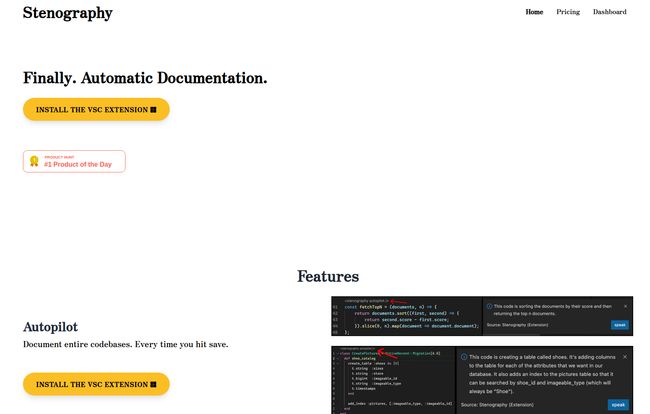
Visit Stenography
The Features That Actually Matter
A tool can have a million bells and whistles, but only a few things really change your daily workflow. Stenography has a few standout features that caught my eye, and they’re not just gimmicks.
Autopilot Your Documentation
This is the headline feature. Stenography can look at entire codebases and just… document them. The idea of pointing a tool at a legacy project and having it populate useful comments is honestly a dream. For new projects, it means documentation becomes part of the development flow, not an afterthought. You write the code, hit save, and the docs start appearing. This alone could be a massive time-saver and a killer for procrastination.
An API That Speaks Human
Beyond just adding comments, Stenography has a powerful API that provides explanations of code in plain English. This is incredible for onboarding new team members or even just for yourself when you’re jumping back into a complex module. Instead of spending an hour reverse-engineering a function, you can get a clear summary of what it does, what it expects, and what it returns. It’s like having the original developer on call, 24/7.
More Than Just Comments with Stack Overflow
Okay, this is the kicker for me. This is the feature that made me go from “huh, neat” to “okay, I need this.” Stenography doesn’t just explain your code; it can also hydrate its responses with suggestions from Stack Overflow. We all live on that site anyway, right? Imagine your code explainer not only telling you what the code does but also linking you to relevant discussions, potential pitfalls, and alternative solutions from the collective brain of the developer community. That’s not just documentation; that’s proactive problem-solving. Its’ a fantastic integration.
It Lives Where You Live
A tool is only useful if it fits into your existing workflow. Stenography seems to get this, offering extensions for popular environments like VSCode and Chrome. This means you don’t have to constantly switch contexts, copy-pasting code into a separate window. It’s right there in your editor, ready when you need it. I love it when a tool respects my screen real estate and my focus.
Let’s Talk Turkey: The Pricing
Alright, so it sounds great, but what’s the damage? The pricing structure is actually pretty straightforward, which I appreciate. No confusing credit systems or convoluted enterprise tiers (well, mostly).
| Plan | Price | Key Features |
|---|---|---|
| Free | Free | Up to 250 invocations per month. A great way to test it out. |
| Tier I | $10 / month | 1,000 invocations, all core features including API and extensions. |
| Tier II | $20 / month | 2,500 invocations and early access to new features. |
| Team | Contact for Pricing | 100,000+ invocations, custom uploads, team support. |
Personally, I think the Tier I plan for $10 a month is the sweet spot for most freelance developers or people working on small teams. 1,000 invocations is a decent amount, and for the price of a couple of fancy coffees, you’re buying back hours of tedious work. The Team plan is a classic “Contact Us,” which always makes me sigh, but it’s standard for enterprise-level needs.
Who Is Stenography Really For?
After playing around with it, I can see a few groups getting a ton of value here:
- Solo Devs & Freelancers: You’re the chief cook and bottle washer. Anything that saves you time is pure gold. This helps you maintain sanity and produce professional, well-documented code for clients.
- Fast-Moving Startups: You’re shipping features at lightning speed. Documentation is probably the first thing to get dropped. Stenography can help keep your codebase from turning into a spaghetti monster without slowing you down.
- Tech Leads & Senior Devs: Onboarding new hires just got way easier. Instead of you spending hours explaining every little thing, new devs can get up to speed faster with AI-generated explanations.
- Students & Learners: Trying to understand a complex open-source library? This could be an amazing learning aid, breaking down intimidating code into something more digestible.
It’s not going to replace the need for high-level architectural diagrams or deep, contextual business logic. But for the line-by-line, function-by-function drudgery? Yeah, this feels like a genuine step forward.
My Final Verdict
So, is Stenography the magic bullet that will kill code documentation forever? No, probably not. And that’s okay. You’ll still need to write the high-level stuff. But it’s a powerful weapon against the most time-consuming, soul-sucking parts of the process. It attacks documentation debt at the source.
The privacy-first approach is a massive plus, and the Stack Overflow integration is just plain smart. For a solo developer, the $10/month plan feels like an absolute bargain when you weigh it against the time you’ll save and the future headaches you’ll avoid. It’s a tool that understands a real, persistent pain point in the development world and offers a practical, elegant solution. I’m impressed. It’s staying in my toolbox for the foreseeable future.
Frequently Asked Questions
Is Stenography safe to use with my company’s private code?
Yes. Stenography advertises a “Privacy First” approach. It uses a passthrough API, which means your code is not stored on their servers. It’s processed and the documentation is sent back to you, without being retained.
How is Stenography different from just using ChatGPT?
While you can paste code into ChatGPT for an explanation, Stenography is more integrated. It works directly in your code editor (like VSCode), connects to Stack Overflow for richer context, and is specifically designed for the documentation workflow. The privacy model is also clearer and built-in for this specific purpose.
What editors and environments does Stenography support?
As of now, they prominently feature extensions for VSCode and Google Chrome, meaning it can be integrated directly into one of the most popular code editors and used across web-based coding environments.
What counts as an “invocation”?
An invocation is typically a single request to the API. For example, asking it to document a specific function or explain a block of code would likely count as one invocation. Generating docs for an entire file might use several.
Who is behind the Stenography tool?
Stenography was built by Bram Adams. He’s an OpenAI Developer Ambassador and a GPT-3 O’Reilly Media instructor, which brings a lot of expertise in AI and language models to the project.


