
Categories: AI Homework Helper, AI Notes Generator, AI Productivity Tools, AI Writing Assistants
StudySyncUp Review: Is This AI Study Tool Worth It?

If you’re a student, your digital life is probably a chaotic mess of tabs and apps. You’ve got Google Docs for essays, Trello or some other Kanban board for project management, a random note-taking app on your phone, your university’s clunky portal, and about fifteen other things all screaming for your attention. It’s like trying to herd cats, but the cats are your assignments and they’re all on fire.
For years, we’ve been promised the ‘one app to rule them all.’ I’ve seen dozens of them come and go. So when I came across StudySyncUp, which calls itself “the ultimate productivity app for students,” my professional skepticism kicked in. Another one? Really? But I have to admit, the feature list looked intriguing. An all-in-one platform with an AI tutor baked right in? Okay, you have my attention. I decided to take a proper look, cut through the marketing fluff, and see if this is the real deal.
What Exactly Is StudySyncUp?
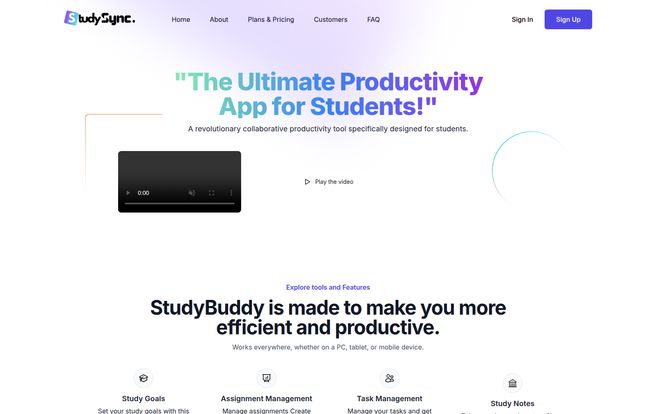
At its core, StudySyncUp is a cloud-based productivity suite designed to bring all your study tools into one single dashboard. Think of it less as one revolutionary new tool and more as a clever consolidation of all the tools you’re already using. No downloads, no software to install, no annoying update notifications. You just log in through your browser on your PC, tablet, or phone, and everything is there. It’s a bit like a Swiss Army knife for your academic life.
One quick thing I noticed on their site is the name is sometimes referenced as ‘StudyBuddy’. Maybe an old name, maybe a cute nickname for the platform? Who knows, but it’s StudySyncUp on the tin, so that’s what we’ll stick with. The main idea is to stop the app-switching madness and give you a single hub for everything from writing papers to managing group projects.
My Favorite Features (And a Few Quirks)
A tool is only as good as its features, right? I poked around the platform to see what really stands out and what’s just window dressing. Here’s the breakdown.
The AI Tutor is Genuinely Helpful (Mostly)
The first thing that jumps out is the “Ask AI Tutor.” This is the shiny new toy, the feature that gets all the attention. And for good reason. If you’re stuck on a concept, need to brainstorm ideas for a paper, or want a quick explanation of a complex topic, it’s surprisingly useful. It can help you structure your thoughts and get unstuck. Now, let’s be real: it’s not going to replace a human professor. For deep, nuanced feedback, you still need a real person. But for those late-night study sessions when you just need a pointer? It’s pretty fantastic. A word of caution: don’t let it write your essays for you. Use it as a tool, not a crutch. We all know how that ends.
Assignment and Task Management Under One Roof
For me, this is the unsung hero of StudySyncUp. The platform combines assignment tracking with to-do lists and study goal setting. Seeing your progress bars for assignments and study goals on one central dashboard is incredibly motivating. It finally puts an end to having your major deadlines in one app and your daily tasks in another. It sounds simple, but the mental clarity this provides is huge. It just works.
Visit StudySyncUp
More Than Just Notes: Docs, Spreadsheets, and More
StudySyncUp comes with built-in tools to create and share documents and spreadsheets. Are they as powerful as the full desktop version of Microsoft Excel? No, of course not. But for 90% of what a student needs—writing an essay, creating a simple project budget, or collaborating on a lab report—they are more than enough. The platform also includes an image editor and digital asset management, which is a nice touch for keeping all your project files in one place. Its features are well-integrated.
True Collaboration for Group Projects
Ah, group projects. The bane of every student’s existence. StudySyncUp aims to make them less painful. The ability to share documents, manage tasks, and see who did what can save a lot of arguments and passive-aggressive emails. This is where the different pricing tiers really come into play, which we’ll get to next.
Let’s Talk Money: A Breakdown of StudySyncUp Pricing
Okay, this is often the make-or-break part, especially for students on a budget. The pricing structure is actually pretty straightforward, which I appreciate. No hidden fees or overly complex tiers. Plus, they offer a free trial, so you can test it out before committing.
| Plan | Price per Month | Key Features | Best For |
|---|---|---|---|
| Basic | $4.99 | 1 User, 1GB Storage, All core productivity apps, Basic Support | The solo student who wants to get organized. |
| Standard | $9.99 | 2 Users, 5GB Storage, All core apps, Standard Support | Study partners or small group projects. |
| Premium | $19.99 | Unlimited Users, 10GB Storage, All core apps, Premium Support | Entire classes, study clubs, or even tutors. |
The Basic plan is a great entry point. For the price of a fancy coffee, you get a powerful organizational tool. The Standard plan is the sweet spot for collaborative work. But the Premium plan… that’s the interesting one. For $20 a month, you get unlimited users. If you can get a study group or even an entire class to chip in, the cost per person becomes ridiculously low. That’s a serious value proposition.
The Good, The Bad, and The… Meh
No tool is perfect. After spending time with StudySyncUp, here’s my honest take on the highs and lows.
The biggest positive is the sheer convenience. The all-in-one approach genuinely declutters your digital workspace and, by extension, your mind. The AI integration is thoughtful, and the user interface is clean and intuitive. It’s accessible from anywhere, which is a huge plus.
On the downside, the storage limits are my main concern. 1GB on the Basic plan can disappear quickly if you work with a lot of images or large PDF files. 10GB on the Premium plan is better, but still might be a squeeze for design students or video editors. Also, as mentioned in their own docs, the basic plan may have some limitted features, which is standard practice but something to be aware of. You’re trading the immense power of specialized, individual apps for the convenience of an integrated system.
Who is StudySyncUp Really For?
So who should actually pull the trigger and sign up? I think it’s a perfect fit for a few key groups.
First and foremost, the high school or college student. This is the bulls-eye target audience. If you’re juggling multiple subjects, deadlines, and group projects, this platform could seriously streamline your workflow.
Second, the lifelong learner or online course enthusiast. If you’re taking courses on platforms like Coursera or Udemy, StudySyncUp is a brilliant way to organize your notes, track your progress, and manage your personal learning projects without the formal structure of a university.
And finally, I think there’s a sneaky good use case for educators and tutors. The Premium plan’s unlimited user feature makes it an affordable way to create a collaborative hub for a small class, sharing assignments and resources without wrestling with a complex Learning Management System (LMS).
Final Verdict: My Two Cents on StudySyncUp
So, is StudySyncUp the ‘ultimate productivity app’ it claims to be? I’d say it’s a very, very strong contender. It doesn’t try to reinvent the wheel. Instead, it builds a better vehicle by putting four perfectly good wheels onto a single, well-designed chassis. The convenience of having your notes, tasks, documents, and AI assistant in one place cannot be overstated.
While power users might miss the deep feature sets of dedicated software, for the vast majority of students and learners, StudySyncUp offers a fantastic balance of functionality and simplicity. The pricing is fair, and the value, especially on the Premium plan for groups, is excellent.
My advice? Give the free trial a spin. Mess around with the tools for a week. See if it clicks with your workflow. You have absolutely nothing to lose and a whole lot of organization and sanity to gain.
Frequently Asked Questions about StudySyncUp
- What is the difference between the monthly and yearly plans?
- Based on their site, it looks like the monthly plan is billed month-to-month, while a yearly plan (which they mention is 10% off) is billed as one payment for the entire year, offering a discount.
- How do I cancel my subscription?
- Like most modern services, you can typically manage your subscription, including cancellation, directly from your account settings dashboard within the platform.
- Is StudySyncUp better than just using Google Workspace?
- It’s different. Google Workspace offers more powerful individual tools (Docs, Sheets). StudySyncUp’s strength is the seamless integration of all study-specific tools, like goal setting, assignment tracking, and the AI tutor, into one cohesive dashboard. It’s less powerful but more focused.
- Can the AI Tutor write my essays for me?
- No, and you shouldn’t want it to. The AI is designed as a brainstorming and clarification tool. Using AI to write your work is academic dishonesty. Use it to help you understand and structure your own ideas, not to replace them.
- Is my data safe with StudySyncUp?
- StudySyncUp, like any reputable cloud service, will have privacy policies and security measures in place. They mention a Privacy Policy and Terms of Service in their footer, which you should always review if you have specific concerns about your data.
- Does StudySyncUp work offline?
- As a cloud-based platform, its primary functionality requires an internet connection. While some modern web apps have limited offline capabilities, you should assume you’ll need to be online to access and save your work effectively.


