
Categories: AI Agent, AI API, AI Assistant, AI Chatbot, AI Copilot, AI Developer Tools, AI For Data Analytics, No-Code&Low-Code
Superflows Review: An AI Assistant for Your SaaS?

You’re inside a powerful SaaS tool, you know the data you need is somewhere in there, but it’s buried under three layers of menus and a dashboard that looks like the cockpit of a 747. You just want a simple answer. Or to perform a simple action. But instead, you’re on a clicking odyssey. It’s frustrating, right?
For years, the solution has been ‘better UI/UX’ or ‘more intuitive dashboards’. And that’s fine. But what if the next leap isn’t a better dashboard, but no dashboard at all? What if you could just… ask for what you want? In plain English?
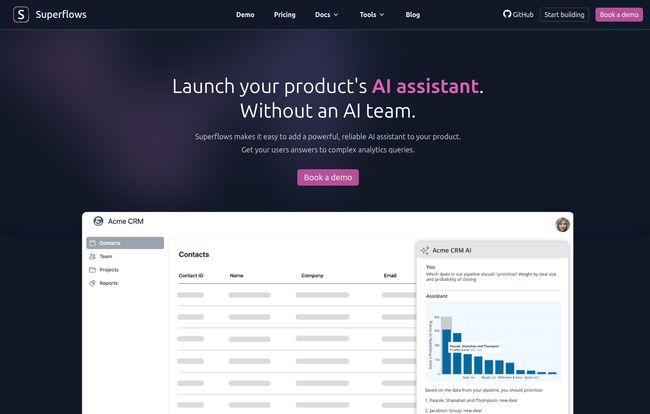
That’s the promise of a new wave of tools, and one that recently caught my eye is Superflows. It’s not just another AI chatbot widget. Not by a long shot. This is a platform designed to let you embed a genuinely useful AI assistant directly into your own product. An assistant that can actually do things. I’ve been digging into it, and honestly, it’s got me thinking about the future of user interaction.
So What Exactly is Superflows? (More Than Just a Chatbot)
Okay, let’s break it down. At its heart, Superflows gives your users a conversational interface to interact with your product. The magic, and the reason I’m even writing this, is that it connects directly to your product’s underlying API and its documentation. Think about that. It’s not guessing based on generic knowledge. It’s learning from the very blueprint of your software.
Visit Superflows
The best analogy I can come up with is this: It’s like hiring a super-smart intern who has memorized your entire API spec. They know every function, every endpoint, and they’re just waiting for you to tell them what to do. This ‘intern’ can do two incredible things: answer questions and take actions.
This approach splits into two main functions that are pretty powerful when combined:
- Chat-to-API: The user tells the AI what to do, and the AI translates that into an API call to make it happen.
- Chat-to-Docs: The user asks a question, and the AI finds the answer within your existing help documentation.
This isn’t just about deflecting support tickets with a smarter FAQ bot. It’s about changing how people use software at a fundamental level.
The Real Magic is in the Actions
The Chat-to-API feature is, for me, the absolute showstopper. We’re moving beyond just information retrieval. We’re talking about AI-driven action.
Imagine you run a CRM product. Normally, adding a new contact involves clicking ‘Contacts’, then ‘Add New’, filling out five different fields, and hitting ‘Save’. It’s a process. With a Superflows-powered assistant, your user could just type:
“Add Sarah Jenkins, sarah.j@examplecorp.com, as a new lead from the marketing campaign. Set her status to ‘warm’.
And it just… happens. The AI parses the intent, identifies the required data, and makes the correct API call. No clicks. No forms. Just intent translated into action. This is a massive reduction in user friction. It makes your product feel less like a rigid tool and more like a responsive partner. The potential for increasing user engagement here is just huge.
Ditching the Endless Search with Smart Documentation
Now let’s talk about the other side of the coin: Chat-to-Docs. Every SaaS company has a love-hate relationship with its documentation. You spend ages writing it, and users still can’t find anything. They’ll ask a support agent a question that’s literally answered on the first page of your Getting Started guide.
Superflows ingests your documentation and turns it into a conversational knowledge base. When a user asks, “How do I set up a two-factor authentication?” it doesn’t just link them to an article. It can provide a step-by-step summary right there in the chat. It’s like giving every single user a personal product expert who’s available 24/7. The impact on your support team’s workload could be massive. Fewer tickets, happier users, and a support team that can focus on the really complex problems.
Who Should Be Looking at Superflows?
This isn’t for everyone, but for certain types of businesses, I think it could be a home run. Specifically, I’m looking at:
- Data-Heavy SaaS Platforms: Think analytics, business intelligence, or monitoring tools. Instead of building endless custom report generators, let users ask, “Show me user sign-ups from Germany last month, broken down by acquisition channel.”
- Action-Oriented Tools: CRMs, project management software, marketing automation. Any product where users are frequently creating, updating, or managing items.
- Companies Drowning in Support Debt: If your support team is constantly answering the same questions, this could be a lifeline.
For Product Managers and Founders, the value is a faster time-to-market for user-requested features and a serious competitive edge. For developers, it means less time building out complex, stateful front-end interfaces and more time working on the core engine of the product. That’s a win-win.
Let’s Talk Brass Tacks: The Good and The Not-So-Good
No tool is perfect, and it’s important to go in with your eyes open. I’ve spent enough time in this industry to know there’s always a trade-off.
The Upside of Handing Over the Reins
The advantages are pretty clear. You’re reducing the time it takes for users to get value from your product, which is the holy grail of user retention. You’re also potentially saving a ton of engineering resources. In my experience, building, testing, and maintaining a complex analytics dashboard can take a team months. Superflows offers a shortcut. It empowers your users to build their own ‘reports’ on the fly, just by asking. That’s a powerful concept.
A Few Things to Keep in Mind
Now for the reality check. Superflows is not a magic wand. Its effectiveness is directly tied to the quality of your existing infrastructure. If you have a poorly documented, inconsistent API, Superflows will struggle. Garbage in, garbage out. This tool forces you to have good API hygiene, which is probably a good thing in the long run, but it’s a prerequisite.
Its also reliant on the quality of your documentation for the Chat-to-Docs feature. If your help articles are vague or out of date, the AI’s answers will be too. Finally, you are building a core piece of your user experience on a third-party platform. That’s a strategic decision that requires trust and a bit of a leap of faith.
How Much Does This AI Power Cost?
Ah, the big question. The pricing model is pretty straightforward and seems well-targeted for its audience. I’ve laid it out in a simple table.
| Plan | Price | Key Features |
|---|---|---|
| Testing | Free | Evaluate in test mode, 50 queries, connect to your API in the playground, single seat. |
| Scale | $999 / month | 10,000 Chat-to-API queries, 200,000 Chat-to-Docs queries, unlimited seats, custom setup. |
| Enterprise | Custom | All Scale features plus audit logs, priority feature requests, and higher query limits. |
The Free tier is actually useful. You can properly test it with your API before committing a dime, which I love. No need to sit through a sales demo just to see if it works. The Scale plan at $999/month might cause some sticker shock, but you have to contextualize it. How much does one front-end engineer cost per month? If this tool saves you from a 3-month project building a new reporting suite, it has paid for itself many times over. The Enterprise plan is the classic “call us” for large organizations with specific compliance and volume needs.
My Final Take: Is Superflows a Game-Changer?
So, what’s the verdict? I think Superflows is a genuinely exciting tool. It represents a shift in how we think about user interfaces. Is it going to replace every button and menu in your app? No. But for the right use cases, it can be a transformative layer that sits on top of your existing product, making it feel ten times more powerful and intuitive.
It’s not a solution for a SaaS with a messy backend. It’s a force multiplier for teams that already have a solid, well-documented API. If that’s you, I seriously recommend giving their free plan a spin. You might be surprised at how natural it feels to just… talk to your software.
Frequently Asked Questions about Superflows
- Is Superflows just another AI chatbot?
- Not at all. A typical chatbot follows a script or uses generic AI. Superflows connects directly to your product’s specific API and documentation, allowing it to take real actions and provide context-aware answers based on your software’s actual functionality.
- How difficult is it to set up Superflows?
- The setup process involves connecting your API (usually via an OpenAPI/Swagger spec) and providing your documentation. The difficulty really depends on how clean and well-structured your API and docs are. If they’re in good shape, the process can be quite fast.
- Can Superflows work with any SaaS product?
- In theory, it can work with most SaaS products that have a REST API. The better your API is designed and documented, the more effective Superflows will be. It’s best suited for products that are data-heavy or require users to perform many distinct actions.
- Is the $999/month Scale plan worth the cost?
- You have to weigh it against your engineering costs. If implementing Superflows saves your team from a multi-month development project for a new feature (like a custom dashboard), it could provide a significant return on investment very quickly, not to mention the potential gains in user retention.
- What’s the difference between Chat-to-API and Chat-to-Docs?
- Think of it as ‘doing’ versus ‘knowing’. Chat-to-API is for taking action—creating a user, updating a record, running a report. Chat-to-Docs is for information retrieval—answering questions about how the product works based on your help articles.
- How secure is connecting my product’s API?
- Security is obviously a major consideration. Superflows operates as a proxy, passing requests to your API. You’d still control your authentication and authorization logic. For specific security protocols and compliance details, it’s best to consult their official documentation or contact their team directly.
Conclusion
Superflows is a glimpse into the future of software interaction. It’s a tool built on a simple but powerful idea: the shortest path between a user’s intent and an outcome is a conversation. While it requires a solid foundation to build upon, for the right SaaS company, it could be the key to unlocking a new level of user engagement and freeing up precious developer resources. It’s definitely one to watch.


