
Categories: AI Avatar Generator, AI Face Swap Generator, AI Face Swap Video, AI Lip Sync Generator, AI Voice Cloning
Swapface Review: A Game-Changer for AI Face Swapping?

If you’re in the content creation game, you know the grind. Churning out videos, trying to stay fresh on stream, constantly searching for that next thing to grab your audience’s attention. I’ve been there, staring at OBS, wondering if I have the energy to do another 8-hour stream. We’ve seen trends come and go – from the VTuber explosion to those weird AI art filters that took over Instagram for a month.
But every so often, a piece of tech comes along that doesn’t just feel like a gimmick. It feels like a genuine shift. That’s the vibe I’m getting from Swapface. I stumbled upon it a while back, and I’ve gotta admit, my initial reaction was a mix of “whoa, that’s cool” and a healthy dose of skepticism. Another AI toy? But the more I looked into it, the more I realized… this might actually be a tool that redefines what’s possible for independent creators.
What Exactly is Swapface? (And Why Should You Care?)
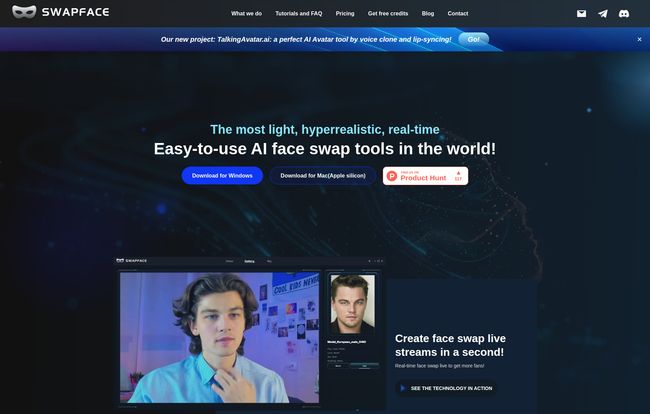
So what is this thing? In a nutshell, Swapface is a desktop app that lets you swap your face with someone else’s in real-time. We’re not talking about those clunky, delayed filters on your phone that look like a sticker stuck to your forehead. We’re talking about hyperrealistic, high-quality face replacement that maps to your expressions instantly. You smile, it smiles. You raise an eyebrow, it raises an eyebrow. All live, with no awkward processing lag.
Think of it less like a goofy social media filter and more like a live digital makeup artist living in your PC. You feed it a high-quality photo of the face you want to become, point your webcam at your own face, and… that’s pretty much it. The AI does the heavy lifting, mapping the new face onto your own in real time. For anyone who’s ever tried to do complex VFX, the idea of achieving this with a single click is just… wild.
Visit Swapface
The Features That Actually Matter for Creators
A flashy concept is one thing, but execution is everything. As a professional blogger in the SEO and traffic space, I’ve seen countless tools promise the world and deliver a barren wasteland. So, I dug into what makes Swapface tick. And a few things really stood out.
It’s Shockingly Easy to Use
My first thought was, “Okay, this is going to be a nightmare to set up.” I expected a mess of Python libraries, command-line hell, and tutorials written by people who have never spoken to another human. I was wrong. The website basically says: connect your camera, pick a face, go. That’s a bold claim. And while there’s always a little more to it than that, the core principle holds true. The interface is clean, designed for people who want to create content, not debug code. It’s a massive step up from the early days of open-source deepfake software which was, frankly, a pain to use.
Privacy Isn’t an Afterthought (This is HUGE)
For me, this is the killer feature. The absolute deal-breaker. Swapface processes everything locally on your own machine. Your face data, the images you use, none of it gets uploaded to some mysterious cloud server in a country you can’t pronounce. In an era where every app wants to harvest your data, this is a breath of fresh air. Let’s be real, the idea of my face data sitting on a third-party server gives me the creeps. With Swapface, you have complete control. That peace of mind is invaluable, and frankly, it should be the industry standard.
Performance That Doesn’t Melt Your PC
AI can be incredibly demanding. So when I saw “cost-effective” listed as a benefit, I raised an eyebrow. But their claim holds up. You don’t need a $4,000 supercomputer to run this. The specs are pretty reasonable for any serious gamer or creator.
Here’s a quick breakdown of the hardware requirements:
- Minimum Setup: You’ll need at least an AMD Ryzen 5 2600 processor, 8GB of RAM, and an NVIDIA GeForce 1060 or Radeon RX 580. A pretty standard mid-range gaming PC from a few years ago.
- Recommended Setup: For the best results, they suggest an AMD Ryzen 5 3600, 16GB RAM, and an NVIDIA GeForce 3070 or Radeon RX 5700. This is a more modern setup, but still very attainable.
The key takeaway? It needs a dedicated graphics card. So no, this probably won’t run on your work laptop with integrated graphics. But if you have even a modest gaming rig, you’re likely good to go. It’s an investment, but a far smaller one than hiring actors or spending weeks on post-production VFX.
The All-Important “Realism” Factor
At the end of the day, none of this matters if it looks bad. We’ve all seen terrible deepfakes – glitchy, uncanny, and just plain weird. Swapface aims for “hyperrealistic,” and from the demos I’ve seen, it gets impressively close. The lighting seems to adapt, the expressions are fluid, and it avoids that ‘mask’ look. The example of recreating a scene from Pulp Fiction on their site is a perfect testament to its potential for high-quality content creation, not just silly gags.
Who is Swapface Really For?
This isn’t just a toy. It’s a tool with some serious applications. I can see it being a massive hit with a few key groups:
- Twitch Streamers & YouTubers: The potential for roleplaying, creating unique on-stream personas, or even protecting your real identity while still being expressive on camera is enormous. Imagine a history channel where the host becomes the historical figures they’re discussing. The possibilities are endless.
- Social Media Content Creators: For TikTok, Instagram Reels, and YouTube Shorts, this is pure gold. You can create viral-worthy skits, movie parodies, and memes in minutes, without needing a whole cast and crew.
- Indie Filmmakers and Animators: This could be a revolutionary pre-visualization tool. Or even a way to get realistic facial performances for digital characters without expensive motion capture rigs.
The Catch: System Requirements and What’s Missing
No tool is perfect, and it’s important to be realistic. The biggest hurdle for most people will be the dedicated graphics card requirement. This immediately gates it off from casual users on standard laptops. It’s a tool for people who are already at least semi-serious about their tech. You also need a relatively modern OS – Windows 10 Anniversary Update or newer, or a Mac with Apple’s M-series chips.
The other question mark is the pricing. As of this writing, there’s no clear “Pricing” page on their website. You can download the software, but it’s unclear if it’s a one-time purchase, a subscription model, or a freemium setup with limitations. This is a bit of a frustration, and something I hope they clarify soon. Transparency in pricing is just as important as the feature set.
My Final Verdict on Swapface
So, is Swapface a game-changer? In my opinion, yes. It’s one of the first tools I’ve seen that successfully bundles real-time performance, high-quality results, and a privacy-first approach into an easy-to-use package. It democratizes an incredibly powerful technology that was once the exclusive domain of VFX studios and hardcore techies.
Of course, you can’t talk about this tech without mentioning the elephant in the room: deepfakes. And it’s a valid concern. But like any powerful tool (hello, Photoshop), its value is determined by the user. For creative, positive, and transformative content creation, Swapface offers a tantalizing glimpse into the future. And I, for one, am excited to see what people build with it.
Frequently Asked Questions (FAQ)
Is Swapface free?
The website offers a direct download but doesn’t have a public pricing page at the moment. It may operate on a freemium model or a free trial, but the exact cost structure isn’t clear yet.
Do I need a powerful computer to run Swapface?
You don’t need a supercomputer, but you do need a dedicated graphics card. A mid-range gaming PC with something like an NVIDIA GeForce 1060 or better will work, but a more modern card like a GeForce 3070 is recommended for the best performance.
Is my data safe when using Swapface?
Yes. This is one of its main strengths. All the AI processing happens on your local computer, so your images and facial data are never uploaded to their servers.
Can I use Swapface on my old Intel Mac?
Unfortunately, no. The Mac version is specifically designed for Apple Silicon (M1, M2, M3 chips, etc.). Windows users need the Windows 10 Anniversary Update or newer.
How is this different from a Snapchat filter?
The primary differences are performance and realism. Swapface is designed for high-quality, real-time output for professional content like live streams and polished videos, whereas phone filters are generally lower fidelity and not designed for that use case.
The world of content creation is moving fast, and AI is at the wheel. Tools like Swapface aren’t just novelties; they are fundamentally changing the creator’s toolkit. It’s making the impossible possible for the one-person-show, and I can’t wait to see the explosion of creativity it’s about to ignite.


