
Categories: AI CRM, AI Customer Service, AI Data Mining, AI Sales, AI Sales Assistant, AI Workflow
Swyft AI Review: Is It The End of Manual CRM Updates?

If you’ve ever been in sales, you know the feeling. You’ve just crushed a discovery call. The prospect loves you, the path to a deal is clear, and you’re riding high. And then it hits you. The post-call comedown. The part where you have to spend the next 20 minutes meticulously updating 15 different fields in Salesforce, trying to recall every nuance of the conversation. It’s the bane of every sales rep’s existence, and honestly, it’s where good data goes to die.
We’ve all been there. You tell yourself, “I’ll update it later,” but later never comes. Or you rush through it, leaving vague notes that are useless for forecasting. For years, this has just been… the cost of doing business. But what if it wasn’t? I’ve been hearing some chatter about a tool called Swyft AI that claims to automate this entire painful process. So, naturally, I had to see what all the fuss was about.
What Exactly is Swyft AI, Anyway?
Imagine having a hyper-efficient personal assistant who listens to all your sales calls, reads your emails, and then silently, perfectly updates your CRM for you. That’s the core idea behind Swyft AI. It’s an AI-powered pipeline management platform designed to sit between your conversations (on Zoom, Gong, etc.) and your CRM (looking at you, Salesforce).
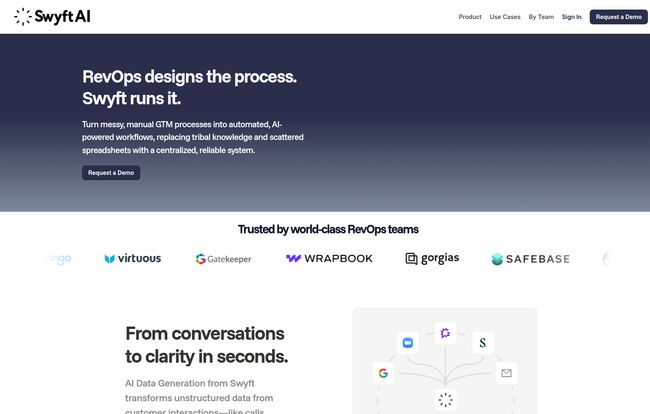
It’s built for the whole Go-to-Market (GTM) crew—from the sales reps on the front lines to the RevOps wizards behind the curtain and even the Customer Success folks keeping clients happy. The tagline on their site says it all: “RevOps designs the process. Swyft AI runs it.” That’s a bold claim, and it points to a tool that’s less about just another dashboard and more about being the engine that runs your sales machine.
How Swyft AI Automates Your Entire Sales Workflow
So how does this magic actually happen? It’s not just smoke and mirrors. Swyft AI operates on a pretty slick combination of AI-powered data extraction and customizable workflow automation. It’s a one-two punch against manual work.
From Messy Conversations to Clean Data
This is the secret sauce. Swyft AI’s brain connects to where your customer interactions happen—your calls, your emails—and digests that unstructured chaos. It identifies things like budget, timeline, key decision-makers, and potential risks, all from the natural flow of conversation. It then transforms this into structured data and pushes it to the right fields in your CRM. Think about that for a moment. No more human error, no more forgotten details, and no more subjective note-taking. Just clean, consistent data, every single time. The impact on your data hygiene and forecasting accuracy could be massive.
Visit Swyft AI
The “If This, Then That” for Your Sales Process
Once you have clean data, you can build powerful automations. Swyft lets you create workflows with triggers, conditions, and actions. For example, you can set up a rule: IF a meeting is completed where the prospect mentions “timeline is Q4,” THEN automatically update the “Close Date” field in Salesforce and create a follow-up task for the rep. This is where the RevOps team can really shine, building out these automated processes that guide reps, eliminate guesswork, and make sure nothing ever falls through the cracks again. It’s about making your sales process repeatable and scalable, not just reliant on individual heroics.
Keeping Your Tech Stack Happy
One of my initial worries with tools like this is, “Oh great, another platform my team has to learn.” But Swyft AI seems to understand this. It’s not trying to be a replacement for Salesforce or Gong. It’s designed to integrate with them. Seeing logos like Slack, Zoom, and Salesloft on their site is reassuring. It’s a piece of middleware, a connector that makes the tools you already use more powerful. This is a huge plus, as it reduces the friction of adoption. However, it’s also a prerequisite—you need that existing tech stack for Swyft to plug into.
The Real-World Impact: More Selling, Less Typing
So what does all this tech actually do for you? It gives you back your most valuable asset: time. I’ve seen internal studies at companies showing reps spend upwards of 20-30% of their time on administrative tasks. That’s a full day or more every week spent typing, not selling. Swyft AI aims to give that day back.
But it’s more than just time savings. The testimonials tell a compelling story. Scott Silverman of Virtuous called it “revolutionary for our organization.” Stephen Shih at Panther mentioned getting to insights that were previously “buried in our call recordings.” This points to a deeper benefit: uncovering the risks and opportunities hidden in your customer conversations. The AI can surface deal-killers or competitive mentions that a busy rep might miss, giving leadership a true, unfiltered view of the pipeline.
Okay, What’s the Catch? A Look at the Potential Hurdles
Alright, no tool is a silver bullet, and it’s my job to be skeptical. While Swyft AI sounds fantastic, there are a few things to consider.
- Setup Isn’t Instant: This isn’t a simple Chrome extension you install in five minutes. Because it ties so deeply into your specific sales process and tech stack, there’s going to be an initial setup and configuration period. You’ll need to work with their team to map your fields and define your automation rules. This is a good thing for long-term success, but don’t expect instant gratification.
- The AI Trust Factor: The whole system hinges on the AI’s accuracy. Can it correctly interpret sarcasm? What about complex technical jargon? While the technology is impressive, you’ll want to have a period of monitoring and spot-checking to build trust. I imagine the AI learns and improves over time, but it’s a fair question for any team to ask during a demo.
So, How Much Does This Magic Cost?
This is the million-dollar question, isn’t it? I scoured their website, and there is no public pricing page. In the world of B2B SaaS, this almost always means one thing: custom pricing. You’re not going to find a simple three-tiered plan here. Pricing will likely depend on the number of users, the complexity of your setup, and the specific integrations you need. To get a number, you’ll have to book a demo and have a conversation. While I always prefer transparent pricing, this approach does make sense for a tool this integrated. They’re selling a solution, not just a piece of software.
My Final Take on Swyft AI
After digging in, I’m genuinely impressed with the problem Swyft AI is tackling. It’s not another flashy dashboard; it’s a foundational tool aimed at fixing a problem that has plagued sales teams for decades. It’s a direct assault on wasted time and bad data.
Is it for everyone? Probably not. If you’re a one-person startup using a spreadsheet as a CRM, this is overkill. But for any established sales team, especially those with a dedicated RevOps function, this could be a total game-changer. It’s a tool that promises to make your reps more effective, your forecasts more accurate, and your entire GTM engine a whole lot smarter. It’s a cure for the Salesforce admin headache, and it might just be the best medicine your sales team gets all year.
Your Swyft AI Questions Answered
1. Does Swyft AI replace my CRM?
No, absolutely not. Swyft AI is designed to enhance your existing CRM, specifically Salesforce. It acts as an automation layer on top of your CRM, feeding it clean and accurate data from your sales activities, but your CRM remains your system of record.
2. How accurate is the AI in Swyft AI?
While no AI is 100% perfect, tools like Swyft use very advanced natural language processing models. The accuracy is generally very high for common sales conversations. Most companies find that a short period of monitoring and providing feedback helps the AI quickly learn the specifics of their business and terminology, improving accuracy over time.
3. Who is Swyft AI best for?
Swyft AI is ideal for mid-market to enterprise-level B2B companies with established sales and Revenue Operations (RevOps) teams. If your organization relies heavily on Salesforce and uses tools like Gong, Zoom, or Slack for customer communication, you’re the prime audience.
4. How difficult is the setup process for Swyft AI?
The setup is more involved than a simple plug-and-play app. It requires a dedicated implementation process where you’ll work with the Swyft team to connect your systems and configure the automation rules based on your unique sales process. This initial investment in time is what makes the tool so powerful.
5. Is Swyft AI free to use?
No, Swyft AI is a premium enterprise tool. They do not offer a free plan. Pricing is customized based on your team’s size and needs, and you’ll need to schedule a demo to get a quote.
Reference and Sources
- Swyft AI Official Website
- HubSpot’s State of Sales Report (For general data on sales rep time allocation)


