
Categories: AI Meeting Assistant, AI Note Taker, AI Summarizer, AI Transcription
My Honest Tactiq Review: The AI Note-Taker I Actually Use

If I see one more back-to-back-to-back meeting block on my calendar, I might just flip my desk. The modern workday, especially for those of us in the digital marketing and SEO space, has become a marathon of video calls. And with every call comes the frantic dance of typing, trying to capture every brilliant idea, every subtle commitment, every single action item. It’s exhausting. You’re either a great participant or a great note-taker; it’s almost impossible to be both.
For years, I’ve been on the hunt for a solution. I’ve tried otter.ai, I’ve tried fireflies, I’ve tried just hitting ‘record’ and praying I’d have time to watch a 60-minute meeting all over again (spoiler: I never do). They all had their quirks. Some sent a very obvious, and sometimes a little creepy, bot into the meeting. Not a great look when you’re trying to close a new client.
Then, I stumbled upon Tactiq.io. And honestly? It’s a bit of a game-changer.
So, What Exactly is Tactiq?
In a nutshell, Tactiq is an AI meeting assistant that works as a simple Chrome extension. It plugs right into Google Meet, Zoom, and Microsoft Teams. Its whole reason for being is to take on the grunt work of meetings so you can, you know, actually focus on the human conversation happening. It transcribes everything in real time, pulls out summaries, identifies tasks, and basically acts like the hyper-efficient personal assistant you wish you had.
It’s not just another transcription service. It’s more like a ghostwriter for your meetings, silently documenting everything and then handing you the polished summary afterward. And the setup is ridiculously simple. You install the extension, and it just… works.
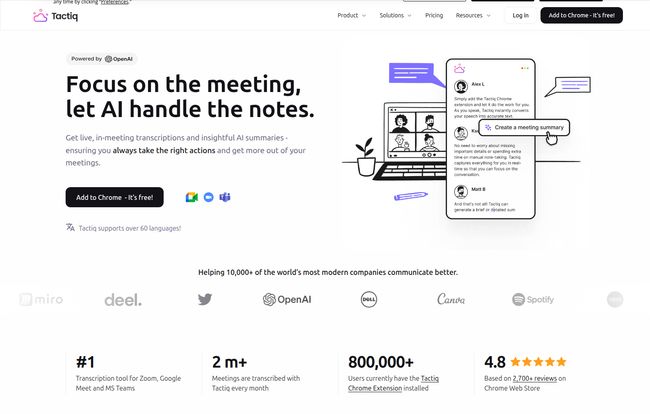
Visit Tactiq
The One Feature That Made Me a Believer
Okay, here’s the secret sauce. The thing that made me go from ‘skeptic’ to ‘advocate’. Tactiq doesn’t send a bot into your meeting.
Let that sink in. There’s no awkward “Tactiq Bot has joined the call” announcement that makes everyone pause and ask, “Uh, who’s that?” The transcription happens right there in a small, private window on your screen. It’s completely invisible to everyone else unless you choose to share it. This is, without a doubt, its biggest advantage. It removes the social friction. You get all the benefits of a live transcript without derailing the meeting’s natural flow or making people feel like they’re being formally recorded by Big Brother. It’s subtle, it’s seamless, and frankly, it’s brilliant.
Beyond Just Transcription: Where the AI Magic Happens
Getting a text file of your meeting is cool, but the real power is what Tactiq does with that text. It doesn’t just give you a wall of words; it gives you intelligence.
Instant Summaries and Action Items
About two minutes after a call ends, voilà, a summary appears. Not just any summary, but one powered by AI (they use OpenAI’s models, for those who care about the tech stack). It pulls out the key points, decisions, and most importantly, the action items. It even tries to identify who is responsible for what. I’ve found this to be surprisingly accurate. It saves me at least 15-20 minutes of post-meeting admin work, which, over a week, really adds up.
Asking Your Meeting Questions with Custom Prompts
This is a power-user feature that I’ve grown to love. You can create your own custom AI prompts. Think of it as having a direct line to the meeting’s collective brain. You can ask things like, “What were the client’s main concerns?” or “List all the deadlines mentioned in this call” or “Generate a follow-up email based on our discussion.” It’s like having a research assistant who’s already done all the listening for you.
Workflows That Actually… Work
A tool is only as good as its ability to play nice with others. Tactiq gets this. It integrates directly with the places my work actually lives: Notion, Slack, Google Docs, Jira, HubSpot, you name it. With a click, I can send the full transcript to a Google Doc, push action items into my Notion database, or share key takeaways in a Slack channel. This closes the loop and prevents valuable information from getting lost in the ether.
Let’s Talk Brass Tacks: The Tactiq Pricing Breakdown
Alright, so what’s the damage? The pricing structure is actually pretty reasonable and flexible, which I appreciate. They don’t hide it behind a “Contact Sales” wall for most users.
Here’s a quick rundown based on their pricing page:
| Plan | Price (Billed Annually) | Who It’s For |
|---|---|---|
| Free | $0 | Students, casual users, or anyone wanting to test it out. |
| Pro | $10/user/month | Freelancers, consultants, and professionals who live in meetings. |
| Team | $16.67/user/month | Small to medium-sized teams needing collaboration and admin features. |
The Free plan is generous enough to give you a real feel for the tool, offering 10 free transcripts per month. For many, that might be all they need. The Pro plan is the sweet spot, in my opinion. For the price of a couple of fancy coffees a month, you get unlimited transcripts and more powerful AI features. This is where the tool really starts to sing. The Team plan adds on unlimited AI credits and centralized admin controls, which makes sense for any manager looking to roll this out company-wide.
The Not-So-Perfect Bits (Because Nothing Is)
Look, no tool is perfect. While I’m clearly a fan, there are a few things to keep in mind. Some might call them cons, but I see them more as ‘things to be aware of’.
First, it is a Chrome extension. If you’re a die-hard Firefox or Safari user, you’re out of luck for now. For the 90% of us living in the Chrome ecosystem, this isn’t an issue at all.
Second, the transcription is private by default. I listed this as a pro, but it’s a double-edged sword. It means you have to make a conscious effort to share the summary or notes with your team afterward. It’s not a big deal, just an extra click, but it’s a different workflow than tools where the transcript is automatically shared with all attendees.
Finally, yes, the most powerful features are behind a paywall. The free plan is great, but the unlimited transcriptions and custom prompts on the paid plans are what truly transform your workflow. But hey, good tools cost money to build and maintain. That’s just business.
Also Read: Webudy Review: Your AI-Powered Web Co-Pilot?
My Final Verdict: Who is Tactiq Really For?
After a solid month of use, I’m keeping Tactiq in my toolkit. It has genuinely reduced my meeting fatigue and made my follow-ups faster and more accurate.
This tool is an absolute must-have for:
- Project Managers: To capture every requirement and assign action items flawlessly.
- Sales Teams & Account Managers: To recall every client detail and commitment without frantic typing.
- Consultants & Freelancers: To provide detailed meeting summaries and prove your value.
- Anyone who despises taking notes but needs a perfect record of their conversations.
Who is it not for? If you only have a couple of internal video calls a month, you can probably get by without it. But for anyone whose calendar looks like a game of Tetris gone wrong, Tactiq is less of a nice-to-have and more of a sanity-saving necessity.
Conclusion
We’re constantly told to ‘work smarter, not harder’, but it often feels like an empty platitude. Tools like Tactiq are a tangible step in that direction. By offloading the cognitive burden of note-taking to AI, it frees up your brainpower to focus on what humans do best: connecting, strategizing, and creating. It’s a small change to your workflow that delivers a disproportionately large impact. I, for one, am happy to hang up my meeting stenographer hat for good.
Frequently Asked Questions about Tactiq
- Does Tactiq use ChatGPT?
- Yes, Tactiq integrates with OpenAI’s models, including those that power ChatGPT, to generate its summaries and insights. However, they have a strict data privacy policy and your data isn’t used to train OpenAI’s public models.
- Is Tactiq secure for sensitive meetings?
- Absolutely. They tout enterprise-grade security and are SOC 2 Type II and GDPR compliant. This is a big deal for corporate environments where data privacy is paramount.
- Will everyone in the meeting know I’m using Tactiq?
- No, and this is its best feature! Because it runs as a local Chrome extension and no bot joins the call, it’s completely invisible to other participants unless you decide to announce it or share the transcript.
- What video conferencing platforms does Tactiq support?
- Currently, it supports the big three: Google Meet, Zoom, and Microsoft Teams.
- Can I try Tactiq for free?
- Yes, you can. They have a free-forever plan that gives you 10 meeting transcripts per month, which is perfect for trying it out and seeing if it fits your workflow.
- Where does the transcription happen?
- The transcription happens in real-time in a small, private widget that appears on your screen during the meeting. Only you can see it.


