
Categories: AI Bio Generator, AI Social Media, AI Social Media Post Generator, AI Writing Assistants, Headlines AI
Taplio Review: An Honest Look at This AI LinkedIn Tool

It’s the platform we love to hate, right? We know we should be on there, building our personal brand, networking, dropping knowledge bombs. But the reality? It’s a content-hungry machine that demands to be fed. Every. Single. Day. The pressure to come up with something witty, insightful, or even just vaguely professional can be… a lot. I’ve had more mornings than I can count staring at that blank “Start a post” box with my brain just making dial-up noises.
So, when another AI-powered LinkedIn tool slides into my DMs—or, you know, my targeted ads—promising to solve all my problems, my default setting is skepticism. I’ve been in the SEO and traffic generation game long enough to see countless ‘revolutionary’ platforms that are just repackaged fluff. But Taplio kept popping up. People I respect were mentioning it. So I thought, what the heck. I’ll give it a spin for all of us.
So, What Exactly is Taplio?
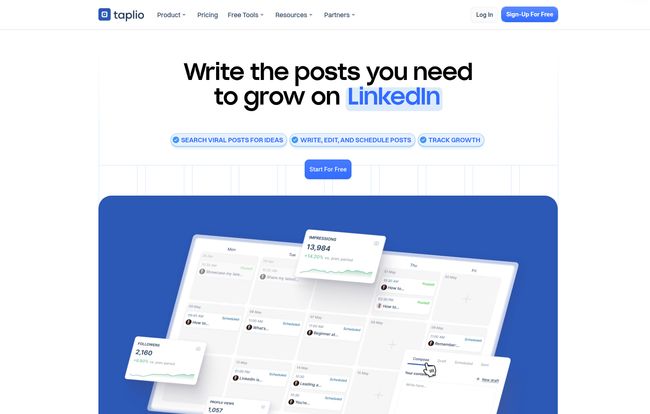
In a nutshell, Taplio bills itself as an all-in-one tool for growing on LinkedIn. It’s not just one thing; it’s a whole toolkit. Think of it as a Swiss Army knife for your LinkedIn strategy. It’s got an AI content writer, a post scheduler, a library of viral posts for inspiration (more on that later), and some pretty detailed analytics to see what’s actually working.
The main promise is efficiency. They claim you can create a month’s worth of content in about an hour. A bold claim, and one that immediately made my inner cynic raise an eyebrow. But the goal is clear: to help you stop guessing and start growing your personal brand on LinkedIn without it becoming your full-time job.
The Features That Actually Matter
A long list of features is great for a landing page, but what’s it like to actually use the thing? I poked around all the corners of the platform, and a few things really stood out to me as genuinely useful.
The AI Content Creation and Viral Library
This is the main event. Taplio’s AI is trained on, supposedly, millions of top-performing LinkedIn posts. You can give it a prompt, an idea, or even a link to an article, and it will generate a few post options for you. Now, let’s be real. Is it going to write a poetic masterpiece in your unique voice right out of the box? No. Of course not.
What it is good for is breaking through writer’s block. It’s an idea generator. A starting point. I found its best use was to generate a basic structure, and then I’d go in and inject my own personality, stories, and opinions. Using the AI writer without editing is like buying a nice suit off the rack and not getting it tailored. The basic shape is there, but the details that make it yours are missing.
The real goldmine for me, however, is the Viral Post Library. You can search by topic or keyword and see a massive database of posts that have already performed incredibly well. This isn’t for copying! Please don’t be that person. It’s for understanding formats, hooks, and angles that resonate with people. It’s market research at your fingertips.
Visit Taplio
LinkedIn Post Scheduling That’s a Breeze
This is a simple but huge quality-of-life improvement. Yes, LinkedIn has its own scheduler now, but it’s pretty bare-bones. Taplio lets you queue up your posts, set a consistent schedule, and then just… walk away. Batch-creating your content for a week or two and then letting the tool handle the publishing is a massive time-saver. It’s one of those things that, once you have it, you can’t imagine going back.
Analytics and the Handy Chrome Extension
LinkedIn’s native analytics are okay, but they can feel a bit clunky. Taplio presents your data in a much cleaner, more intuitive dashboard. You can easily track views, engagement rates, and follower growth over time, helping you connect the dots between what you posted and the results you got. The included Chrome Extension is also a nice touch, giving you quick stats on anyone’s profile you visit. It’s great for a little competitive analysis or finding influencers.
The Not-So-Perfect Parts (An Honest Look)
No tool is perfect, and Taplio is no exception. It’s important to go in with your eyes open. One of the biggest potential downsides is an over-reliance on AI. If you just copy and paste what the AI gives you, your content will sound generic. It will sound like a robot, because, well, it was written by one. This tool requires a human touch to be truly effective.
I’ve also seen some people in SEO circles debate the effectiveness of AI content in general. My take? AI is a powerful assistant, not a replacement for a creator. Its output is only as good as the prompts you give it and the editing you apply afterward. This is a tool to enhance your workflow, not to do your job for you.
Breaking Down the Taplio Pricing
Alright, let’s talk money. This is a premium tool, and it comes with a premium price tag. There’s no permanent free plan, but they do offer a 7-day free trial to let you test the waters, which I always appreciate. They also have a 30-day refund policy on your first payment, which lowers the risk a bit.
Here’s a general look at their plans as of writing this:
- Starter Plan: This is currently around $39/month. It gets you started with AI post ideas, scheduling, and basic analytics. It’s probably enough for a solopreneur or someone just dipping their toes into consistent LinkedIn content.
- Standard Plan: At about $65/month, this seems to be the sweet spot. It adds more advanced AI features, better analytics, and the ability to find and engage with relevant content, which helps with networking.
- Pro Plan: This one’s a bigger jump, at $199/month. It’s clearly aimed at power users, teams, or agencies. It offers features like building targeted lead lists, team collaboration, and advanced outreach capabilities.
Is it worth it? If LinkedIn is a critical channel for your business—for lead generation, networking, or personal branding—then yes, the time you save could easily justify the cost of the Starter or Standard plan. Think about it: what’s your hourly rate? If this tool saves you 4-5 hours a month, it’s likely already paid for itself.
My Final Verdict: Who Is Taplio For?
After spending some quality time with Taplio, I’ve got a pretty good feel for who would get the most out of it.
This tool is a fantastic fit for busy founders, solopreneurs, consultants, and marketing managers who know they need to be active on LinkedIn but just don’t have the bandwidth. It automates the tedious parts and provides a rocket boost for the creative parts. If you’re on a sales team using social selling, the Pro plan’s lead-building features could be a game-changer.
Who is it not for? If you’re a large corporation with a dedicated social media team of five people, you might already have a more complex, enterprise-level solution. And honestly, if you’re someone who genuinely loves the slow, methodical process of crafting every single post from scratch and find joy in that process, you might feel like Taplio takes away some of teh magic.
For the rest of us mortals just trying to stay relevant and grow our network? It’s a seriously powerful ally. It doesn’t do the work for you, but it makes the work a hell of a lot easier.
Frequently Asked Questions
- Is Taplio safe to use with my LinkedIn account?
- Yes, from everything I’ve seen, Taplio is safe. It works through official APIs where possible and mimics human behavior to stay within LinkedIn’s terms of service. It’s a well-established tool used by thousands, not some shady, fly-by-night bot.
- Can I really make a month of content in one hour?
- I’d say that’s optimistic marketing speak, but it’s not entirely untrue. You could probably generate the drafts for a month’s worth of content in an hour or two. You’ll still need to spend time refining, editing, and adding your personal touch to make them great.
- How is Taplio different from a simple scheduler like Buffer?
- While it has scheduling, that’s just one piece of the puzzle. The main difference is the deep integration with LinkedIn-specific features: the AI trained on LinkedIn posts, the viral library, the engagement tools, and the lead-finding capabilities. It’s a specialized tool, whereas Buffer is a generalist.
- Will the AI-generated posts sound like me?
- Not at first. The key is to use the AI as a starting point. The more you edit its suggestions and feed it your own ideas, the better it gets at matching your tone. Think of it as an intern you have to train.
- Is there a completely free version of Taplio?
- No, there isn’t a permanent free plan. They operate on a subscription model but provide a 7-day free trial so you can test all the features before committing to a paid plan.
References and Sources
- Taplio Official Website
- Taplio Pricing Information
- Ahrefs Guide to Personal Branding – A good read on why a strong personal brand matters.


