
Categories: AI Assistant, AI Productivity Tools, AI Scheduling, AI Task Management, AI Workflow
Taskopi Review: AI Task Management or Just Hype?

If you’re in the digital space, your life is probably a chaotic symphony of Trello boards, Slack notifications, Asana tasks, and about a dozen sticky notes plastered to your monitor. I know mine is. We’re all on this perpetual quest for the one perfect productivity tool—the one that will finally wrangle our to-do lists and make us feel like we have our lives together. It’s the holy grail of the modern worker.
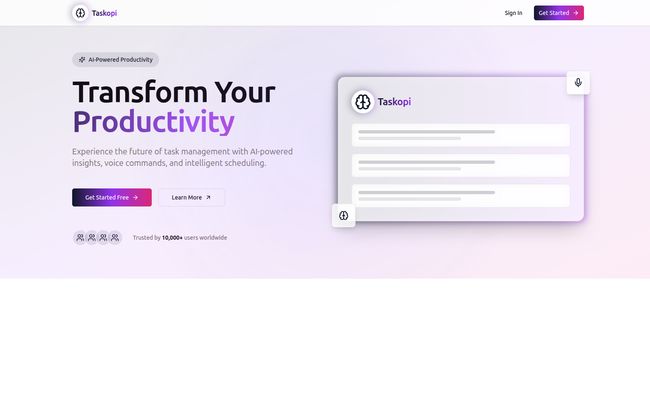
So, when a new tool pops up on my radar, especially one that throws around terms like “AI-Powered Productivity,” my inner SEO and tech geek sits up and pays attention. The latest contender is a sleek-looking platform called Taskopi. It promises to “Transform Your Productivity” with AI insights, voice commands, and intelligent scheduling.
Sounds pretty great, right? Almost too great. In a world saturated with AI everything, from AI-generated cat photos to AI-powered coffee makers, you have to wonder what’s genuine innovation and what’s just clever marketing. So I decided to put on my analyst hat and see what Taskopi is all about.
Visit Taskopi
What Exactly is Taskopi Supposed To Be?
On the surface, Taskopi presents itself as an intelligent task management platform. It’s not just another digital checklist. The core idea, it seems, is to create a more natural, intuitive way to manage your work. Instead of you meticulously planning every little detail, Taskopi’s AI is supposed to do some of the heavy lifting. Think of it less like a rigid project manager and more like a proactive personal assistant who just gets you. It’s a bold claim, especially with giants like Asana and Trello dominating the space. But innovation often comes from the new kids on the block, so I’m listening.
The Features That Caught My Eye
Alright, let’s get into the nuts and bolts. A tool is only as good as its features, and Taskopi is swinging for the fences with some AI-centric capabilities.
Speaking Your To-Do List into Existence
The first thing that jumps out is voice commands. We’ve all gotten used to yelling at our phones or smart speakers. “Hey Google, what’s the weather?” or “Siri, set a timer for 10 minutes.” Taskopi wants to bring that same convenience to your workflow. The idea of just saying, “Taskopi, add ‘Draft the Q3 traffic report’ to my tasks for Friday,” while I’m pacing around my office with a coffee in hand… I’ve gotta say, that’s appealing. It could genuinely reduce the friction of stopping what you’re doing to type something out.
An AI That Actually Understands You?
This goes hand-in-hand with their Natural Language Task Creation. This is the real test of its AI. It’s one thing to recognize a specific command; it’s another to interpret human-like language. If I can type or say, “Remind me to follow up with the client about the CPC campaign every other Tuesday,” and the tool can parse that, set up a recurring task, and maybe even tag the right client project—well, that’s not just a feature, that’s a game-changer. It’s the difference between a simple tool and a smart partner.
The End of Calendar Tetris
Ah, scheduling. My old nemesis. Taskopi claims to have Smart Scheduling with calendar integration. This isn’t just about plopping a task onto a date. The platform says it offers intelligent conflict detection. We’ve all been there: you schedule a focus block to write an article, only to realize later it clashes with a mandatory team meeting. An AI that could flag that proactively would save me so much headache. It’s like having a secretary whose only job is to stop you from double-booking yourself. A true blessing.
Your Personal Productivity Coach
Beyond just organizing tasks, Taskopi offers Analytics & Insights. It provides detailed metrics, which is great, but the interesting part is the “AI-driven productivity suggestions.” Could it tell me I’m most productive between 10 AM and noon and should schedule my deep work then? Could it notice I always push back my content planning tasks and suggest breaking them into smaller chunks? This moves a tool from being a passive receptacle for tasks to an active coach for your workflow. I’m intrigued, if a bit skeptical, about how deep this actually goes.
The Good, The Bad, and The AI
No tool is perfect, and a healthy dose of skepticism is required, especially with new tech. After poking around, here’s my honest take.
What I’m Genuinely Excited About
The biggest pro here is the seamless integration of AI. It’s not just a gimmick; the features seem designed to solve real, everyday productivity problems. The voice commands and smart scheduling, if they work as advertised, could be a huge time-saver. As someone who juggles multiple client SEO campaigns, the thought of an AI helping me spot scheduling conflicts or optimize my workflow is incredibly compelling. Plus, they mention Enterprise-Grade Security, which is a must-have. You can’t have your entire company’s project plans sitting on an insecure server. That’s a big green flag for professional use.
A Few Red Flags and Questions
Okay, now for the other side of the coin. The first thing is the potential for a steep learning curve. To really get the most out of an AI system, you often have to learn its language, its quirks. It might take time to trust its suggestions. There’s also the risk of what I call “AI-driven over-optimization.” Sometimes you just need to get things done, not analyze the optimal minute to do them. It’s a fine line between helpful and distracting.
But my biggest issue? The mystery. While digging around their site, I clicked on the ‘Learn More’ button, hoping to find pricing or more detailed case studies, and was greeted with… a 404 Page Not Found. Ouch. For a tech company, that’s not a great look. It immediately makes me wonder if the platform is still in early development or if they just missed a broken link. As an SEO guy, a 404 on a primary call-to-action button gives me a slight eye twitch.
So, How Much Does This AI Magic Cost?
This brings me to the million-dollar question: what’s the price? And the answer is… I have no idea. The pricing is completely absent from the homepage, and with the ‘Learn More’ button leading to a digital dead end, there’s no way to find out. They have a “Get Started Free” button, which suggests a freemium model, but the limits of that free plan are a total black box. Is it a 14-day trial? A free-forever plan with limited features? This lack of transparency is a bit of a turn-off. I can’t recommend a tool to a client or a fellow freelancer without knowing the potential investment.
Who Is Taskopi Really For?
Based on the features, I can see this being a powerful tool for tech-savvy individuals, freelancers, and small, agile teams who are drowning in tasks. The promise of streamlining and automation is a huge draw for anyone who wears multiple hats. The mention of “Enterprise-Grade Security” hints that they might be aiming for larger corporate clients too, but the lack of clear pricing and a slightly unfinished website feel more like a startup still finding its footing. It’s in a bit of an identity crisis, perhaps?
Frequently Asked Questions about Taskopi
- Is Taskopi free to use?
- Taskopi has a “Get Started Free” option, which likely points to a free plan or a trial period. However, detailed pricing and the specifics of the free tier are not currently available on their website.
- How does Taskopi’s AI work?
- It uses natural language processing (NLP) to understand tasks you type or speak, and machine learning algorithms to provide smart scheduling, detect conflicts, and offer productivity suggestions based on your work patterns.
- Can I integrate Taskopi with my Google or Outlook calendar?
- Yes, the smart scheduling feature is built around calendar integration, allowing it to see your existing events and help you schedule tasks around them without conflicts.
- Is Taskopi secure for sensitive business information?
- The platform advertises “Enterprise-Grade Security,” which indicates a high level of security protocols designed to protect business and client data.
- What makes Taskopi different from other task managers like Asana or Trello?
- Its main differentiator is the deep integration of AI into the core user experience, particularly with voice commands, natural language understanding, and proactive productivity insights, rather than just being a place to manually list and organize tasks.
- Does Taskopi have a mobile app?
- While not explicitly mentioned on the homepage, a tool with voice command functionality would be most effective with a strong mobile app. It’s reasonable to assume one is either available or in development.
My Final Thoughts on Taskopi
So, what’s the verdict? I’m cautiously optimistic. Taskopi is tapping into a very real need: we don’t just want to list our tasks, we want help managing them. The concept is brilliant. The execution… is still a bit of a mystery. The broken link and missing pricing information are wrinkles that need ironing out, for sure.
That said, teh potential is undeniable. If the AI is as smart as it claims to be, this could easily become my new favorite tool. For now, I’d say it’s worth signing up for the free version to see for yourself. Go in with an open mind and a bit of patience. Who knows? It might just be the AI assistant you’ve been looking for all along. And if you find that pricing page, do me a favor and send it my way.
References and Sources
- The official Taskopi website (as of my last visit).
- “The Role Of AI In Boosting Workplace Productivity” – Forbes Technology Council.
- My own 10+ years of experience battling with productivity software.


