
Categories: AI Design Generator, AI Tattoo Generator, Text to Image
Tattoos.ai Review: An AI Tattoo Generator Worth Using?

The quest for the perfect tattoo design is a special kind of agony. You spend hours, no, weeks, tumbling down the Pinterest and Instagram rabbit holes. You save a hundred images that are all kinda-sorta what you want, but not quite. Then you try to explain your Frankenstein’s monster of an idea to a tattoo artist, who is probably trying their best not to roll their eyes. It’s a process.
I’ve been in the SEO game for years, so I’ve seen AI go from a nerdy buzzword to a tool that’s changing… well, everything. Content, ads, code. So when I heard about an AI that designs tattoos, my curiosity piqued. Could a machine really capture the personal, artistic soul of a tattoo? Or is it just another gimmick?
Enter Tattoos.ai. A platform that claims it can generate bespoke tattoo designs in seconds. I had to give it a shot. For science. For you. And, if I’m being honest, because I have a spot on my arm that’s been begging for some new ink.
So, What’s the Big Deal with Tattoos.ai?
At its core, Tattoos.ai is an idea machine for your skin. You don’t scroll through endless pre-existing designs hoping one fits. Instead, you tell the AI what you’re dreaming of, and it creates something unique for you. Think of it less as a finished blueprint and more as an incredibly talented concept artist that works at lightning speed.
The whole process is boiled down to three simple steps, which I appreciate. No one needs another complicated app in their life.
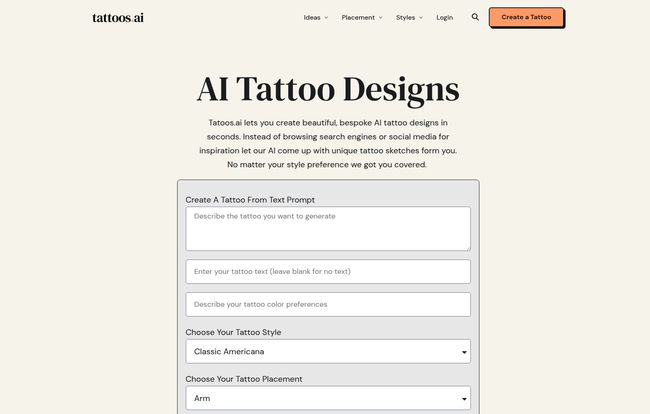
- Fill Out Your Prompt: This is where you play art director. You describe the tattoo you want, what you don’t want, pick a style from their list (and they have a ton, from Fine-line to Cyber-Sigilism), and even tell it where on the body it’s going.
- Let the AI Do Its Thing: You hit the button and in a few seconds, the magic happens. The digital gears turn and it spits out a design based on your instructions.
- Download and Ink: You get your design, and you’re ready to take it to your favorite artist.
Sounds easy enough, right? But does it actually work?
Putting the AI to the Test: My Tattoos.ai Experience
To give it a fair shake, I decided to throw a weird prompt at it. Something I wouldn’t easily find online. I typed in: “A stoic fox in a vintage astronaut helmet, surrounded by minimalist geometric constellations and a single poppy flower. Japanese art style influence.”
I also specified in the ‘negative details’ box: “no cartoony features, no heavy shading.” I selected ‘Forearm’ for placement and ‘Japanese’ for the style, and hit ‘Generate’.
And I waited. For about… 30 seconds. That’s it.
What it came back with was genuinely impressive. It wasn’t one perfect design, but it gave me four different variations on my theme. One was a little too busy, another was too literal with the constellations. But two of them? They were fantastic. They captured the vibe perfectly, blending the stoic fox with the ukiyo-e style lines I was hoping for. It was a 90% solution that I could immediately take to an artist and say, “This. Let’s start with this.”
Visit Tattoos.ai
The Good, The Bad, and The… WEBP?
No tool is perfect, and after playing around for a while, I’ve got a good handle on its strengths and weaknesses.
What I Liked
First off, the speed is just wild. I can’t overstate this. It’s an incredible brainstorming partner. Instead of feeling stuck, you can generate a dozen different directions for an idea in minutes. For someone indecisive like me, that’s huge. The range of styles is also a massive plus, pushing you to consider aesthetics you might have otherwise ignored. I found myself playing with ‘Micro-Realism’ and ‘Diorama Tattoo’ styles just for fun. The creative potential is definitely there, and it’s a brilliant way to create a solid visual reference for your tattoo artist. My artist friends have always said, “A good reference picture is worth a thousand words.” This tool delivers that.
What Could Be Better
Now for the reality check. The quality of the output is 100% dependent on the quality of your input. The old programmer’s adage “garbage in, garbage out” is in full effect. If you just type “wolf tattoo,” you’ll get something generic. You need to be descriptive, use adjectives, and really think about the mood. It forces you to be a better communicator of your own idea, which is actually a good skill to have.
My biggest technical gripe? The designs are downloaded in WEBP format. For the non-techy folks, that’s a modern image format that’s great for websites but not all devices and programs love it. Your tattoo artist might prefer a good old JPEG or PNG. It’s not a dealbreaker—you can find free online converters easily—but it is an extra, slightly annoying step. Something to be aware of.
Let’s Talk Money: The Tattoos.ai Pricing
Okay, so it’s not free. The platform runs on a credit system, which I actually prefer to a recurring subscription. You just buy what you need. As of writing this, the pricing is pretty straightforward.
| Pack Name | Credits | Price |
|---|---|---|
| Ink Starter Pack | 5 Tattoo Credits | $5 (USD) |
| Ink Enthusiast Pack | 15 Tattoo Credits | $10 (USD) |
| Ink Master Pack | 30 Tattoo Credits | $15 (USD) |
When you consider that a custom drawing from an artist can cost anywhere from $50 to several hundred dollars, spending five or ten bucks to get your idea visually perfect feels like a no-brainer. It’s a small investment to make sure you and your artist are on the exact same page before the needle ever touches your skin.
Answering Your Burning Questions
How does the AI tattoo generator actually work?
From what I gather, it uses a sophisticated AI model trained on countless images and artistic styles. When you enter your prompt, it interprets your words and generates a new, original image based on those parameters. It’s not just mashing existing images together; it’s creating something from scratch based on its training.
Can it really create any style?
It offers a surprisingly wide range of popular styles, from American Traditional to Biomechanical. While it might not perfectly replicate the unique hand of a specific, famous artist, it does an excellent job of capturing the essence of a style. It’s a fantastic starting point.
Is this a subscription service?
Nope. And thank goodness for that. It’s a one-time payment based on credits. You buy a pack of credits, and they’re yours to use whenever you want. The FAQs on their site say the credits don’t expire, which is a big plus.
What if I’m not happy with the designs?
This is where prompt refinement comes in. If the first batch isn’t right, tweak your description. Be more specific, or maybe try a different style. For just a few credits, you can iterate a few times until you land on something you love. The platform claims they will work with you if you’re truly unsatisfied, which is good customer service.
Can I take the AI design directly to my tattoo artist?
Absolutely! That’s the whole point. The design serves as a high-quality visual reference. A good tattoo artist will still use it as a foundation, redrawing it to fit your body’s contours and adding their own professional touch, but it eliminates a ton of the guesswork.
Final Thoughts: Is Tattoos.ai Worth It?
So here’s my final take. Tattoos.ai is not going to replace your tattoo artist. And it shouldn’t. The human element, the collaboration, and the skill of a professional artist are irreplaceable.
But what it does do, and does incredibly well, is bridge the gap between your imagination and the final reference photo. It’s an idea accelerator. A cure for creative block. It helps you articulate your vision in a way that words alone often can’t. It gets you 90% of the way there, so your artist can focus on that final, brilliant 10%.
For the price of a couple of coffees, you can save yourself weeks of frustrating searches and ensure the design you get is truly yours. In my book, that’s a pretty smart investment. It won’t hold your hand during the session, but it might just draw the perfect map to your next piece of body art.
Reference and Sources
- Tattoos.ai Official Website
- Tattoos.ai Pricing Page
- About the WEBP Image Format – For those curious about the technical side.


