
Categories: AI Assistant, AI Quiz Generator, AI Teachers, AI Writing Assistants
Teachguin Review: An AI Tutor Tool That’s Actually Simple

If you’re an online tutor, your desktop is probably a chaotic mess of tabs. I know mine is. You’ve got your video call software in one window, a separate app for a whiteboard, Google Docs for lesson plans, and maybe another site for creating quizzes. It’s like being a digital circus performer, juggling flaming torches of software, and praying you don’t drop one in the middle of a lesson.
Every few months, a new platform pops up, screaming “I’m the all-in-one solution!” Most of the time, they’re clunky, over-engineered, or just… not quite right. So when I came across Teachguin, my inner skeptic raised an eyebrow. The name’s kinda cute, like a penguin in a little tweed jacket, but could it really simplify the online teaching grind? I decided to take a look.
So, What is Teachguin, Really?
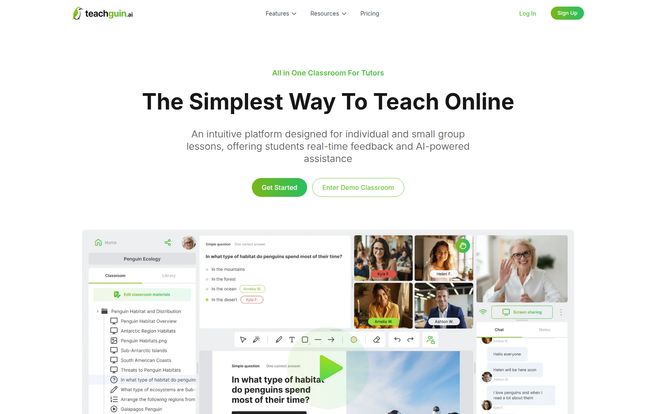
At its core, Teachguin is a virtual classroom platform built specifically for tutors. Not for huge universities or sprawling school districts, but for the individual educator teaching small groups or one-on-one. It promises to bundle everything—video, chat, materials, an interactive whiteboard, and even an AI assistant—into one clean interface. The whole pitch is about making lessons more efficient and, dare I say, more engaging.
The setup they advertise seems almost insultingly simple. A three-step process that feels less like configuring software and more like making a cup of tea:
- Create a Classroom: You fire up a new session instantly. No waiting, no complicated scheduling hoops to jump through.
- Add or Generate Materials: This is where it gets interesting. You can upload your own PDFs and files, or you can ask their AI to whip something up for you. More on that little AI helper in a second.
- Invite Students: Just share a link. They claim students don’t need an account, which is a massive win. The friction of getting a new student to sign up for yet another thing is a real headache we can all do without.
Visit Teachguin
Diving Into the Key Features
An all-in-one platform lives or dies by its features. Are they actually useful, or just shiny objects meant to look good on a landing page? Let’s break it down.
The AI Assistent That Actually Helps
I’m so tired of “AI-powered” being slapped onto everything as a marketing buzzword. But here, it seems practical. The Teachguin AI Assistant is designed to generate custom educational materials on the fly. Need a quick 5-question quiz on photosynthesis? Or a short paragraph explaining the Pythagorean theorem for a 12-year-old? The idea is that you can ask the AI, and it’ll generate content right there in the classroom. This could be a game-changer for those moments when a student veers off-topic and you need to pivot your lesson plan instantly. It turns you from a lesson-planner into a lesson-improviser.
More Than Just a Video Call
The integrated video conferencing and chat are table stakes these days. What caught my eye was the focus on interactive teaching. You can launch polls, quizzes, and questions directly within the lesson. This is a huge step up from the classic “Okay, everyone type your answer in the chat” method, which quickly becomes a disorganized mess. True engagement comes from participation, and tools like this are how you get it, especialy with quieter students.
The Good Old-Fashioned Whiteboard
You can’t teach effectively online without a decent whiteboard. It’s the digital equivalent of huddling around a table to work through a problem. Teachguin’s whiteboard looks clean and intuitive from the screenshots, designed for collaboration. For math tutors, language teachers diagramming sentences, or anyone who needs to visualize concepts, this is a non-negotiable feature. And having it baked right in, instead of screen-sharing a third-party app, is a massive workflow improvement.
Let’s Talk About the Price Tag
Ah, the most important question. How much is this going to cost me? This is where Teachguin gets… interesting. They have two clear tiers, but with a little twist. I’ve put the details in a simple table for comparison.
| Feature | Free Plan (Part-time tutors) | Paid Plan (Full-time tutors) |
|---|---|---|
| Lesson Type | One-on-one only | Individual and Group |
| Classrooms per Day | Up to 3 | Unlimited |
| File Library | Up to 10 files | Unlimited |
| AI Assistant Usage | Limited | More than Free |
The Mystery of the Paid Plan Price
Did you notice something missing? The Paid plan says, “Price to be determined soon.” My first reaction was, “Uh oh.” But then I thought about it from a marketing perspective. This usually means a platform is new, fresh out of the oven, and looking for early adopters. It’s a bit of a gamble, sure, but it often means you can get in on the ground floor. For now, the Free plan is incredibly generous for a part-time tutor or someone just wanting to test the waters thoroughly. It’s not a crippled 14-day trial; it’s an actual, usable free tier.
So Who Is Teachguin Really For?
After looking it all over, I have a pretty clear idea. Teachguin is for the independent online tutor. It’s for the freelancer who’s tired of paying for Zoom, a Calendly subscription, and a Miro board separately. The Free plan is perfect for someone tutoring on the side, maybe handling a couple of clients after their day job. The (future) Paid plan is clearly aimed at the full-time tutor who needs unlimited sessions, group functionality, and a larger content library.
This is probably not the tool for a large tutoring center with 50 tutors that needs complex admin panels and reporting. It’s built for the individual, and frankly, that’s a market that’s been underserved by a lot of the ed-tech giants. It’s refreshing.
Some Lingering Questions Answered
I browsed their site and had a few more questions, some of which they answered in their FAQ.
- Can I actually teach group classes?
- Yes, but you’ll need the Paid plan for that. The Free plan is strictly for one-on-one sessions.
- What are the real limitations on the free version?
- The big ones are the cap of 3 classrooms per day, a 10-file limit in your library, and ‘limited’ use of the AI assistant. It’s enough to get a real feel for it, but a full-timer would hit those caps pretty fast.
- Is there a time limit on lessons?
- This is interesting—they don’t mention a time limit anywhere, not even on the free plan. That’s a huge plus compared to some other platforms that cut you off after 40 minutes.
- Seriously, what’s the deal with the paid price?
- As of now, it’s a mystery. They say it’s coming soon. My advice? Get on their mailing list. New platforms often offer sweet lifetime deals or heavy discounts to their first batch of paying customers.
- Do my students need to download anything or create an account?
- Nope! You just send a link, and they can join the session. This is maybe my favorite feature. Removing that one piece of friction is a bigger deal than most people realize.
My Final Word on Teachguin
So, am I a convert? I’m cautiously optimistic, which for me, is high praise. Teachguin seems to have a clear understanding of what independent tutors actually need: simplicity, integration, and tools that genuinely help the teaching process, not just complicate it. The AI assistant is a genuinely forward-thinking feature if it works as well as advertised.
The lack of a firm price on the paid tier is the only real question mark, but the robust free plan gives you ample opportunity to decide if you like the platform before you ever have to pull out your wallet. For any online tutor feeling the pain of software-juggling, Teachguin is absolutely worth a test drive. It might just be the thing that lets you get back to what you actually love: teaching.
Reference and Sources
- Teachguin Official Website
- For more on this topic, you might find this EdSurge article on AI in the classroom an interesting read.


