
Categories: AI For Data Analytics, AI Productivity Tools, AI Project Management
Teamtrics Review: AI for Remote Team Productivity?

Managing a remote team can feel like trying to conduct an orchestra where every musician is in a different soundproof room. You trust your people, of course. But you also have deadlines, client expectations, and that nagging little voice in the back of your head wondering, ‘Is everything actually getting done?’
For years, the ‘solution’ was clunky time-tracking software that felt more like digital babysitting than empowerment. It was a binary choice: either blissful ignorance or Big Brother. It sucked. We’ve all been searching for that sweet spot – a way to get clear insights on performance without making our teams feel like they’re under constant surveillance. A tool that helps, not hinders.
Well, I’ve been poking around a platform called Teamtrics lately, and I’ve gotta say, it’s making some interesting promises. It claims to be an all-in-one collaboration platform that uses AI to not just track work, but to actively improve team wellness and performance. A bold claim, right? Let’s see if it holds up.
So, What Exactly is Teamtrics?
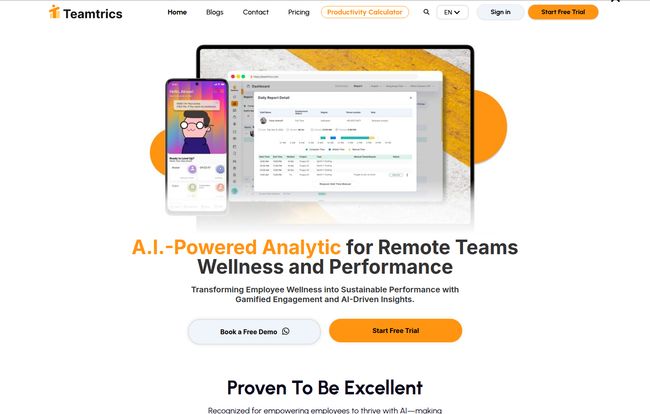
At its core, Teamtrics is a collaboration hub designed specifically for the unique challenges of remote and hybrid work. It’s not just another project management board or a simple time tracker. It’s aiming to be the central nervous system for your team’s operations. Think of it as a combination of a project manager, an HR analyst, and a team morale officer, all rolled into one slick dashboard. The platform uses AI to analyze work patterns, not just to show who’s online, but to provide genuine insights that can help prevent burnout and streamline workflows. It’s a pretty ambitious goal.
Visit Teamtrics
The Elephant in the Room: Is This Just Spyware?
Okay, let’s address this head-on because I know what you’re thinking. Any software that includes ‘activity monitoring’ sets off alarm bells. I’ve seen tools that are downright invasive, and they kill morale faster than a mandatory 8 AM meeting on a Monday.
This seems to be where Teamtrics is trying to draw a line in the sand. They put phrases like ‘Ethical HR Management’ and ‘Data Privacy as Top Priority’ front and center. This isn’t just marketing fluff; it’s a core part of their pitch. Their system is designed to give managers high-level insights into productivity and potential bottlenecks, rather than a minute-by-minute account of an employee’s screen time. It’s about spotting patterns – like if a team member is consistently working late or seems overloaded with tasks – and giving managers the data to actually do something helpful about it.
An Ethical Approach to Remote Team Management
The platform includes features like work-life balance analytics. This is a game-changer, in my opinion. Instead of just seeing ‘Jane worked 10 hours’, a manager could see ‘Jane has worked 2 hours past her scheduled time every day this week, and her task load is 30% higher than the team average.’ That’s not surveillance; that’s an actionable insight. It’s the difference between saying “Work harder” and “How can I help you?” That’s a pretty big shift in perspective.
The Features That Actually Matter
A platform can have all the ethical principles in the world, but if the tools are garbage, what’s the point? Fortunately, Teamtrics seems to have a pretty solid feature set.
AI-Powered Insights (Not Just Raw Data)
Most monitoring tools just give you data. A huge, overwhelming pile of numbers and logs. It’s like being handed a pile of bricks without a blueprint. Teamtrics’ big selling point is its AI, which acts as the architect. It takes all that raw data about tasks, time, and activity and translates it into something you can actually use. It helps visualize productivity, flag potential burnout risks, and suggests better resource allocation. This is what turns data from a report card into a strategy guide.
More Than Just a Clock-In System
The platform integrates comprehensive task and time management tools. You can create projects, assign tasks, and track time against them, which is table stakes for any project management software. But it’s all in one place, connected to the activity and wellness data. It also has a built-in request system for things like time-off, which keeps those pesky little admin tasks from getting lost in email threads or Slack channels.
Gamification and Employee Engagement? Yes, Please.
This was the part that made me raise an eyebrow, in a good way. Teamtrics has a gamified mobile app and a ‘quest management’ system. I know, I know, ‘gamification’ is a buzzword that can be incredibly cringey if done wrong. But here, it seems focused on creating positive reinforcement loops, celebrating milestones, and fostering a bit of healthy competition or collaboration. For a remote team that misses out on the spontaneous high-fives and ‘great job!’ comments in the office, this could be a surprisingly effective way to boost morale. A little bit of digital gold star goes a long way.
Let’s Talk Money: Teamtrics Pricing
Alright, the all-important question: what’s this going to cost? The pricing structure is actually pretty straightforward, which I appreciate. No need to hire a cryptographer to figure it out.
Teamtrics Pricing Tiers
Free Forever Plan: This plan is, well, free. It’s designed for small teams with up to 3 active users. It’s a great way to test the waters, but as expected, the features are limited. Perfect for a freelancer working with a couple of assistants or a tiny startup finding its feet.
Premium Plan: This is the main offering, priced at HK$150 per user, per month (that’s around $19 USD, for my friends across the pond). This unlocks the whole shebang: team and individual dashboards, full project and time management, the work-life balance analytics, payroll processing, the gamified app, and the AI virtual assistant. This is the tier for most established businesses and growing teams.
Enterprise Plan: For the big players with over 100 users. The pricing is personalized, and you get everything in Premium plus some heavy-duty features like a customized API for integration and single sign-on (SSO). This is for organizations that need a deeply integrated, scalable solution.
Honestly, the Premium pricing feels competitive. If you’re currently paying for a separate time tracker, project manager, and maybe some other HR software, consolidating onto one platform like Teamtrics could even save you money and a whole lot of integration headaches.
The Good, The Bad, and The Realistic
No tool is perfect. Let’s break down the highs and the potential lows from my perspective.
What I Really Like About Teamtrics
First off, the focus on well-being isn’t just a footnote; it’s a headline. In today’s market, where burnout is a massive issue, this is a huge plus. The AI-powered insights are the real star, turning abstract data into concrete steps for improvement. Having everything from task management to payroll processing under one roof is incredibly appealing. I’m a big fan of reducing the number of tabs I have open. Plus, that free plan for tiny teams is a genuinely good entry point.
Where It Might Fall Short
Like any powerful tool, there’s likely a learning curve. This isn’t a simple to-do list app, so you and your team will need to invest some time to get the most out of it. Secondly, its effectiveness hinges on consistent use. If your team isn’t diligent about tracking time or updating tasks, the AI won’t have good data to work with—garbage in, garbage out, as they say. And of course, the free plan is limited. It’s a classic freemium hook, get you in the door, but the real magic is in the paid plan.
My Final Take: Is Teamtrics Worth It for Your Team?
So, what’s the verdict? I think Teamtrics is a really compelling option for a specific type of company: the modern, remote-first or hybrid business that understands that employee well-being and productivity are two sides of the same coin.
If you’re looking for a simple, free task manager, this is probably overkill. But if you’re a manager, founder, or HR lead who wants to build a sustainable, high-performing remote culture based on trust and data—not just suspicion—then Teamtrics is absolutely worth a serious look. It feels like a tool built for the future of work, not a relic of the past.
The best way to know for sure is to try it yourself. They have a free trial and a demo, so you can see if it clicks with your team’s workflow before you commit.
Frequently Asked Questions about Teamtrics
- 1. Is Teamtrics difficult to set up for a new team?
- Like any comprehensive platform, there’s an initial setup process to invite users and create projects. However, the interface is designed to be intuitive. Most teams should be able to get the basics up and running within a day, though mastering all the advanced AI features might take a bit longer.
- 2. How does Teamtrics actually protect employee privacy?
- Teamtrics focuses on aggregated data and pattern analysis rather than invasive individual monitoring. It anonymizes data where possible and gives control over what is tracked. The goal is to highlight team-level trends (e.g., increased overtime, workload imbalance) for managers to address, not to read an individual’s private messages.
- 3. Can Teamtrics replace our other project management tools like Asana or Trello?
- For many teams, yes. It has robust task and project management capabilities built-in, including dashboards, assignments, and time tracking. If your team needs a tool that tightly integrates project progress with performance and wellness analytics, Teamtrics could certainly replace a standalone PM tool.
- 4. What’s the biggest benefit of the AI features?
- The main benefit is moving from reactive to proactive management. Instead of finding out about a problem after a deadline is missed or an employee burns out, the AI helps you spot the warning signs early. It translates raw work data into actionable insights about workload, efficiency, and well-being.
- 5. Is the free plan actually useful or just a demo?
- For very small teams (up to 3 users), the free plan is genuinely useful for basic task and time tracking. It lets you experience the core functionality. However, to access the powerful AI analytics, work-life balance features, and gamification, you’ll need to upgrade to the Premium plan.
Conclusion
In the ever-evolving landscape of remote work, tools that treat employees like people instead of just cogs in a machine are the ones that will win out. Teamtrics seems to get that. It’s making a strong case for being more than just software; it’s a partner in building a healthier, smarter, and more connected remote workplace. And in this day and age, that’s something worth paying attention to.


