
Categories: AI API, AI Bypasser, AI Content Detector, AI Grammar Checker, AI Paraphraser, AI Rewriter, AI SEO Tools, AI Writing, Humanizer AI, Undetectable AI
Text2Go Review: Can It Really Humanize Your AI Content?

Let’s have a real chat. You and me. As someone who’s been wrestling with Google’s algorithms and client demands for what feels like a century, I’ve seen it all. The keyword stuffing era. The link farm bonanza. And now, we’re in the age of AI. Specifically, the age of trying to make AI content not sound… well, like AI.
You know the sound. That perfectly polished, slightly soulless prose that’s grammatically flawless but has all the personality of a toaster. It’s the reason we’re all a little paranoid about AI detectors and the infamous Google Helpful Content Update. We’re all chasing that authentic, human voice.
So when a tool like Text2Go lands on my desk (or, you know, in my inbox) promising to “humanize AI content,” my curiosity is definitely piqued. But so is my skepticism. Is this just another paraphrasing tool putting a new coat of paint on an old model? Or is there something more to it? I decided to take it for a spin.
So, What Exactly Is Text2Go?
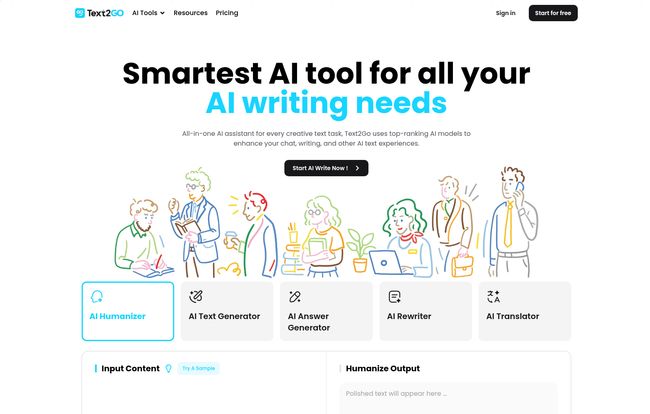
At its core, Text2Go is an AI-powered rewriting tool. But calling it just a “rewriter” feels like a bit of an undersell. The platform’s main claim to fame is its ability to take robotic-sounding text and infuse it with a more natural, human-like quality. Think of it less as a content generator and more like a finishing school for your AI drafts.
It’s designed to do a few key things: polish your grammar and improve readability, sure, but most importantly, it aims to rewrite content in a way that slips past the ever-watchful eyes of AI detection software like GPTZero or Originality.ai. A big promise, and one that every SEO and content marketer is paying close attention to right now.
Visit Text2Go
The Great AI Detection Cat-and-Mouse Game
This is the real battleground, isn’t it? We use AI to scale content production, then we live in fear of being flagged for it. It’s a ridiculous cycle. A tool’s ability to create “undetectable” content is its main selling point. Text2Go throws its hat squarely into this ring, claiming it can help your text bypass detectors like Turnitin, which sends shivers down the spine of every student, and the other big names in the space.
From my own tests, the results were pretty impressive. I fed it a few paragraphs of bog-standard ChatGPT-4 output, and what came out the other side was… different. It was less predictable. The sentence structures were more varied. It felt less like an encyclopedia entry and more like something a person might actually write. It wasn’t perfect magic, but it was a noticeable improvement.
A Closer Look at Text2Go’s Features
Okay, let’s pop the hood and see what this thing is really running on.
The AI Humanizer Core
This is the main event. You paste your text, and Text2Go works its magic. What I appreciate is that it’s not just swapping out synonyms. It seems to grasp the context, a feature they call context-aware paraphrasing. It restructures sentences and rephrases ideas without losing the original meaning. This is much more sophisticated than the spinning tools of old that would turn a perfectly good sentence into gibberish. It’s like having a decent editor on call who’s great at finding new ways to say the same thing.
The All-Important SEO Mode
As an SEO guy, this is where my ears perk up. One of my biggest complaints with many AI rewriters is that they can strip out your carefully placed keywords, wrecking your on-page optimization. Text2Go has a dedicated “SEO mode” that aims to protect your keyword density. I found this worked reasonably well. It’s not a set-it-and-forget-it solution—you should always double-check your keyword placement—but it’s a thoughtful feature that shows they understand their audience. Huge plus in my book.
Multi-Language Support? A Small Question Mark
Here’s where I found a little bit of a wrinkle. The feature list boasts support for 28 languages, which is fantastic for global campaigns. However, some of the documentation I came across suggested it was primarily English-focused. My guess is that the core “humanizer” is most powerful in English, while other features like translation are more broadly available. It’s not a dealbreaker, but something to be aware of if your primary need is for a language other than English. I’d recommend testing it thoroughly on the free plan first.
Let’s Talk Money: Breaking Down the Text2Go Pricing
Alright, the part everyone’s waiting for. What’s this going to cost me? The pricing structure is pretty straightforward, which I appreciate. No hidden fees or confusing credit systems.
| Plan | Price | Key Features |
|---|---|---|
| Free Plan | $0 | 1,000 words/month, 50 AI detections, 500 words/request. Good for a test run. |
| Basic Plan | $11.99/mo | 5,000 words/month, 1000 words/request, bypass detectors, grammar improvements. |
| Pro Plan | $14.99/mo | 50,000 words/month, 2000 words/request, all features, priority support. (This feels like the sweet spot for most serious users). |
| Ultimate Plan | $49.99/mo | 200,000 words/month. For power users and agencies. |
In my opinion, the Pro Plan offers the best bang for your buck. 50,000 words is a generous amount for a solo content creator or a small business, and the price is very competitive. The free plan is more than enough to get a feel for the tool, but the 1,000-word limit is a bit of a tease—you’ll hit it fast if you like the results.
The Good, The Not-So-Good, and The AI
No tool is perfect. After spending some time with Text2Go, here’s my unfiltered breakdown. The biggest advantage is, without a doubt, its effectiveness at reducing that robotic AI feel. The output just reads better, and it does a decent job of getting past detectors. The SEO mode is a massive plus, showing they actually care about the needs of marketers.
On the flip side, the word limits on the lower-tier plans can feel a little restrictive, especially the per-request limit. If you’re working on a long-form blog post, you’ll have to break it up into chunks, which can be a bit tedious. And as I mentioned, the clarity around its multi-language capabilities could be better. Also, a con I saw mentioned was the future implementation of usage-based charges, which is something to keep an eye on. For now, the monthly plans are what they are.
My Final Verdict: Should You Use Text2Go?
So, is Text2Go the magic wand we’ve all been waiting for? Maybe not a magic wand, but it’s a seriously useful tool in the toolbox. It’s not going to write a masterpiece for you from scratch, nor should it. Its real strength is in refining and polishing.
If you’re an SEO, a student, or a content creator who relies on AI for first drafts, Text2Go could be a game-changer. It bridges that uncanny valley between machine-generated text and human-written prose. It saves time on editing and reduces the anxiety of hitting “publish” on a piece of content you’re not 100% confident in.
For me, it’s earned a spot in my workflow. I’ll still do my own final edits—no machine can ever fully replace a human touch—but it gets me 90% of the way there, and that’s a win.
Frequently Asked Questions
How does Text2Go actually bypass AI detectors?
It’s not about just changing words. Text2Go alters sentence structure, varies vocabulary, and adjusts the overall cadence or ‘burstiness’ of the text. AI detectors look for patterns typical of language models—like predictable sentence length and low perplexity. Text2Go works to break those patterns, making the text appear more organically written.
Is Text2Go just a glorified paraphraser like Quillbot?
I would say it’s a step above. While both paraphrase, Text2Go’s primary focus is on ‘humanization’ and bypassing detection, with features like SEO mode built for a specific audience. It feels more targeted toward solving the “robotic text” problem directly, rather than just offering alternative phrasing.
Can I use Text2Go for my college essays?
Look, academic integrity is a serious thing. While Text2Go can help you polish your own writing and rephrase your ideas to improve clarity, you should always be cautious about academic honesty policies. Using it to rewrite your own draft is one thing; using it to spin someone else’s work or a pure AI draft is another. Always check your institution’s guidelines.
Is Text2Go really free to use?
Yes, there is a Free Plan. It gives you 1,000 words per month to humanize and 50 AI detections. It’s a great way to test the platform’s capabilities before committing to a paid subscription.
What’s the main difference between the Pro and Ultimate plans?
The core features are identical. The only difference is the monthly word count. The Pro plan gives you 50,000 words of text humanization per month, while the Ultimate plan bumps that up to a massive 200,000 words. The Ultimate plan is designed for agencies, heavy-duty content teams, or businesses that produce a very high volume of content.
Can I cancel my Text2Go subscription anytime?
Yes, according to their site, you can cancel your subscription at any time. Your plan will remain active until the end of the current billing cycle.
Wrapping It Up
In a world drowning in AI content, standing out is about more than just being informative; it’s about being relatable. Tools like Text2Go are becoming less of a luxury and more of a necessity for those of us who want to maintain quality and authenticity at scale. Give the free plan a shot. You might be surprised at how much more you your AI content can sound.
Reference and Sources
- Text2Go Official Website: https://www.text2go.ai/
- Text2Go Pricing Page: https://www.text2go.ai/pricing


