
Categories: AI Image Generator, AI Short Video Generator, AI Video Editor, AI Video Generator, Image to Video, Text to Video
TextToVideo.Bot Review: AI Video in 60 Seconds?

If you’re in the content game, you know the grind. The content treadmill never, ever stops. And right now, the treadmill is set to a blistering pace called ‘short-form video’. TikToks, Reels, Shorts… they’re the currency of the realm. But man, are they a time sink.
I’ve had days—and I know you have too—where I’ve spent three hours trying to stitch together a 45-second video. You’re hunting for the right clips, writing a script, trying to record a voiceover that doesn’t sound like you’re being held hostage, and then wrestling with a clunky editor. All for a video that gets, what, a few hundred views? It’s exhausting.
So, when another AI tool slides into my DMs promising to solve all my problems, my first reaction is usually a healthy dose of skepticism. The latest one to cross my desk is TextToVideo.Bot, with a bold claim: “Make viral stories with AI Video Editor in 60 seconds!”
Sixty seconds? Viral stories? My inner cynic is raising an eyebrow, but the exhausted content creator in me is leaning in, whispering, “Tell me more…” So, I pulled out the company card, signed up, and decided to see if this was the real deal or just another shiny object.
So What is This TextToVideo.Bot Thing, Anyway?
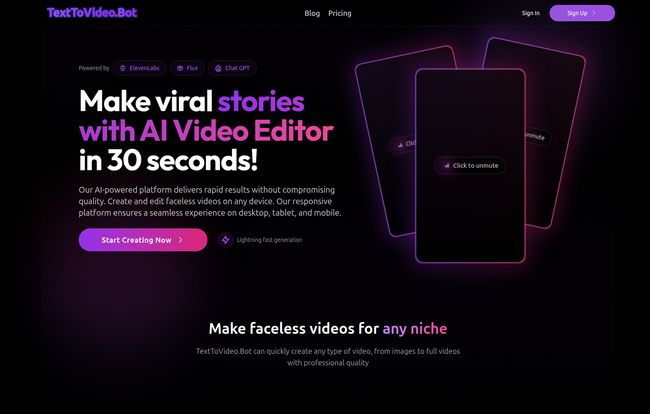
In simple terms, TextToVideo.Bot is an AI video generator designed specifically for the short, snappy, vertical video format that dominates social media. You give it text—a script, a story, a few bullet points—and it does the rest. It generates AI images to match your text, pairs it with a surprisingly human-sounding AI voiceover, adds some trendy music, and spits out a ready-to-upload video.
The big hook here is its focus on creating “faceless” videos. This is huge. The rise of faceless YouTube channels and TikTok accounts that tell historical stories or share interesting facts has been massive. It’s a way to produce content at scale without ever having to be on camera. For businesses, agencies, or introverted creators, that’s a pretty compelling proposition.
Putting it Through Its Paces: My First Creation
The homepage boasts, “So easy, your grandma could do it!” While my grandma is pretty tech-savvy, I get the point. They’re aiming for dead simple. And honestly? They pretty much nail it. The interface is clean, almost minimalist. There aren’t a million buttons and confusing timelines. You’re basically presented with a text box and told to go.
The Script and The AI Images
I decided to test it with a short script about the weirdest facts in history. I typed it in, chose a visual style, and hit go. The magic, of course, is in the AI image generation. It reads your script and creates corresponding images for each scene. Now, we’ve all seen AI image weirdness—people with seven fingers, melting faces, you know the drill. The images here were… surprisingly good. They weren’t quite at the artistic level of a dedicated tool like Midjourney, but for B-roll in a fast-paced TikTok? More than adequate. They had a cohesive style and, for the most part, accurately depicted what was in the script. A solid B+.
Let’s Talk About That AI Voice
This is where I was ready to be disappointed. Most text-to-speech sounds, well, robotic. But TextToVideo.Bot integrates with ElevenLabs, which, if you’ve been following the AI space, you know is the gold standard for AI voices right now. And it shows. You get access to over 150 different voices in 30 languages. The narration wasn’t just clear; it had inflection. It had cadence. It sounded like a real person telling a story, not a machine reading a script. This, for me, was a huge win. A bad voiceover can kill a great video, and they’ve dodged that bullet completely.
Visit TextToVideo.Bot
The Sixty Second Promise
So, the big question. Did it take 60 seconds? From hitting ‘generate’ to having a downloadable MP4, it was probably closer to 90 seconds. Am I going to complain about the extra 30 seconds? Absolutely not. It felt like watching a magic trick. My simple text document had transformed into a dynamic, narrated, and visually engaging video ready for TikTok. It was genuinely impressive.
Who is This Actually For?
After playing around with it for a while, a clear picture of the ideal user emerged. This tool is a beast for:
- Social Media Managers: Juggling 5 different client accounts that all need 3 Reels per week? This tool is your new best friend. It’s like a content factory in a browser tab.
- Niche Content Creators: If you run a channel about history, science, psychology, or anything story-based, you can dramatically increase your output. Think of all those “facts you didn’t know” channels.
- Solopreneurs & Small Businesses: Don’t have the budget for a video team or the time (or desire) to be on camera? This lets you compete in the video space without either.
- Affiliate Marketers: Need to pump out dozens of short videos reviewing or promoting products? This could seriously streamline that workflow.
Who isn’t it for? High-end videographers or brands with super-strict visual guidelines. If you need precise, frame-by-frame control and want to use your own branded footage, you’re still going to need a traditional editor like Adobe Premiere or CapCut. This is about speed and volume for a very specific, very popular style of video.
The All-Important Pricing Question
Alright, let’s talk turkey. The platform runs on a credit-based system, which is pretty standard for AI tools. The more you pay, the more credits you get. Here’s a quick look at their plans:
| Plan | Price | What You Get | My Take |
|---|---|---|---|
| Basic | $9 /monthly | 500 credits (about 5 videos) | Perfect for just trying it out or if you only need a handful of videos a month. |
| Premium | $19 /monthly | 2000 credits (about 20 videos) | This feels like the sweet spot for most serious creators or small businesses. |
| Economic | $39 /monthly | 6000 credits (about 60 videos) | For power users or small agencies managing a few accounts. |
| Business | $99 /monthly | 20000 credits (about 200 videos) | This is for the content machines and agencies running at full throttle. |
Note: All plans include the 150+ ElevenLabs voices, AI images, 30 languages, and TikTok trendy music. The main difference is your video output capacity.
The Good, The Bad, and The AI Weirdness
What I Absolutely Loved
The speed is just undeniable. Going from an idea to a finished video in under two minutes feels like a superpower. The ease of use is another major plus; there’s virtually no learning curve. And I can’t say enough about the voice quality—it elevates the final product from “obviously AI” to “wait, is this AI?”. It’s a game-changer for anyone who hates the sound of their own voice.
Where It Stumbles a Bit
No tool is perfect. The credit system, while common, can feel a bit like you’re at an arcade. You’re always conscious of how many tokens you have left. The biggest drawback, common to all AI generators, is the slight loss of creative control. You can’t manually swap out just one image you don’t like or tweak the timing of a single scene. You’re putting a lot of faith in the algorithm. Occasionaly, an image might be a little… off. Not seven-fingers weird, but maybe not quite the vibe you were going for. Its a trade-off: you’re swapping granular control for incredible speed.
Frequently Asked Questions About TextToVideo.Bot
How many credits does it cost to make one video?
Based on their pricing tiers, it seems to average out to about 100 credits for a one-minute video. So the $19 Premium plan gets you roughly 20 videos a month, which is more than fair for the price.
Can I use my own photos or video clips?
As of my review, it looks like the platform is focused on generating videos using its own AI images. The pricing mentions “AI Images (No Stock Images),” which suggests you can’t upload your own assets. This is key to its speed, but a limitation to be aware of.
Are the videos really ready to post?
Yep. They come out in the correct vertical format, with narration, background music, and animated captions baked right in. You can literally download it and upload it directly to TikTok, Reels, or Shorts.
What languages and styles are available?
It supports 30 languages and 70 different voice styles, all powered by ElevenLabs. This is great for creating content for international audiences or just finding the perfect tone for your brand.
Do I get a commercial license for the videos?
For any paid subscription, you typically get a commercial license to use the videos on your monetized channels and for marketing purposes. It’s always a good idea to double-check the terms of service for the specifics, but this is standard practice.
My Final Verdict: Is TextToVideo.Bot Worth It?
So, we come back to the original question. Miracle or hype? I’m going to land somewhere in the middle, leaning heavily towards miracle.
TextToVideo.Bot isn’t going to replace a skilled human video editor for a Nike commercial. But that’s not what it’s trying to do. It has a very specific job: to create engaging, faceless, short-form social media videos at lightning speed. And at that job, it absolutely excels.
It solves a very real, very frustrating pain point for a huge number of creators and marketers. The time you save is immense, and the quality of the output, especially the audio, is far better than I expected. If you’re on the content treadmill and wish you could just clone yourself, this might be the next best thing. It’s a powerful, focused, and impressively effective tool that has earned a spot in my digital toolbox.


